
Middle East PowerPoint Maps
The collection provides fully vector-editable PowerPoint maps of the Middle East region along with individual country outlines. Strategy teams and consultants use them when presenting location-driven insights where generic world maps fall short and manual drawing wastes critical hours.
Consider a supply-chain director preparing a quarterly review for the CFO at a UAE-based firm: new distribution sites need highlighting on the Oman and Saudi Arabia borders before the board meeting tomorrow. Opening the template lets the focus stay on the numbers instead of fixing line weights across slides.
Every map prioritizes clean data integration so your executive summary slide tells the full story at a glance.
 (133)
(133) Iran PowerPoint Maps Template: Charting Paths to PersuasionID: #PM00214$50.00
 (452)
(452) Iraq PowerPoint Maps Template: Unlock Geographical NarrativesID: #PM00213$54.00
 (708)
(708) Israel PowerPoint Maps: Download PPTID: #PM00212$55.00
 (229)
Jordan PowerPoint Maps: Custom Pro TemplateID: #PM00211$45.00
(229)
Jordan PowerPoint Maps: Custom Pro TemplateID: #PM00211$45.00 (945)
Dynamic Kuwait Maps PPT: Business-ReadyID: #PM00210$50.00
(945)
Dynamic Kuwait Maps PPT: Business-ReadyID: #PM00210$50.00 (697)
Lebanon Map PowerPoint Template - Fully Editable Vector Maps | Instant DownloadID: #PM00209$40.00
(697)
Lebanon Map PowerPoint Template - Fully Editable Vector Maps | Instant DownloadID: #PM00209$40.00 (447)
Fully Editable Oman Maps PowerPoint Template | Instant DownloadID: #PM00208$38.00
(447)
Fully Editable Oman Maps PowerPoint Template | Instant DownloadID: #PM00208$38.00 (511)
Qatar's Blueprint: PowerPoint Maps Template for Bold VisionsID: #PM00207$54.00
(511)
Qatar's Blueprint: PowerPoint Maps Template for Bold VisionsID: #PM00207$54.00 (1103)
Saudi Arabia Maps PPT: Customizable for ProjectsID: #PM00206$56.00
(1103)
Saudi Arabia Maps PPT: Customizable for ProjectsID: #PM00206$56.00 (67)
Syria Map PowerPoint Template: Geopolitical InsightsID: #PM00205$50.00
(67)
Syria Map PowerPoint Template: Geopolitical InsightsID: #PM00205$50.00 (543)
(543) Sand to Strategy: UAE PowerPoint Maps Template MasteryID: #PM00204$50.00
 (415)
Jamaica Keynote Maps: Download Maps of Jamaica TemplateID: #PM00202$50.00
(415)
Jamaica Keynote Maps: Download Maps of Jamaica TemplateID: #PM00202$50.00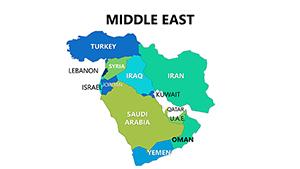 (523)
Complete Middle East PowerPoint Maps: Navigate Global StrategiesID: #PM00080$18.00
(523)
Complete Middle East PowerPoint Maps: Navigate Global StrategiesID: #PM00080$18.00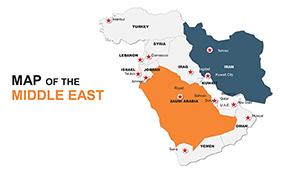 (848)
Custom Middle East Maps PPT: Navigate Global NarrativesID: #PM00049$48.00
(848)
Custom Middle East Maps PPT: Navigate Global NarrativesID: #PM00049$48.00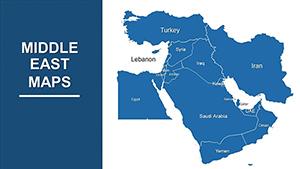 (131)
Customizable Middle East PowerPoint Maps: Precision for Global InsightsID: #PM00014$43.00
(131)
Customizable Middle East PowerPoint Maps: Precision for Global InsightsID: #PM00014$43.00
Which Countries Does the Middle East Map Collection Cover?
The templates include precise outlines for every major nation from Iran to the Gulf states plus a complete regional overview. You can isolate Saudi Arabia for oil market updates or layer the full Levant for trade route analysis without piecing together separate files.
Will the Maps Remain Editable After Download?
Yes - each file arrives as native PPTX with grouped vector shapes ready for immediate changes. No locked elements mean your team can recolor borders or add labels directly in the slide master for department-wide consistency.
Four Real Business Moments These Maps Transform
A market analyst at a European energy firm prepares for the executive committee on Saudi Arabia opportunities. The deadline is tight and the stakeholder expects clear investment heat layers on the map. With the template open, the shapes accept data overlays instantly and the presentation moves from draft to final in under an hour.
Next, a petroleum operations lead updates investors on Iraq field developments. Pipeline routes and border zones must appear accurate during the virtual call. The pre-aligned vector map lets the presenter drop Excel-linked charts without misalignment issues that plague blank slides.
Then, a logistics consultant builds a supply-chain overview for a Jordan government client. Key export routes across neighboring countries need visual emphasis before the contract review. The regional template keeps all countries to the same scale so comparisons read instantly.
Finally, an investment banker pitches Dubai real-estate expansion to a fund in Europe. The Levant map with custom markers highlights growth corridors. The editable format allows quick swaps of data sets between stakeholder versions without redesigning the entire deck.
Any of these situations ring true for your current project? The matching template is listed further down the page.
What You Lose When Creating Regional Maps Manually
Building from scratch forces repeated decisions on column widths for data tables next to the map, font stack matching across 20 slides, and chart color palette alignment. In a real project those choices compound into lost thinking time - time better spent refining the argument rather than fixing a misaligned label on slide 12.
How Structured Maps Support Recurring Reporting Workflows
For a 60-slide quarterly deck that spans multiple countries, the same slide master ensures every map uses identical line weights and aspect ratios. Departments share the updated PPTX file knowing the visual hierarchy stays intact whether the presenter is in Riyadh or London.
A Practical Editing Tip Most Users Miss
When adding heat-map layers, select the target country shape first and apply a fill gradient before ungrouping the full set. This prevents accidental shifts in neighboring borders and keeps the overall regional view balanced even after multiple data updates.
PowerPoint Configuration Details for Reliable Results
These PPTX files embed fonts and use vector paths optimized for 16:9 aspect ratio. To avoid PDF export blurring, disable any default animations on the map group and confirm your version supports shape linking - changes then carry through to printed handouts without quality drop.
Why This Collection Fits Corporate Storytelling Needs
The maps skip decorative icons and focus on editing freedom with clean lines that hold up at any zoom level. Your team edits directly in PowerPoint without external tools, keeping the focus on the business narrative rather than slide polish.
Finding the Right Map Collection for Your Needs
If your next presentation spans multiple continents rather than just the Middle East, start with the PowerPoint maps templates overview page. Teams focused on Latin America often pair these files with the Central America PowerPoint maps templates. For supporting charts and frameworks that work alongside geography slides, the PowerPoint diagram templates provide seamless visual continuity.
Pick the country or regional map that matches your brief and download the PPTX file to begin building.
Are these Middle East PowerPoint map templates compatible with older Microsoft PowerPoint versions?
Yes, the PPTX format works reliably from PowerPoint 2016 onward. Earlier versions may experience minor vector rendering differences during PDF export, but the slide master layouts remain fully functional for editing. Always open the file first and test a color change on one country shape to confirm crisp lines before adding your data layers. If rendering issues appear, switch to a supported version or export as PDF after final edits to preserve the geographic precision.
Can I customize colors, borders, and add text labels freely?
Yes, every country outline is a separate editable shape group in the PPTX slide master. You can ungroup specific nations, apply independent fill colors or gradients, and insert custom labels that stay anchored during zoom. This level of control lets you match your corporate palette without affecting neighboring countries or breaking the overall regional scale.
What license terms apply to team use and client presentations?
Purchase grants perpetual commercial rights for internal team use and client-facing decks. You may share the edited PPTX file within your organization and present the maps in board or investor meetings. Resale of the original unmodified file is not allowed, but any data overlays you add become your own work for full ownership.
Do the templates support 16:9 or 4:3 aspect ratios and PDF export?
The files are built for 16:9 with alternate slide master layouts included for 4:3 if your meeting requires it. For PDF export, keep the map group free of animations and test print preview to ensure vector paths stay sharp. File size stays low because no raster images are used, making large decks with multiple maps easy to share via email or cloud storage.
How do I link external data sources to the map shapes?
PowerPoint’s built-in data linking works directly with the vector shapes. Paste Excel ranges onto the country fills for live charts or use the insert chart feature to drive color changes from spreadsheets. Once linked, updates to the source file refresh the map automatically across all slides that use the same master, saving rework when quarterly numbers change.


