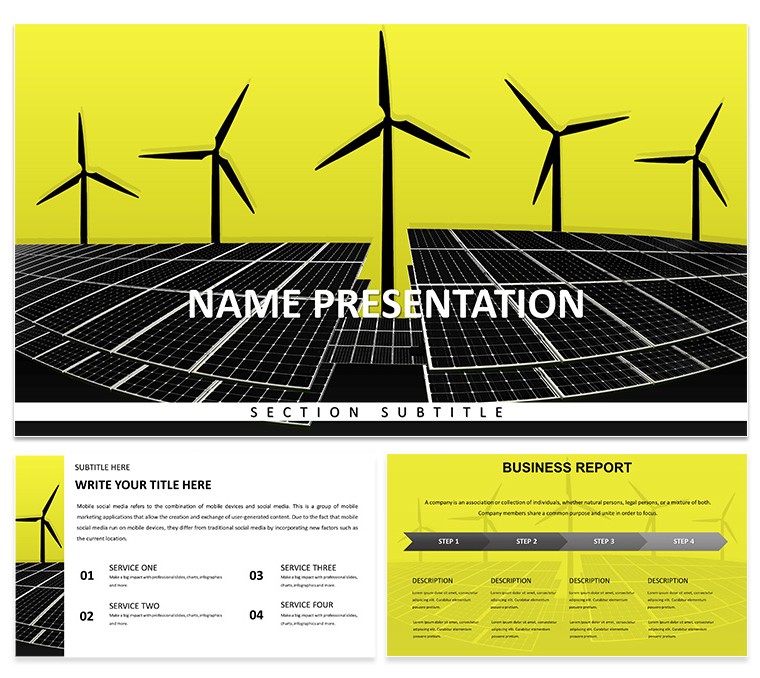
28 diagrams across 7 color schemes, 3 masters, 3 backgrounds, .key and .kth files - priced at $12 for the base tier and $25 for the full diagram set. This Keynote diagram template is positioned for energy sector professionals rather than general audiences, with a visual register that matches boardroom and investor contexts rather than educational or NGO settings.
The cover slide uses a dramatic low-angle photograph of wind turbines shot against a saturated yellow-gold sky at either sunrise or sunset - a warmer, higher-contrast aesthetic than the blue-green tones that dominate most templates in this energy series. The title appears in the lower half in large, bold white type with a minimal left-side vertical accent stripe in yellow, echoing the sky color. The three background variants maintain the warm-toned photographic approach: one shows a turbine silhouetted against a vivid orange horizon, another features an aerial view of a solar array with amber earth tones in frame, and the third uses a closer equipment shot - a turbine nacelle or transformer installation - that gives the slide a hands-on operational feel rather than a scenic one. The diagram slides shift to a light base with yellow and charcoal as the primary accent pair, keeping the warm palette consistent from cover through to data slides.
Global color changes apply via the slide master. In Keynote, open View - Edit Master Slides, modify the yellow accent swatch, and all 28 diagrams inherit the change without slide-by-slide editing. The 7 preset color schemes provide alternatives to the default yellow: cooler options in teal and blue allow repositioning the deck for organisations with different brand standards.
The 28 diagrams include service breakdown layouts useful for multi-line energy company portfolios, step-by-step deployment flow diagrams for project rollout presentations, data comparison grids for benchmarking generation sources, and executive summary slides with large-format stat callouts. Icon style is flat with slightly heavier stroke weight than hairline - more visible on projector screens in bright conference rooms.
Wind farm developers, solar project managers, and energy investment analysts presenting to external stakeholders will find the warmer, higher-contrast aesthetic appropriate for investor-facing materials where visual impact matters alongside data density. The .kth file supports applying the theme to an ongoing deck in progress.
Download and start editing immediately
Specifications
| Feature | Details |
|---|
| Diagrams | 28 diagrams - service breakdowns, deployment flows, comparison grids, executive stat callouts |
| File formats | .key, .kth |
| Software | Apple Keynote (macOS and iOS) |
| Color schemes | 7 presets; default yellow-gold + charcoal; alternatives in teal and blue; switch via slide master |
| Editable elements | Text, icon stroke, diagram fills, chart bars, accent color via master slide |
| Masters / Backgrounds | 3 masters, 3 warm-toned turbine/solar photo backgrounds |
| Free vs Paid | $12: 3 masters + 3 backgrounds. $25: adds 28 diagrams + 7 color schemes |
| Categories | Energy - Power, Industry - Production |
Frequently Asked Questions
Does this template work on Keynote for Mac and iOS?
The .key and .kth files are both native Apple formats that open in Keynote on macOS without any conversion or plugin. The .kth theme file lets you apply this template's visual system - backgrounds, master layouts, typography - to a Keynote deck you already have in progress. Full master editing, including the global accent color change, is available on macOS Keynote. On iOS and iPadOS, the Keynote app lets you edit text, replace images, and modify individual slide elements, but master-level changes are not accessible through the iOS interface, so global palette switches should be done on a Mac before moving to mobile for delivery.
How do I change the color scheme across all slides at once?
The yellow-gold accent color - which controls diagram fill areas, chart bar color, icon strokes, and heading highlights - is set at master slide level. In Keynote on Mac, navigate to View - Edit Master Slides, click the yellow accent color swatch, and replace it with your target color using the hex input or color picker. Close the master editor and Keynote applies the change across all 28 diagram slides instantly. To switch between the 7 built-in color schemes, select the corresponding master set rather than editing colors manually - each scheme is already pre-configured as a named master group within the file.
Can I use this template for client projects and paid work?
The standard license permits use in all presentation contexts where the slides are delivered to an end audience - investor briefings, client proposals, internal executive reports, conference talks, and academic presentations. Slides built from this template may appear in billed deliverables. The license covers single-user use and does not extend to sharing the .key or .kth source files with additional users, embedding the files in a template bundle for resale, or any form of redistribution. Teams requiring multi-seat access should contact ImagineLayout before purchasing.
What is the difference between the $12 and $25 versions?
The $12 base version delivers 3 master slides and 3 photo backgrounds. These give you the visual framework - layout grid, typography scale, photo-backed slides - without any pre-built content diagrams. The $25 version includes everything from the $12 tier plus 28 diagram slides built across 7 color schemes: service breakdown layouts, deployment flow diagrams, benchmarking comparison grids, and large-format executive stat callout slides. The $13 price difference covers the pre-built diagram construction; if you need those layouts ready to populate rather than built from scratch, the full version is the more efficient choice.
What is the refund policy?
Refunds are issued when the delivered files are technically defective - files that fail to open in Keynote, are corrupted during download, or are materially different from what is described and shown on the product page. Digital downloads that have been accessed are not refunded on the basis of design preference or a changed decision after purchase. Before buying, confirm that .key and .kth formats are compatible with your macOS and Keynote version, and that the diagram types visible in the slide previews match the layouts your presentation requires. Technical issues should be submitted via the Contact page with your order number.
See more in the Energy - Power Keynote Theme collection or browse all Keynote Templates and Themes.