 Click to zoom
Tourist Attractions Keynote Template - Instant Download | ImagineLayout
| Format | .pptx |
| Slides | 3 unique layouts |
| Aspect ratio | 16:9 |
| Compatibility | PowerPoint |
| Animated | No |
| Language | English |
| License | Commercial |
| File size | — |
| Version | v1.0 |
| Last updated | September 2026 |
What's inside
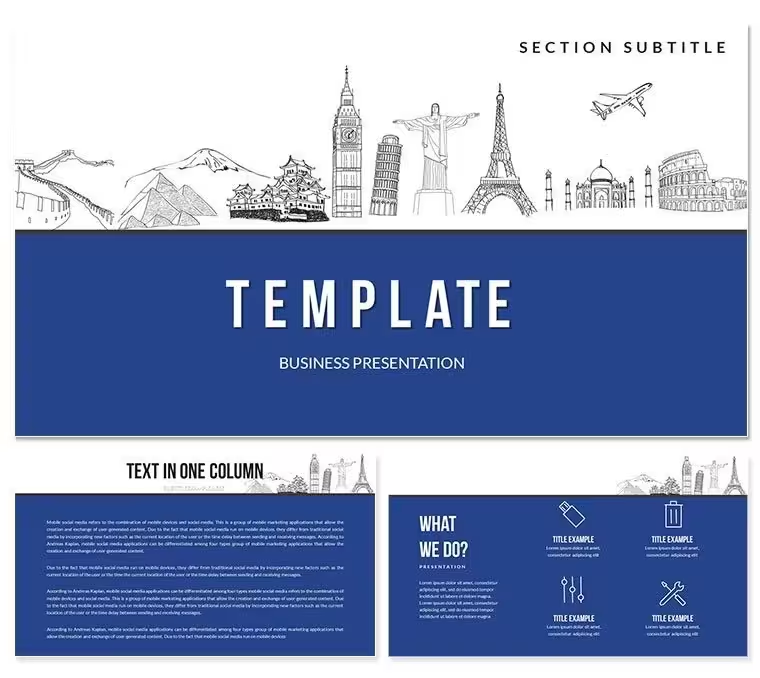
What is a Keynote template for tourist attractions? A Keynote template for tourist attractions is a pre-structured .key file with 28 thematic diagram layouts and 7 color schemes, designed for travel agencies, educators, and destination marketers presenting country-specific tourism content in Apple Keynote 12 or later.
Package Contents
28 diagrams across 7 color schemes are included in the paid version of this Keynote diagram template. The layouts span destination highlight frames, attraction comparison structures, itinerary overview diagrams, and audience-facing tourism briefing slides. All 28 diagrams exist across all 7 color schemes, making it straightforward to align the deck with a specific country's visual identity or a travel brand's palette.
The $20.00 package covers the 28 diagrams, 7 color schemes, 3 Keynote masters, and 3 backgrounds. At $10.00, the base tier includes the 3 masters and 3 backgrounds only - the diagram library is exclusive to the paid version. For anyone building a destination or multi-country tourism presentation, the full package is the operative choice.
The diagram range here covers a broader set of tourism storytelling structures than single-destination sets in the same category - the mix of overview, comparison, and detail layouts means one file handles an entire tour operator pitch rather than requiring slide-by-slide custom builds.
Typical Use Cases by Role
A travel agency account manager preparing a destination pitch for a corporate group travel client uses the multi-country comparison layouts to show three destination options side by side. The structured frames hold photography placement zones, attraction bullet points, and pricing reference fields - reducing deck build time from three hours to under 45 minutes compared to building equivalent layouts from scratch.
A geography educator at a secondary school uses the overview and detail diagram structures to build a term-long unit on global tourist regions. The 7 color schemes allow each geographic zone - Europe, Asia, the Americas - to carry its own visual identity within the same file. The educator adapted the same base file across five consecutive lesson plans by swapping color schemes and updating text, without rebuilding the layout once.
Event coordinators at international conference venues use the attraction briefing layouts to prepare welcome decks for arriving delegates. The clean information spacing and consistent diagram structure communicate venue location, nearby attractions, and transport options without requiring a graphic designer to produce the slide.
Download and start editing immediately
From Download to Final Deck
How do I adapt this Keynote template for a specific destination? Open the .key file, select the relevant diagram layout for your destination type, replace placeholder text with location-specific content, apply the color scheme that fits your brand or destination identity, and export. The full workflow takes under 20 minutes.
- Step 1 - Open the .key file in Keynote 12 or later (1 minute) - Keynote loads all 28 diagram layouts and 3 masters automatically on first open.
- Step 2 - Select the diagram layouts relevant to your destination (2 minutes) - Browse the slide panel and duplicate only the layouts you need; delete the rest.
- Step 3 - Replace placeholder text with destination content (5 minutes) - Click each text field; labels update without ungrouping grouped elements.
- Step 4 - Apply a color scheme via the master slide (2 minutes) - View → Master Slides; select the scheme that matches your destination or brand palette.
- Step 5 - Export as .key or PDF (1 minute) - Keep as .key for live presenting or export to PDF for email distribution.
Editing difficulty: Beginner. No prior Keynote design experience needed. The master slide system handles global color changes without manual per-slide updates.
Why This Template, Not a Blank Slide
Building a 28-layout tourism deck from scratch in Keynote means designing each diagram frame, establishing consistent information spacing, aligning photo zones with text columns, and creating seven parallel color variants by hand. With Keynote experience, that is a 5-7 hour task. Without it, most professionals spend two days and still deliver slides with misaligned elements and inconsistent font sizes across layouts.
One layout decision worth noting: destination information in travel presentations often fails because it mixes too many visual elements on a single slide - photos, bullet points, maps, and pricing all compete for attention. The diagram structures in this file segment information zones clearly, with each zone handling a single content type. That segmentation is a deliberate layout composition choice that keeps audiences reading in the intended sequence rather than scanning randomly.
The 7 color schemes also serve a functional purpose beyond aesthetics. When presenting multiple destinations in a single session, color contrast between schemes helps audiences mentally separate regions or options without needing to read the slide title first. Color does the categorical work before the text does.
Download and start editing immediately
Frequently Asked Questions
Which Keynote version is required to open and edit this file?The .key file is compatible with Keynote 12 or later on macOS. Earlier versions may fail to render the master slide color themes correctly, causing layout and color display issues. Keynote 13 on macOS Sonoma or Ventura is the recommended environment for full editing access. iOS Keynote allows viewing and basic text changes but does not support full master slide editing, so color scheme adjustments should be made on a Mac. The .kth file can be imported into the Keynote theme browser for reuse in future projects.
What does the $10 version include compared to the $20 version?The $10.00 base tier includes 3 slide masters and 3 background designs - a complete Keynote theme suitable for text-driven presentations. The $20.00 paid version adds all 28 tourism diagram layouts and the 7 color schemes that give each diagram its visual identity. If you need structured layouts for destination comparisons, itinerary overviews, or attraction spotlights, the $20.00 package is the one that covers those use cases. The diagrams are not sold separately and are only accessible through the full paid tier.
Can this template be used for commercial travel agency presentations?The standard purchase license covers internal business use and client-facing presentations created as part of your own professional work. If you are a travel agency producing decks delivered to paying clients as part of a design or consulting service, confirm the applicable license with ImagineLayout before distributing those files. Reselling or redistributing the template files themselves - in original or modified form - is not permitted. For high-volume agency use, contact ImagineLayout support to discuss the appropriate license arrangement.
How do I switch between the 7 color schemes?Open the .key file and go to View → Master Slides in the Keynote menu bar. The 7 color schemes are pre-configured as separate master variants. Click the master corresponding to the scheme you want; the color change applies globally across all 28 diagram layouts linked to that master. To apply different schemes to different sections of the same deck, assign slides to different masters selectively via the slide panel. No manual color adjustments are needed - the scheme system handles the full palette swap automatically.
Are animations included in the template?The page does not list pre-built animations as part of the download. Keynote's native animation tools are fully compatible with every shape and text element in the file. To add a build, select an element, open the Animate panel in the right sidebar, and choose a build-in type such as Appear, Fade, or Move In. For tourism presentations shown in live settings, simple builds work better than complex motion sequences, which can distract from destination photography and data. No existing animations need to be removed - the file ships without them.
What is the refund policy for digital downloads?Refunds are available when a downloaded file is technically defective - for example, it fails to open, is corrupted, or does not function as described with the stated Keynote version. Refunds are not issued for change-of-mind purchases after the file has been downloaded, since digital files are delivered immediately and cannot be returned. Review the 28 slide preview images carefully before purchasing to confirm the layout styles meet your needs. For any technical defect, contact ImagineLayout support with your order number to initiate a resolution.
Good for
- Project roadmaps and sprint plans
- Product launch timelines
- Quarterly or annual review decks
- Company history and milestone summaries
Licence
reviews
I used only a few slides from this but the charts were useful.
The icons are basic but fine for office presentations.
A little repetitive after a while.
The structure made my report look more organized.
Good enough if you’re short on time.
FAQ
Will it work in Google Slides?
Are fonts embedded?
Can I use this for client work?
What's the refund policy?
Do you update the template after purchase?
Similar templates
See all Keynote templates →



All 1 slides