How to Use Slide Master in PowerPoint: A Practical Guide
Learn how to use Slide Master in PowerPoint to build reliable layouts, control recurring elements, and fix presentation-wide formatting without fighting individual slides.
Design tips, tutorials, product updates, and industry insights.

Learn how to use Slide Master in PowerPoint to build reliable layouts, control recurring elements, and fix presentation-wide formatting without fighting individual slides.

Moving a PowerPoint deck to Google Slides is easy; keeping its layout, fonts, charts, and animations intact takes a little more care.
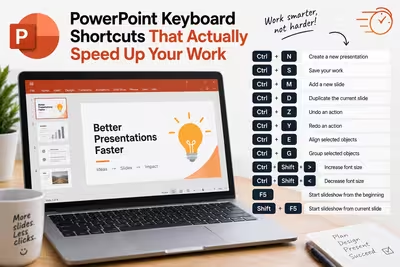
Most people know three PowerPoint shortcuts and assume that's the ceiling — here's what changes once you learn the other twelve.

The PDF looked fine in the export dialog — so why does the logo look like it went through a fax machine once the client opens it?

Your deck is 80MB and won't attach to an email — here's what's actually taking up the space, and how to shrink it without the slides looking like they were faxed.

Guy Kawasaki's famous pitch formula was never built for a deck that has to sell itself to eight people who weren't in the room.

The "right" number of slides has less to do with a magic rule and more to do with what stage you're actually pitching.

Everyone puts a line going up-and-to-the-right on their growth slide — here's why that's usually the least convincing part of it.

The "After X seconds" checkbox is the easy part — the part that actually determines whether your audience stays with you is the number you type into it.