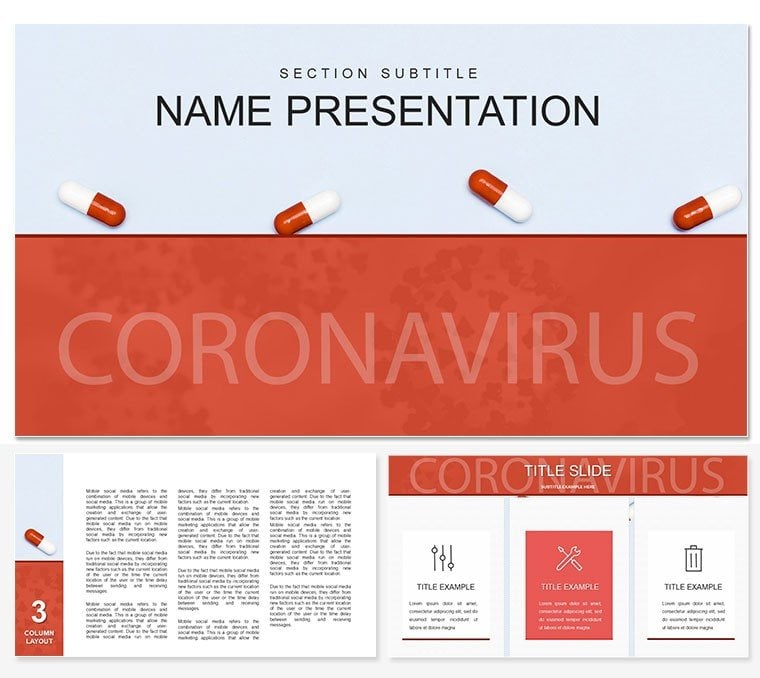
 Click to zoom
Disease Outbreak Keynote Template - Editable Keynote | ImagineLayout
| Format | .pptx |
| Slides | 3 unique layouts |
| Aspect ratio | 16:9 |
| Compatibility | PowerPoint |
| Animated | No |
| Language | English |
| License | Commercial |
| File size | — |
| Version | v1.0 |
| Last updated | March 2026 |
What's inside
What is a disease outbreak Keynote template? A Keynote diagram template pre-built with epidemiology-focused slide layouts - transmission flow diagrams, infection rate charts, and containment response visuals - that open directly in Apple Keynote for immediate editing.
What's Inside the Download
28 diagrams across 7 color schemes ship in two file formats: .key for live editing in Apple Keynote and .kth for applying the theme to an existing deck. The free tier includes 3 slide masters and 3 backgrounds - enough to run a single-topic briefing. The paid version at $20 adds all 28 diagrams and the full 7-palette system, which covers presentations ranging from dark-mode emergency briefings to neutral-tone academic lectures.
The diagram types span the full scope of an outbreak presentation: transmission pathway maps that show vector-to-host relationships, case count bar charts, geographic spread timelines, containment decision trees, and comparative fatality rate diagrams. These layout types address a complete public health communication arc - from initial detection through containment and post-incident analysis - rather than clustering around a single phase of response.
Unlike single-chart layouts built around a generic health icon, this set uses epidemiological visual logic throughout. Transmission diagrams follow the standard host-vector-environment triangle rather than generic flow arrows. Color assignments are not decorative - red for active transmission zones, amber for monitored regions, gray for contained areas - following the visual conventions that public health professionals already apply mentally during live briefings. That structural consistency means the audience reads the diagram before reading the label.
A public health epidemiologist at a regional disease surveillance unit needed to present an active respiratory outbreak analysis to a joint taskforce of clinicians and government officials - two audiences with different visual literacy levels - within 48 hours of data confirmation. Building from scratch meant either two separate decks or a compromise layout. The 28-diagram set covered both scenarios: simplified transmission pathway slides for the policy section, case-rate bar charts for the clinical section, all within the same Keynote file. Color scheme switching took under 4 minutes. The analyst cut deck preparation from 3 hours to 45 minutes and presented both audience sections from a single file without redesigning a single shape.
Download and start editing immediately
From Download to Final Deck
Editing difficulty: Beginner. No design software required beyond Keynote 12.
Open the .key file in Keynote. The first 2 minutes should go to the master slide view - navigate to View - Master Slides and select the color scheme that matches your institution's visual identity. Changing the palette here updates all 28 diagrams simultaneously; editing individual slide colors directly creates inconsistency across the deck and costs 15 minutes of repeated corrections.
Once the global palette is set, move to slide content. Each transmission node and geographic zone is an independent shape - click once to select a region, then use Format - Shape Style to enter an exact hex value for your organization's accent color. Text placeholders in case count labels accept typing directly without unlocking grouped elements. Add or remove diagram blocks by duplicating slides and dragging the layout layer.
Export to PDF through File - Export To - PDF when the deck is final. The .kth file serves a different purpose: apply it to an existing institutional slide deck through Keynote's Change Theme panel to inherit the masters and backgrounds without rebuilding content.
Building From Scratch vs. Starting Here
Building a 28-diagram outbreak deck from blank slides in Keynote requires sourcing or drawing the transmission pathway shapes, establishing a consistent color logic across all diagram types, aligning the containment zone shapes to a repeatable grid, and then rebuilding the same structure for each of the 7 color variants. A designer with Keynote experience budgets 6-10 hours for that scope. A non-designer budgets considerably more - and the result often shows inconsistency in node spacing and connector weight that becomes visible on a projection screen.
The specific design reasoning that matters here: color-coded zones in a disease outbreak diagram are not decorative - they encode operational status. Red does not mean "danger" in a general sense; it means "active transmission confirmed." If the zone colors are arbitrary or inconsistent with WHO and CDC visual conventions, the audience must re-learn the color logic during the presentation itself, which fragments attention at exactly the moment the speaker needs it. A pre-built template built around this convention removes that cognitive overhead entirely.
Download and start editing immediately
Frequently Asked Questions
Which version of Keynote do I need to open this file?The .key file requires Keynote 12 or later, which is available on macOS Monterey and newer. The .kth theme file is compatible with Keynote for iCloud as well, so team members on iPad or Windows browsers can apply the theme without a macOS device. If you are on an older macOS version, check System Preferences - Software Update before downloading - Keynote 12 ships with the standard macOS update cycle and does not require a separate purchase.
How do I change the color scheme across all 28 diagrams at once?Open the file, then navigate to View - Master Slides in the Keynote menu. Select the master associated with your chosen color scheme - the 7 variants are pre-built into the master slide structure. Editing a color at the master level propagates the change to every diagram that inherits from that master. Avoid editing colors on individual slides directly; that overrides the master and creates color inconsistencies that must be fixed slide by slide.
Can I use this template for client-facing public health reports?The license covers internal use, client presentations, and institutional briefings - including presentations delivered to government bodies, hospital boards, or partner organizations. The license does not permit resale of the template file itself, redistribution as a standalone design product, or sub-licensing the file to a third party who then sells it. If you are using the template as part of a paid consulting engagement to produce slides on behalf of a client, that use is permitted.
What is the difference between the free and paid version?The free version ($10) includes 3 slide masters and 3 background variants - the structural foundation for a basic health briefing. The paid version ($20) adds all 28 diagram slides across 5 diagram categories and unlocks all 7 color schemes. If your presentation requires transmission pathway diagrams, case-rate charts, or geographic containment visuals beyond the basic master layout, the paid version is the functional tier for this use case.
What is the refund policy?ImagineLayout offers refunds on digital products when the file does not open correctly or is materially different from what is shown in the preview. Because the download is a digital file, refunds are not issued for change-of-mind purchases after download. If you encounter a technical issue - a corrupted file, a format that does not match the listed specifications, or a compatibility problem with the stated Keynote version - contact the support team via the Contact page with your order number and a description of the issue.
How do I insert custom photos or institution logos into the slides?Each slide contains image placeholder shapes. Click once on the placeholder to select it, then drag your image file directly onto the shape - Keynote scales and crops the image to fit the placeholder bounds automatically. For logos, use Format - Image - Remove Background if the logo requires a transparent layer. SVG files are not directly supported in Keynote image placeholders; export your logo as a PNG with transparency before inserting.
Good for
- Project roadmaps and sprint plans
- Product launch timelines
- Quarterly or annual review decks
- Company history and milestone summaries
Licence
reviews
This one actually helped me structure my school presentation better.
The colors felt softer compared to other templates I downloaded.
A couple slides looked too busy once I added my own data.
I liked the cleaner graph pages the most.
Pretty solid for basic presentations.
FAQ
Will it work in Google Slides?
Are fonts embedded?
Can I use this for client work?
What's the refund policy?
Do you update the template after purchase?
Similar templates
See all Keynote templates →



All 1 slides