 Click to zoom
Cool Drink Keynote Template - Editable KEY Instant Download
| Format | .pptx |
| Slides | 3 unique layouts |
| Aspect ratio | 16:9 |
| Compatibility | PowerPoint |
| Animated | No |
| Language | English |
| License | Commercial |
| File size | — |
| Version | v1.0 |
| Last updated | March 2026 |
What's inside
Files and Formats Included
What is a Keynote diagram template? A Keynote diagram template is a pre-built .key or .kth file with ready-made diagram slides, editable master layouts, and color palettes - designed to open in Apple Keynote and accept your content without any additional setup.
28 diagrams across 7 color schemes are included in the full purchase, plus 3 master slides and 3 background variants available in both tiers. Both .key and .kth format files ship in the download, opening natively in Keynote 12 or later on macOS. The diagram types cover the structural range useful for a food and beverage business presentation: product line comparison layouts, ingredient or recipe flow diagrams, brand positioning charts, and seasonal campaign overview slides.
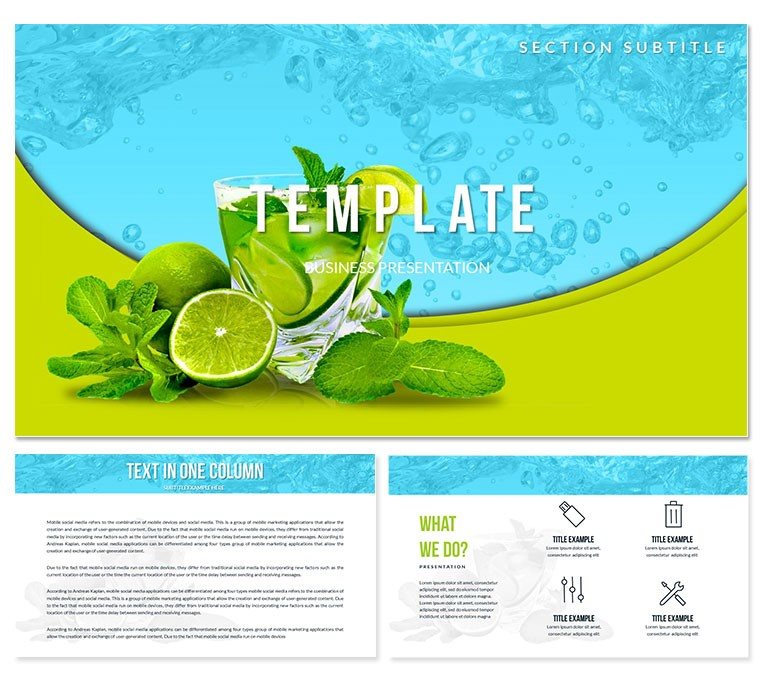
The visual palette is built around cool blues, tropical accent tones, and clean white zone separators - a color language that communicates freshness and energy without becoming overly playful. A bar manager presenting a new cocktail menu to venue ownership, or a beverage brand marketer pitching a summer product launch to a retail buyer, gets a visual environment that reinforces the product category naturally.
Unlike general hospitality templates that use food photography backgrounds with no structural diagram content, this set ships with both a strong thematic visual identity and 28 working diagram layouts. That combination supports presentations that need to look industry-specific and communicate structured data - menu planning, product comparison, supply chain flows - without building both elements separately.
Who Reaches for This Template
A beverage brand product manager preparing a seasonal launch pitch for a grocery retail chain needed to present product positioning, distribution strategy, and comparison against three competitor SKUs - all in under 20 slides, built in 48 hours. Constructing comparison and positioning diagrams in Keynote from scratch would have consumed most of that window. Using this Keynote template's pre-built layouts, the manager adapted 9 diagram slides in 55 minutes and reused the same structural deck for a convenience store buyer meeting the following week by swapping product names and updating the color scheme.
A hospitality consultant presenting a cocktail program overhaul to a hotel bar management team used the product flow diagrams to map ingredient sourcing and drink preparation stages. The diagram's clean zone layout made a complex sourcing structure immediately readable for operations staff unfamiliar with flowchart formats - the session ran on schedule without requiring verbal re-explanation of the process.
- Beverage brand product managers preparing retail and distribution pitch decks
- Bar managers and venue operators presenting menu strategy to ownership
- Hospitality consultants building cocktail program proposals for clients
- Food and beverage marketing teams structuring seasonal campaign presentations
Download and start editing immediately - the .key file opens in Keynote 12 with no setup required.
Customization in 5 Steps
How do I adapt this Keynote template to a beverage brand presentation? Open the .key file, apply your brand colors through the master slide, replace placeholder text with your product data, and export. A 10-slide deck takes under 20 minutes to adapt.
- Step 1 - Open the .key file in Keynote 12 or later (1 minute). No import process; file opens directly from Finder or Downloads.
- Step 2 - Select and duplicate the diagram layouts you need (2 minutes). Review all 28 options and duplicate originals before editing to preserve the full library.
- Step 3 - Apply brand colors via master slide (3 minutes). View - Edit Master Slides - select active master - update fill swatches with brand hex values.
- Step 4 - Replace placeholder labels with product and campaign content (6-10 minutes). Click any label directly and type. Labels sit outside diagram shapes - editing one element does not move adjacent ones.
- Step 5 - Export as .key or PDF (1 minute). PDF for buyer or client distribution; .key for live presenting with edits accessible during the meeting.
Editing difficulty: Beginner. All customization uses standard Keynote menus - no design background required.
Building From Scratch vs. Starting Here
Constructing 28 structured food and beverage diagram slides in Keynote from a blank file requires building each comparison zone, flow connector, and label position manually - then replicating the logic across 7 color variants. An experienced Keynote user would need 8-12 hours to produce the same output at comparable consistency. A brand manager or hospitality professional without design background attempting the same would encounter misaligned shape groups, connectors that detach when any element is moved, and color choices that produce good contrast on a monitor but flatten under warm venue lighting.
One design decision built into this file is worth noting: the cool-toned palette uses hue separation between diagram zones rather than brightness separation alone. Many food and beverage presentations rely on pastel gradient fills that look visually appealing in print or on a display but collapse into a single perceived tone when projected in a venue with warm ambient light. Zone hue variation - blue vs. teal vs. white - holds its distinction across different display environments. That calibration takes repeated testing on actual display hardware to achieve from scratch and cannot be reliably eyeballed in Keynote's preview mode.
Download and start editing immediately.
Frequently Asked Questions
Which version of Keynote is needed to use this template?The .key file requires Keynote 12 or later on macOS. Keynote 12 is a free update available from the Mac App Store and requires macOS Big Sur or above. The .kth file is for applying the template theme to an existing Keynote deck and also requires version 12. iPad and iPhone Keynote can open the .key file for viewing and basic editing, but master slide modifications - including color scheme changes - should be completed on macOS for full control. Verify your version under Keynote - About Keynote if you are on an older macOS release.
How do I apply my brand colors to the diagrams?Open the master slide panel via View - Edit Master Slides. Select the master assigned to your working slides, then click any filled shape element to open the Fill color picker in the right panel. Enter your brand hex value or choose from the color picker. All presentation slides using that master update simultaneously. For decks using multiple color scheme variants from the 7 included, repeat the process for each relevant variant master. Most users complete a full brand color replacement in 3-5 minutes.
What is included in the full version vs the base version?The base version ($12) includes 3 master slides and 3 background variants - the visual theme layer of the template. The full version ($24) adds the 28 pre-built diagram slides organized across 7 color schemes. The diagrams cover comparison layouts, product flow charts, positioning charts, and overview structures that form the working content of a food and beverage presentation. If you only need the themed background to build your own slides, the base version covers that. If you need ready-made structural slide content, the full version is the relevant purchase.
Can this template be used in commercial and client presentations?The standard license covers commercial use, including client pitches, buyer presentations, internal brand meetings, and marketing decks. The original template files may not be redistributed, sold, or sublicensed. You may produce an unlimited number of finished presentations under a single license. For team or organization-wide deployment, contact ImagineLayout support to discuss available licensing options.
Does the file include animations or transitions?Good for
- Project roadmaps and sprint plans
- Product launch timelines
- Quarterly or annual review decks
- Company history and milestone summaries
Licence
reviews
Overall it’s fine for quick business presentations
I used it for a meeting deck and it looked clean enough for internal use
The structure is easy but the design feels a little outdated
Charts are readable but not very detailed
I didn’t struggle editing anything which was good
FAQ
Will it work in Google Slides?
Are fonts embedded?
Can I use this for client work?
What's the refund policy?
Do you update the template after purchase?
Similar templates
See all Keynote templates →



All 1 slides