Knowledge Word Template for Learning Docs | ImagineLayout
Type: Word templates template
Category: Education & Training
Sources Available: .dotx, .jpg
Product ID: WT01389
Package Contents
Two formats are available at download: a .dotx Word template file and a .jpg preview image. The .dotx opens in Microsoft Word 2016+ as a new untitled document each time, preserving the master file for repeated use across different projects and subject areas. Tags confirm this layout covers school subjects, university documents, lesson materials, and research contexts - making it applicable across academic writing, structured knowledge documents, and corporate learning deliverables.
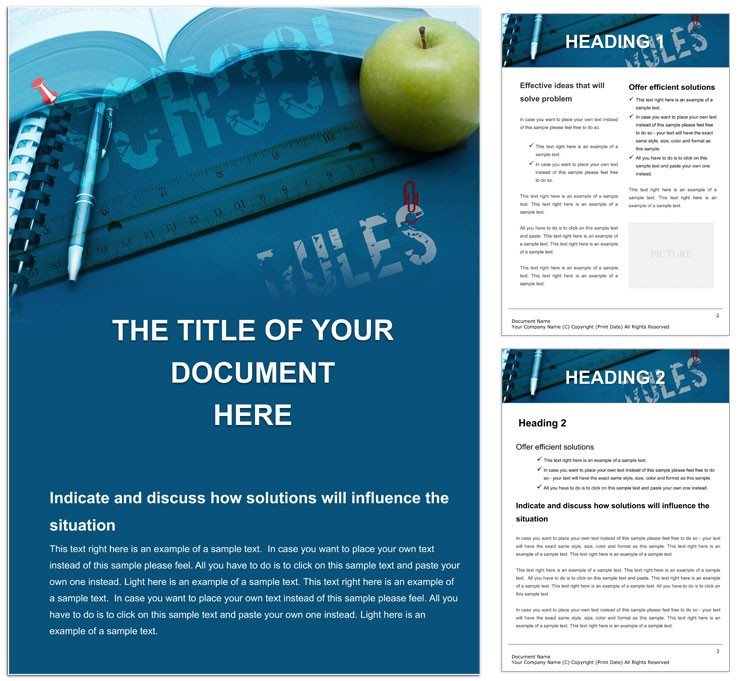
The layout structure moves from a content introduction through expandable body sections to a close that supports reference lists or appendix material. Calming blue and verdant green dominate the color palette, with gold accent markers used as visual hierarchy signals. That combination is chosen for knowledge and research contexts: cooler tones reduce visual fatigue during extended reading, and the gold accents create contrast without introducing aggressive interruption into the typography balance.
Color mode and DPI are not listed on the product page - verify these with your print vendor before any professional print production run. Page size is not specified; adjust under Word`s Layout settings to match your delivery format. Bleed and trim guides are absent from the file; add them manually before commercial print submission. The .jpg is non-editable and is most useful for presenting the layout concept before editing begins.
Technical Specifications
| Specification | Details |
|---|---|
| File Format | .dotx - Word template that opens as a new untitled copy, leaving the source file intact for reuse |
| Preview Format | .jpg - static visual reference; non-editable, useful for sharing layout previews before editing begins |
| Color Mode | Not specified - convert to CMYK before offset print production to avoid color shift on press |
| Resolution / DPI | Not specified - 300 DPI minimum is standard for professional printing; confirm with your vendor |
| Bleed / Trim Guides | Not specified - add 3 mm bleed manually if submitting to a commercial print vendor |
| Page Size | Not specified - adjust under Layout > Size in Word to match your output format |
| Price | $8.00 - one-time purchase; both formats included |
| Product ID | WT01389 |
| Software Required | Microsoft Word 2016 or later on Windows or Mac; Word for Mac 2019+ supported |
From Download to Print-Ready File
Editing requires Microsoft Word 2016 or later. Difficulty level is beginner - no design background is necessary to work with this file. Fonts are embedded in the .dotx; if Word shows a font substitution alert on first open, accept or install the flagged font before proceeding.
- Open the .dotx in Word 2016+. A new untitled document opens automatically. Save it with a project-specific name before editing to keep the master template intact.
- Align the page size to your output format. Go to Layout > Size and set dimensions for your target - A4 for international academic submission or Letter for North American formats. Confirm margins under Layout > Margins.
- Replace placeholder content with your material. Click each placeholder and type directly. Retain the existing heading styles - overwriting them with plain text removes the style properties that maintain grid alignment and typography balance throughout the document.
- Adjust the color palette for your context. Open Design > Colors > Customize Colors. Swap the blue, green, and gold theme values to your institutional or brand hex codes. All linked document elements update in one step.
- Prepare the file for output. For digital delivery, use File > Export > PDF. For professional printing, confirm the CMYK conversion, add bleed if required by your vendor, and verify DPI before submitting.
Who Reaches for This Design
An academic librarian at a university research center needed a consistent document format for curated reading guides distributed to graduate students across three departments. She opened the .dotx in Word 2016, replaced body placeholders with annotated bibliography entries and subject introductions, and exported to PDF for digital distribution. The calming blue palette held screen contrast well without generating complaints about visual fatigue during extended reading sessions.
A graduate research advisor at a professional development institute used the expandable body section structure to create a series of module workbooks for a 12-week research methods course. Each workbook started from the same .dotx, with section headers and color accents adjusted per module theme. Starting from one master file rather than building 12 separate documents saved approximately three hours of formatting work across the full series.
A corporate learning and development specialist at a financial services firm adapted the layout for internal knowledge-base articles distributed to compliance training cohorts. She retained the blue palette - aligned with the firm`s brand - and used the gold accent markers to highlight regulatory reference boxes within the body text. The Education and Training Word template category holds additional layouts for structured learning documents. For time-structured lesson content with a timeline-driven layout structure, the Time Lessons Word template provides a related document format within the same category. Cross-cultural or multilingual training material design is addressed by the Global Knowledge Word template, a complementary option for international knowledge documents.
Download and start editing immediately
Building From Scratch vs. Starting Here
Replicating this layout in a blank Word document requires establishing at minimum three custom paragraph styles, a consistent callout box format, an appendix section with independent header numbering, and a coordinated blue-green-gold color theme across all elements. An experienced Word user building those components from scratch typically needs 60 to 90 minutes before a single line of content is written.
Common failures in from-scratch knowledge document layouts include callout box sizing that collapses when text volume varies between sections, color themes that degrade between screen and offset printing, and heading numbering that resets unexpectedly across copied sections. Color mode is not specified for this file. The calming blue dominant tone - approximately CMYK C:70 M:20 Y:10 K:0 for a standard academic blue - and the verdant green accents - approximately CMYK C:60 M:0 Y:80 K:10 - can shift measurably on uncoated paper stock. Uncoated paper absorbs ink unevenly and pulls cooler tones toward gray. Coated stock holds these values with greater fidelity. The gold accent markers - approximately CMYK C:0 M:15 Y:80 K:0 - are particularly sensitive to uncoated stock, where they read as flat yellow rather than rich gold on press. Confirm coated stock with your print vendor when accurate palette reproduction matters for your professional printing run.
Download and start editing immediately
Which software versions support the .dotx file format in this template?
The .dotx file works with Microsoft Word 2016 or later on Windows and Word for Mac 2019 or later on macOS. Older Word versions may not apply the template`s built-in paragraph styles correctly, which disrupts the heading hierarchy and the overall grid alignment. Google Docs accepts .dotx uploads but does not reliably preserve custom styles or anchored layout elements - editing in Microsoft Word is strongly recommended for consistent results across all document sections.
Under what conditions can a refund be requested for this download?
ImagineLayout`s refund policy outlines the specific conditions under which digital template purchases may be reviewed - read the full policy at imaginelayout.com/refund-policy/ before buying. Because the .dotx file is a digital delivery accessible immediately upon purchase, standard digital goods refund terms apply regarding whether the file has been downloaded and accessed. Technical issues such as a corrupted file or a download that fails to complete should be reported to ImagineLayout support with your order details. Preference-based refund requests after the file has been downloaded are outside the standard policy conditions.
Does this file meet the requirements for professional offset printing?
The file is a .dotx Word template formatted for screen display - it is not a press-ready file. Color mode and resolution are not stated on the product page. Before sending any output to an offset or digital press, export the document to PDF, convert colors to CMYK, and confirm your vendor`s bleed and trim specifications. The calming blue and verdant green palette renders differently on coated versus uncoated stock - coated paper is recommended for the most consistent color reproduction across all palette values during professional printing.
What are the permitted and prohibited uses under the template license?
The template is licensed for personal and commercial use by the individual or organization that purchases it. Permitted uses include producing documents for academic institutions, training programs, clients, and employers. Sharing the original .dotx file publicly, offering it as a free download, or sublicensing it to other parties is prohibited under the license terms. Review the complete terms of use at imaginelayout.com/terms/ before distributing documents created with this template in a commercial or institutional context.
How do I change the color scheme to match my institution or brand?
Open the .dotx in Word 2016+, navigate to the Design tab, and select Colors, then Customize Colors. The dialog shows all theme accent, background, and text colors used throughout the document. Enter your institution`s or brand`s hex codes in the blue, green, and gold fields - all elements tied to those theme values update simultaneously. For selective edits that should not affect the full color scheme, right-click the specific element and choose Font Color or Format Shape to apply a standalone value independently.
What does the .jpg preview file included in the download actually show?
The .jpg is a non-editable static image showing the template`s full visual design before any content is added. It captures the layout structure, the blue and green palette, section header styles, and the gold accent markers. The preview is useful for presenting the layout to a manager, client, or committee for approval before the editing process begins - no Word installation is required to view it. All actual editing takes place in the .dotx file using Microsoft Word 2016 or later.