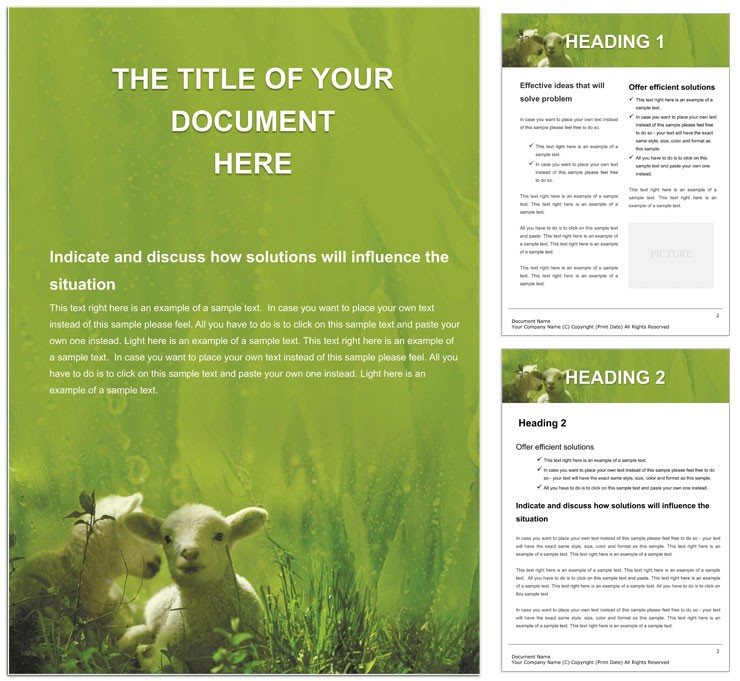
Lamb Farming Word Template 50 Pages Agriculture | ImagineLayout
Type: Word templates template
Category: Agriculture & Animals
Sources Available: .dotx, .jpg
Product ID: WT01075
Layout, Formats and Fold: Full Contents
Fifty adaptable pages fill this download.
Adaptable layouts support farm management goals.
Buyers receive editable text and replaceable images.
Ten minutes after opening you finish setup.
What the File Includes
| Specification | Details |
|---|---|
| File Formats | .dotx and .jpg files that support professional printing when exported from Word to PDF |
| Compatible Software | Microsoft Word 2016+ ensuring consistent output for production environments |
| Page Size | Not specified allowing flexibility for standard office printing sizes |
| Color Mode | Not specified with natural tones for livestock visuals |
| Resolution | Not specified with scalable elements for sharp results in digital printing |
| Bleed and Trim Guides | Not specified but straightforward to add for clean edges in offset printing |
| Price | $8 providing affordable access to experienced production layouts |
Three Projects Where This Template Fits
An Agricultural Consultant in the farming industry documents grazing rotations that improve herd health and saves weeks of paperwork.
A Farm Manager in livestock operations creates health logs with clear sections leading to better compliance.
A Ranch Veterinarian in animal care builds annual summaries with balanced typography resulting in clearer client records.
Download and start editing immediately
Edit, Brand, Print: The Workflow
- Open the .dotx file in Microsoft Word 2016+ to begin the template load.
- Edit text using the editable text feature for your data.
- Replace images through the replaceable images option.
- Modify colors with the color swatches panel for your brand.
- Export the file to PDF with correct settings for print-ready output.
What You`d Need to Set This Up Yourself
Starting from a blank document requires learning layout structure and takes many hours.
This option avoids mistakes in panel composition and white space management.
Natural tones stay stable on coated stock during offset printing.
Explore more options in the agriculture animals word templates section.
Similar agriculture layouts appear in the make wine design.
Complementary ideas come from the honey bee layout.
Get this Word template now and customize your next report
What software versions are needed to edit this template?
Microsoft Word 2016 or later works best for full compatibility with the .dotx format. Earlier versions may open the file but some features like color swatches could behave differently. The template uses standard Word tools for editing text and images. Always test your export settings before professional printing to ensure visual hierarchy remains intact.
What is the refund policy for this product?
A full refund is available within 30 days if the downloaded file fails to open in Word 2016 or later. Refunds are not issued after successful download and use unless the file is proven corrupted through support verification. Contact support with your order number and error details. The policy protects both buyers and the production process.
Is the file print-ready?
Exporting the .dotx file to PDF creates print-ready output with CMYK considerations when needed. The editable text and replaceable images maintain quality through digital printing or offset printing. Bleed and trim are simple to add in Word for edge-to-edge results. Production experience shows clean results on standard coated stock.
What license applies to the template?
You may use the template for personal and commercial projects including client work. Reselling or redistributing the original file is prohibited. Multiple users within one organization need separate licenses. The license covers unlimited edits and prints while protecting the original design files.
How do I change colors in the template?
Select any element and open the color swatches panel to pick new shades. The Font Color tool works for text changes across the layout structure. Layer structure keeps swatches organized for quick brand updates. Production context confirms colors stay consistent when exported for professional printing.
What do the file formats do?
The .dotx serves as the main editable document for your content. The .dot acts as a template starter for repeated use in Word. The .jpg provides a visual preview before purchase. Each format supports editing features and export settings for print production needs.