Warning Chemistry Word Template: Safety Docs | ImagineLayout
Type: Word templates template
Category: Medicine - Pharma
Sources Available: .dot, .dotx, .jpg
Product ID: WT00348
Files and Print Specs Included
3 source files come with this download: .dot, .dotx, and .jpg. The .dotx is the active editing file for Word 2016 and later; the .dot extends compatibility to older Word installations; the .jpg serves as a static preview. All three arrive in a single purchase at $8.00.
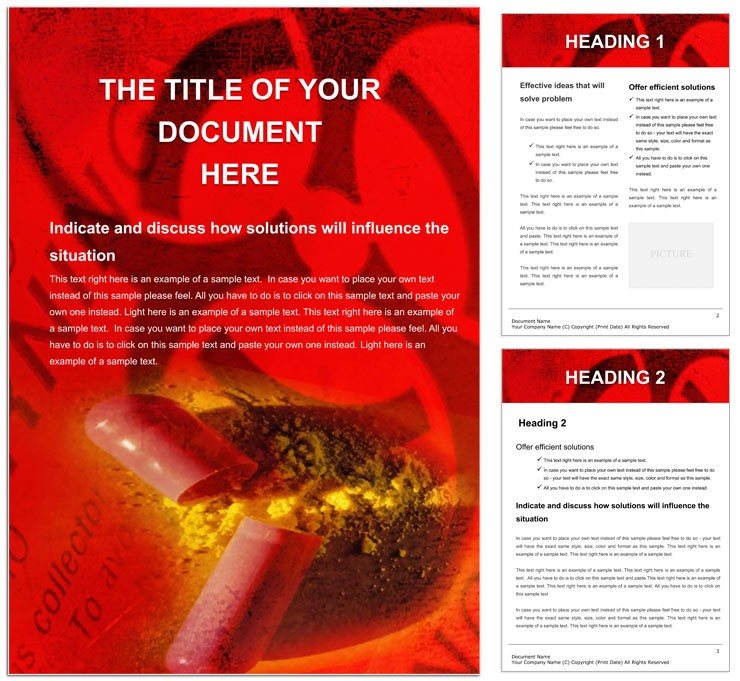
The layout structure is built around a specific design decision: alert boxes with highlighted frames are positioned as separate, standalone blocks rather than inline callouts. That separation preserves scannability - a lab technician reviewing a protocol under time pressure can locate a caution block without reading surrounding body text. Sections are arranged to support hazard symbols at the top, procedural steps in the body, and summary or response guidance at the foot of a page, matching how safety documents are structured in laboratory and classroom environments. The layout structure supports both portrait orientation for standard handout sheets and landscape for diagram-heavy pages.
The buyer receives an editable Word framework with pre-formatted hazard icon placeholders, alert box frames, and structured sections for chemical names, risk categories, and mitigation steps. Color mode, DPI, and bleed are not specified on the product page. For professional printing or poster production, confirm these specifications with your print vendor before exporting.
Technical Specifications
| Specification | Details |
|---|---|
| Product ID | WT00348 - include this in any support inquiry for faster case resolution |
| File Formats | .dot, .dotx, .jpg - .dotx for current Word versions; .dot for legacy; .jpg for preview only |
| Software Required | Microsoft Word 2016+ recommended; .dot also opens in earlier versions |
| Category | Medicine - Pharma - designed for laboratory, clinical, and educational safety contexts |
| Price | $8.00 - instant download after purchase |
| Color Mode | Not specified - Word defaults to RGB; convert to CMYK if printing professionally |
| Resolution / DPI | Not specified - verify with your print vendor for poster or professional printing workflows |
| Bleed / Trim Guides | Not specified - add manually in Word page setup if ordering from a commercial printer |
Customization in 5 Steps
The .dotx file uses the Microsoft Word workflow throughout. Editing difficulty is low for anyone with basic Word experience; intermediate for users who want to replace placeholder icons with custom hazard symbols.
- Open the .dotx file in Word 2016+. A new document opens based on the template - the source file is not modified.
- Replace placeholder text in each section: chemical name, hazard class, risk description, and response procedures. Keep sentences short - direct language in safety documents reduces misreading under stress.
- Swap or resize the hazard symbol placeholders. Insert your own icons via Insert > Pictures, or use Word's built-in Shapes library for simple warning symbols. Resize proportionally using the corner handles to avoid distortion.
- Adjust alert box colors using the Table Design > Shading tool for box backgrounds, and Font Color for header text. Red and yellow are standard for alert hierarchies per ISO visual communication guidelines; apply your institution's approved palette where those standards apply.
- Export to PDF via File > Save As > PDF for distribution, or print directly from Word after confirming page size and margin settings match your target format - A4 or Letter, portrait or landscape.
Three Projects Where This Template Fits
A lab safety officer at a contract research organization needs to produce updated chemical hazard sheets for 12 workstations before a quarterly audit. Opening the .dotx file and populating the pre-built hazard sections removes the manual step of constructing alert box formatting from scratch - a task that typically takes 45-90 minutes per document when done without a structured template. The officer replaces placeholder text, inserts facility-specific emergency response contacts, and exports a print-ready file for laminated posting.
A chemistry instructor at a community college develops a student safety handout for a unit on reactive compounds. The template's separated alert block structure lets the instructor layer hazard-symbol placeholders alongside short procedural steps, producing a two-page handout that functions as both a reference sheet and a study guide. The layout structure supports visual hierarchy without requiring the instructor to manage column spacing manually.
A pharmacy technician training coordinator at a regional hospital system creates standardized orientation materials covering medication handling and chemical storage protocols. The editable text sections accommodate both general OSHA language and facility-specific procedure variations, supporting consistent formatting across departments without reformatting each document individually.
Download and start editing immediately
Why This Template, Not a Blank Document
Building a safety document from a blank Word file requires setting up alert box borders manually, finding or creating hazard icons that match document scale, and establishing a grid alignment that holds when text length varies between sections. Those mechanics take time away from writing accurate safety content - which is where the real professional work lies in this document type.
Common mistakes in from-scratch builds include inconsistent border weights across alert boxes, icon sizes that distort when resized without constraint handles active, and heading levels that collapse into body text when the document is printed at reduced size. A structured template removes each of these failure points before writing begins.
Pro Insight: Color mode is not specified on the product page, which is the detail that most often causes problems at the print-ready file stage. Word documents default to RGB. Red warning backgrounds - common in chemical safety layouts - shift noticeably toward orange on some CMYK press profiles, particularly on uncoated stock. If this template will be used for large-format poster printing or professional printing on coated stock, convert any colored shapes to CMYK-equivalent values before PDF export and request a press proof. For single-sheet office or digital printing, RGB output is typically acceptable. For related safety and pharmaceutical documentation layouts, the Medicine - Pharma Word templates collection covers the full category. If your workflow also includes tablet or pill-related documentation, the Medicines Tablets Word Template provides a complementary layout for pharmacy-oriented content. For broader pharmaceutical documentation needs, the Medical Record Word Template covers patient and clinical record structures that often accompany chemical safety files.
Download and start editing immediately
Which software versions are required to edit the .dot and .dotx files?
The .dotx file is designed for Microsoft Word 2016 and later versions, including Microsoft 365 on Windows and Mac. Word 2016+ ensures full compatibility with table styles, alert box formatting, and any built-in shape elements in the template. The .dot file extends usability to older Word versions for users on legacy installations. Neither format requires a plugin or third-party add-in. If editing in LibreOffice or Google Docs, most text sections will transfer, but custom table borders and placeholder shapes may need manual adjustment after import.
What are the specific refund conditions for this template?
ImagineLayout offers refunds in three defined situations: if the product cannot be downloaded (request within 14 days of purchase); if the template has a serious defect affecting normal use (notify within 72 hours of purchase with order number and issue details); or if the product does not match its listed description (reviewed case-by-case). Refunds are not issued if the file was downloaded and used for an extended period, if no explanation is provided, or if the request violates the Terms of Service. After approval, refunds process in 7-10 business days and return to the original payment method. Bank processing times may vary.
Is this file print-ready with CMYK color mode, correct DPI, and bleed marks?
Color mode, resolution, and bleed settings are not specified on the product page. Word documents operate in RGB by default. For professional printing or poster-scale output, you will need to verify and adjust these settings manually before exporting: convert colored elements to CMYK-equivalent values, confirm the page size matches your printer's sheet requirements, and add bleed via Word's page setup if the print vendor requires it. For standard office or digital printing, the default Word PDF export is sufficient without these adjustments.
What uses are permitted and prohibited under the license?
The license permits use of the template for creating documents in personal and commercial contexts - safety handouts, institutional protocols, educational materials, and client deliverables are all covered. You may create multiple documents from the same template file. What is not permitted is distributing, reselling, or sharing the original .dot or .dotx file with external parties or on template marketplaces. Documents produced using the template may be distributed freely as finished works. Review ImagineLayout's Terms of Use for the complete conditions.
How do you change colors in the Warning Chemistry Word template?
All color changes happen through Word's native tools - there is no Swatches panel as in Illustrator. To change text color, select the text and use the Font Color dropdown in the Home ribbon. To change alert box background colors, click inside the box, go to Table Design, and use the Shading dropdown to apply a new fill. For document-wide color changes, go to Design > Colors > Customize Colors to build a named theme palette and apply it throughout the file in one action. ISO safety standards typically assign red to immediate danger, yellow/amber to warnings, and blue to informational notices - consider these conventions when selecting alert box colors for laboratory or institutional use.
Are fonts embedded in the file, and what is each format used for?
The .dotx is the primary editing file - open it in Word 2016+ to start a new document with all layout and styles pre-configured. The .dot provides the same function in legacy Word environments. The .jpg is a non-editable preview for evaluating the design before purchase. Fonts in Word template files are not embedded by default; they reference fonts installed on the user's system. If a colleague opens the file on a machine where the original fonts are not installed, Word substitutes the nearest available alternative, which can alter text spacing. To prevent this, go to File > Options > Save and check "Embed fonts in the file" before sharing across teams.