 Click to zoom
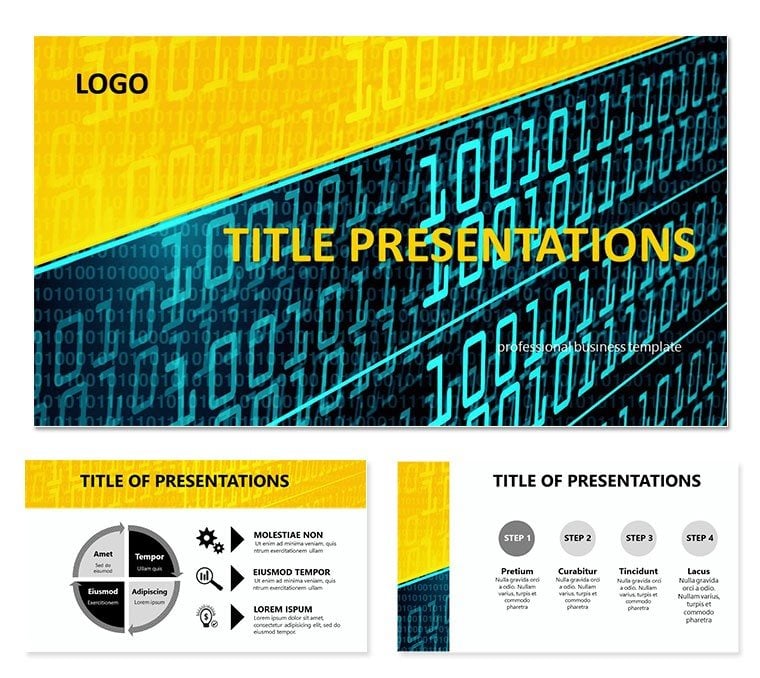
Programming Codes PowerPoint Template
| Format | .pptx |
| Slides | 3 unique layouts |
| Aspect ratio | 16:9 |
| Compatibility | PowerPoint |
| Animated | No |
| Language | English |
| License | Commercial |
| File size | — |
| Version | v1.0 |
| Last updated | December 2025 |
What's inside
Explaining software architecture or algorithm efficiency to non-technical stakeholders ranks among the toughest presentation challenges I've faced in tech consulting. Default slides with plain text code blocks lose audiences fast. This programming codes PowerPoint template offers syntax-highlighted layouts and dynamic diagrams that bridge the gap between complex code and clear communication, perfect for sprint reviews or investor demos.
The modern code-inspired backgrounds and 28 specialized diagrams across 7 color schemes bring technical precision to your storytelling.
Specialized Layouts for Code and Architecture
Core slides feature formatted code snippet sections with line numbering and dark/light mode options for displaying functions or classes. Flowchart diagrams map algorithm logic with decision nodes and loop structures ready for your pseudocode.
Architecture overviews use layered block diagrams to show microservices interactions, while timeline slides track development sprints with progress bars. Infographic elements simplify data structures - trees, graphs, or arrays - with animated build options.
Chart layouts handle performance metrics or complexity analysis, fully linked for live data updates.
How Developers and Teams Use This Template
During agile retrospectives, engineering managers visualize backlog prioritization with custom diagram flows. CTOs pitching new platforms use the architecture slides to demonstrate scalability to boards.
Training sessions for junior developers benefit from step-by-step code walkthrough layouts that highlight key concepts progressively.
Fast Integration into Development Workflows
Works seamlessly in PowerPoint 2016+, Keynote, and Google Slides. Copy actual code directly into placeholders - the formatting holds. Switch between color schemes to match your IDE theme or company brand in moments.
Instant download means you can prepare professional tech talks even on tight deadlines.
Real Scenarios from Tech Presentations
Startup founders demo MVP features with interactive prototype flow diagrams. IT consultants explain system migrations using before-after architecture comparisons.
Educators teaching algorithms break down sorting methods with visual step animations. Analysts report on code quality metrics through integrated dashboard-style slides.
Template Benefits Comparison
ElementThis Programming TemplateDefault Code SlidesFrom-Scratch DesignCode DisplaySyntax-ready formatted blocksPlain text distortionManual font and spacing fixes&td>Diagram Variety28 purpose-built tech diagramsLimited basic shapesExtensive drawing time&td>Professional FinishCohesive modern code aestheticInconsistent stylingDesigner costs&td>Customization SpeedMinutes for full adaptationHours per slideDays of iterationApplications in Technology Sectors
- Software Development: Architecture reviews and feature planning.
- Technology Startups: Product roadmaps and funding pitches.
- Education: Coding courses and workshop materials.
- Enterprise IT: System documentation and training decks.
- Consulting: Technical assessments and solution proposals.
Frequently Asked Questions
Can I paste real code snippets and maintain formatting?
Yes, the text boxes preserve monospace fonts, indentation, and line breaks - ideal for languages like Python, Java, or JavaScript.
Are the diagrams suitable for explaining algorithms?
Absolutely, with dedicated flowchart and tree structures designed specifically for computational logic and Big O illustrations.
How many color schemes are available?
Seven distinct schemes, from classic dark mode to vibrant options matching popular IDE themes.
Is animation supported for step-by-step code reveals?
Built-in animation sequences allow progressive disclosure of code lines or diagram builds during presentations.
What about compatibility with Google Slides?
Full support - import the PPTX and all elements including diagrams remain editable and functional.
Good for
- Project roadmaps and sprint plans
- Product launch timelines
- Quarterly or annual review decks
- Company history and milestone summaries
Licence
reviews
This is the best coding template I've found. The syntax highlighting placeholders actually hold the formatting when I paste Python code.
The dark mode background is great for my eyes but prints poorly in black and white. Wish there was a light mode toggle.
Used the algorithm flowcharts to explain recursion to junior devs. The structured layout saved me a lot of whiteboard time.
FAQ
Will it work in Google Slides?
Are fonts embedded?
Can I use this for client work?
What's the refund policy?
Do you update the template after purchase?
Similar templates
See all PowerPoint Templates →

All 1 slides