 Click to zoom
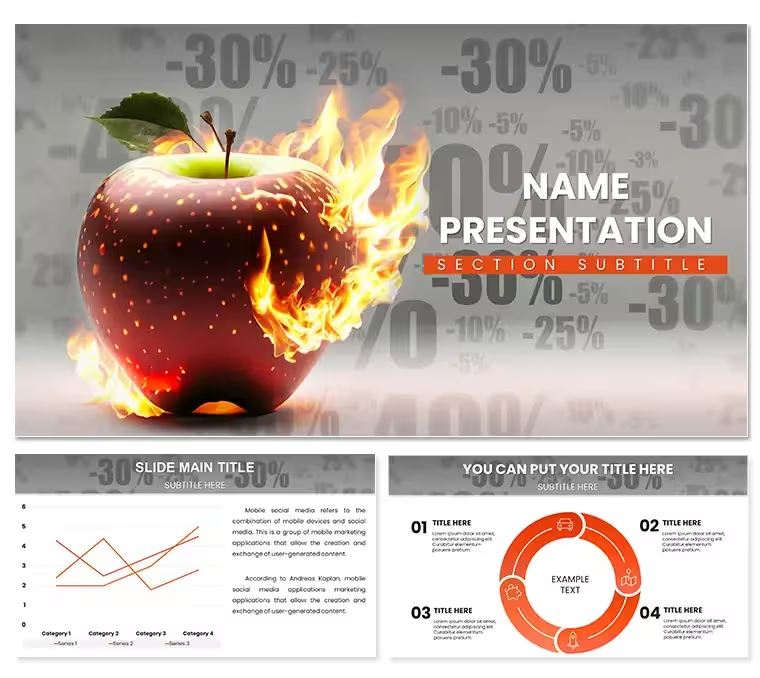
Fiery Sales Discounts PowerPoint Template
| Format | .pptx |
| Slides | 3 unique layouts |
| Aspect ratio | 16:9 |
| Compatibility | PowerPoint |
| Animated | No |
| Language | English |
| License | Commercial |
| File size | — |
| Version | v1.0 |
| Last updated | April 2023 |
What's inside
Feel the heat of a flash sale closing in, where every slide crackles with the energy of limited-time deals that convert browsers to buyers. The Fiery Sales Discounts PowerPoint Template is your arsenal for marketers and e-tailers aiming to torch objections and ignite interest. Boasting 28 dynamic diagrams in seven scorching color schemes, it wraps promotions in flames of red, orange, and yellow - colors that scream "act now" without saying a word. From percentage slashes to bundle blasts, these slides don't whisper offers; they roar them into revenue.
Three masters lay the foundation with backgrounds that gradient from ember glows to inferno peaks, ensuring your deck burns bright on any screen. Fully editable in PowerPoint 2016+, swap in your SKUs or urgency timers with a few clicks. It's the visual equivalent of a countdown clock - ticking visuals that make "while supplies last" feel immediate and irresistible.
Fanning the Flames: Essential Features for Hot Promotions
This template isn't about subtle sizzle; it's full-on blaze. Bold typography dominates, stacking keywords like "50% OFF" in fonts that tower like bonfires, creating hierarchy that guides eyes to the deal's core.
- Promotion Layouts: Dedicated slides for percent-offs, BOGO specials, and flash timers, each with placeholder fields for prices and fine print.
- Animated Graphics: Flames lick around discount badges, with build sequences revealing savings step-by-flame.
- Typography Toolkit: Mix sans-serifs for headlines and scripts for taglines, all scalable for email embeds or billboards.
- Scheme Variety: Seven palettes, from sunset warms to lava reds, to match seasonal campaigns.
Vector elements mean no loss in resizing for social snippets, and the three backgrounds adapt to light or dark modes seamlessly.
Deal-Sealing Scenarios: Where It Shines
Envision a Black Friday briefing: Slide 4's tiered discount pyramid stacks offers visually, editable bars shrinking as margins rise. Or a product launch webinar, where slide 17's bundle carousel spins alternatives, highlighting upsell paths with fiery arrows. These uses address the marketer's dilemma - making offers pop amid inbox noise.
Implementation flows simply: Load your promo codes into text boxes on slide 9's coupon clipper, then animate the tear-away effect. For email campaigns, export statics from slide 21's urgency banner. Against generic templates, this one's animations add that extra spark, turning passive scrolls into cart adds.
- Ignite Your Copy: Fill headlines with deal specifics, using bold for slashes like "/".
- Animate the Burn: Sequence flame entrances to build tension, syncing with voiceover on expiration.
- Validate Heat: A/B test color schemes on mockups for click-through lift.
- Extinguish Safely: Add hyperlinks to T&Cs slides to cool legal concerns.
This process fuels fast iterations, perfect for agile teams chasing quarterly quotas.
Blazing Trails: Pro Tips for Maximum Impact
For e-commerce vets, integrate QR codes on slide 26's callout cards, linking straight to checkout. The template's chart options - donut slices for savings breakdowns - pair with Excel for real-time inventory pulls. In retail roadshows, leverage the hierarchy to layer regional pricing, fonts scaling impact by market.
Think of it like a well-stoked grill: Layer visuals for sustained sizzle. Optimize for mobile by compressing animations, ensuring thumb-swipes reveal deals smoothly. And for post-pitch analysis, note-slide annotations track which flames drove the most callbacks.
Don't let opportunities cool - grab this template and fan your next campaign into a wildfire of wins.
Frequently Asked Questions
How do the animations work for discounts?
Pre-set builds reveal elements like price drops; adjust in Animations tab for custom pacing.
Can I change the color intensity?
Yes, edit theme colors to tone down for subtle promos or amp up for holidays.
Is it e-commerce specific?
Primarily, but adaptable for service bundles or nonprofit fundraisers with relabeled layouts.
Does it include placeholders for images?
Every promo slide has drag zones for product shots, auto-cropping to fiery frames.
Compatibility details?
PowerPoint 2016+; animations preserved in exports to video or PDF.
Good for
- Project roadmaps and sprint plans
- Product launch timelines
- Quarterly or annual review decks
- Company history and milestone summaries
Licence
reviews
The chessboard diagram for strategy moves is clever.
The squares were not perfectly aligned. Aligned them.
Used for a competitive strategy presentation. The pawn icons helped.
I wish the template had more pieces than just pawns. Added a knight.
It’s okay. It was a good metaphor.
FAQ
Will it work in Google Slides?
Are fonts embedded?
Can I use this for client work?
What's the refund policy?
Do you update the template after purchase?
Similar templates
See all PowerPoint Templates →


All 1 slides