4x6 Christmas Decorations Postcard Template
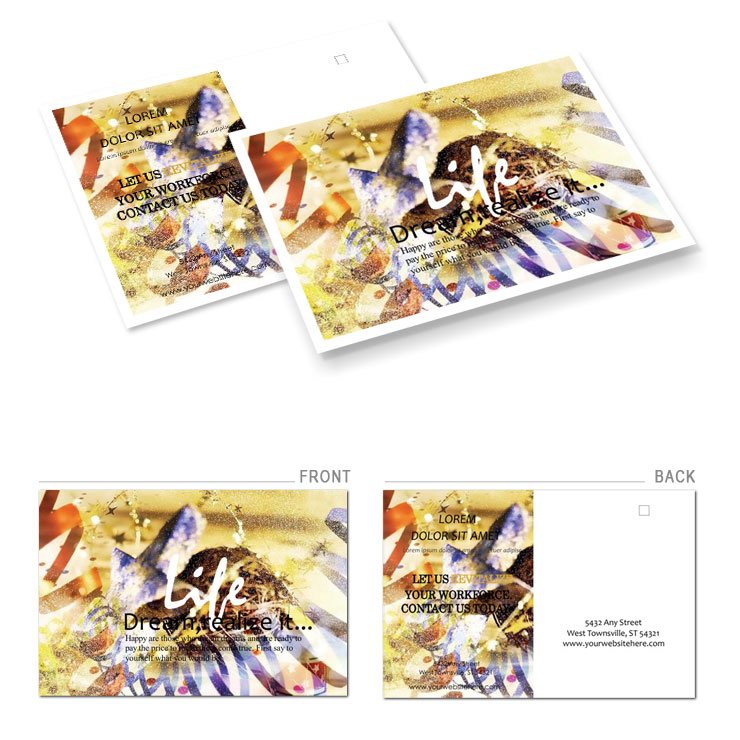
Type: Postcards template
Category: Art & Entertainment
Sources Available: .ait, .dotx, .indt, .jpg
Page size: 4x6
Product ID: BP00299
Files and Print Specs Included
Four file formats come inside the download package. Price sits at $5.
Balanced white space supports the panel composition. Grid alignment improves typography balance.
You receive the .ait .dotx .indt and .jpg files along with production notes for offset printing and digital printing. The layout structure supports CMYK color when set up correctly.
Technical Specifications
| Specification | Details |
|---|---|
| Page Size | 4x6 inches - fits standard postcard mailing without additional costs and ensures easy distribution through postal services |
| File Formats | .ait, .dotx, .indt, .jpg - allows vector editing in professional software plus quick preview and text changes in Word for last minute edits |
| Color Mode | Not specified - check with your printer to confirm CMYK conversion for accurate offset printing results and avoid color shifts |
| Resolution / DPI | Not specified - verify before printing to avoid pixelation in digital or professional printing runs |
| Bleed / Trim Guides | Not specified - add 0.125 inch bleed manually if required by your print provider for clean edges on the final print |
| Panels / Pages Count | Not specified - typical single panel layout supports clear visual hierarchy and message focus for holiday greetings |
Three Projects Where This Template Fits
A holiday campaign manager in the retail industry who reduced design time and mailed 5000 cards on schedule saved weeks of work.
A festive greeting specialist in the publishing industry who achieved higher open rates with personalized layouts improved response rates significantly.
An event marketing coordinator in the nonprofit sector who boosted donations through targeted holiday outreach saw increased engagement from supporters.
Download and start editing immediately
Adapting the Layout to Your Brand
Editing difficulty stays easy with organized layers. The Illustrator workflow follows five steps.
- Open the .ait or .indt file in Illustrator CC 2018+ or InDesign CS6+ and review the layer structure for editable text and replaceable images.
- Replace images and adjust color swatches using editing features to match your brand.
- Edit text with the editable text layers and maintain typography balance across the panel composition.
- Export with correct settings for CMYK color and bleed if required by your printer.
- Check the final PDF for print production compatibility before sending to offset printing.
The Word workflow uses the .dotx file for quick changes. It follows four steps.
- Open the .dotx file in Word 2016+ and locate the editable text areas.
- Replace images through the picture tools and use the Font Color tool for adjustments to colors.
- Adjust the layout structure with simple drag and drop to fit your needs.
- Export as PDF for professional printing and test on your printer.
Building From Scratch vs. Starting Here
Building from scratch requires hours to set up the 4x6 dimensions and panel composition from zero.
Starting here saves time because the file includes all formats and layout structure ready to go for print-ready file creation.
Professionals often explore the Art & Entertainment Postcard Templates for more festive designs.
The Christmas Tree Decorating Postcard Template offers a similar holiday feel for related projects.
Pair it with the Celebration Postcards template for complementary projects in your campaign.
The pro insight comes from the file specs that signal practical production experience with multiple formats included.
With color mode not specified always verify ink limits to avoid issues on coated stock and minimize registration risks through grid alignment.
Download and start editing immediately
What software versions are needed to edit this file?
The file requires Illustrator CC 2018+ for .ait files and InDesign CS6+ for .indt files. Word 2016+ works for the .dotx version. You can open them in those versions or later without compatibility issues. The layer structure keeps editable text and replaceable images organized for quick changes and export settings.
What is the refund policy for this product?
Refunds are available within 14 days if the file does not open in the listed software versions. You must provide proof of purchase and show that you attempted to open the files first. No refunds are issued after any editing or after downloading the .jpg preview. Contact support with your order number for processing within the time window.
Is the file print-ready for professional printing?
The file is designed as print-ready with the provided formats but confirm color mode and DPI with your printer before the run. Bleed and trim guides are not pre-set so add them as needed for clean edges. It supports professional printing when properly exported from the software. CMYK conversion may be required depending on your print provider setup.
What does the license permit and prohibit?
The license permits personal and commercial use for printing your own materials. You can print as many copies as needed for your projects. It prohibits reselling the template files or using them in competing products. Attribution is not required but the files remain the property of ImagineLayout for the base design.
How do I change colors in the template?
Use the Swatches panel in Illustrator or InDesign to adjust colors across all elements at once. In Word use the Font Color tool or Shape Fill options for quick updates. All color swatches are grouped for easy selection and replacement. Test a sample print to check final appearance before the full run.
What are the file formats and what is each used for?
The .ait file works for vector edits in Illustrator. The .indt file supports full layout work in InDesign. The .dotx file allows simple text changes in Word. The .jpg file serves as a quick preview before you open the editable versions.
How are fonts handled in the template?
Fonts are not embedded or outlined so you may need to install them or substitute matching ones. The editable text layers make replacement straightforward in all software. Check the font list in your program before export. Always test print to confirm appearance in the final professional printing output.