 Click to zoom
Christmas Keynote Template - Fully Editable | Instant Download | ImagineLayout
| Format | .pptx |
| Slides | 3 unique layouts |
| Aspect ratio | 16:9 |
| Compatibility | PowerPoint |
| Animated | No |
| Language | English |
| License | Commercial |
| File size | — |
| Version | v1.0 |
| Last updated | September 2026 |
What's inside
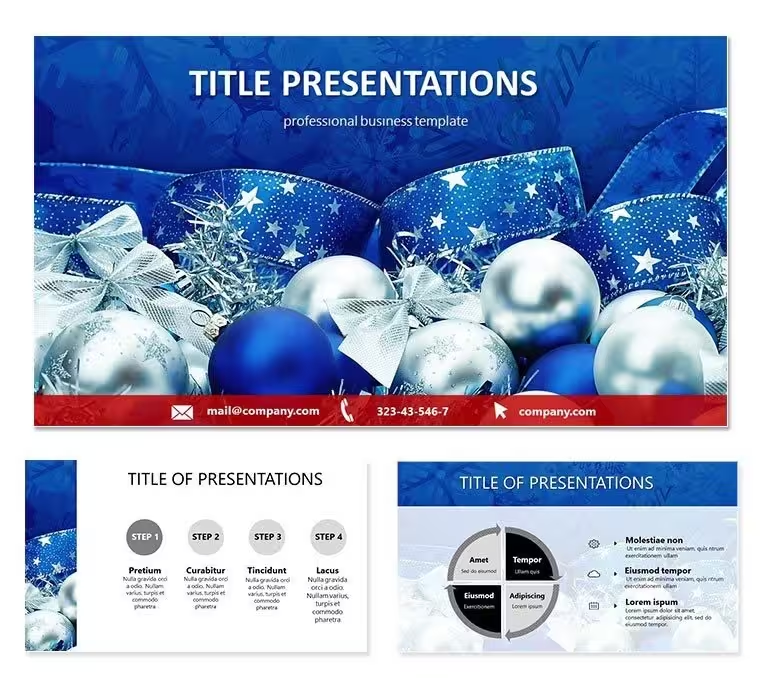
Download the Christmas Keynote template with festive decorations theme, 28 diagrams and 7 color schemes in KEY format. Ideal for holiday events, corporate parties and seasonal marketing campaigns. Instant download, fully editable for Apple Keynote users.
What's Included
The Christmas Keynote template delivers 4 main slides packed with 28 diagrams across 7 color schemes in native KEY and KTH files. Everything is vector-based and ready for immediate use in Apple Keynote. The package includes the full presentation file plus theme file for easy application to new decks. No third-party plugins required.
File Formats and Compatibility
Compatible with all recent versions of Keynote on Mac and iOS. The 7 color schemes let you match any brand palette instantly by swapping fills on diagrams and backgrounds. Download size is small for fast access even on mobile.
Key Features
This holiday-themed template stands out with its decorations-focused visuals and 28 customizable diagrams that handle everything from timelines to bullet lists. The 7 color schemes provide instant variety for different events without starting over. Unlike baking or reindeer-focused Christmas templates in the related section, this one centers purely on decorations for versatile seasonal storytelling.
FeatureBenefit28 DiagramsReady data visualization slides7 Color SchemesInstant theme switchingKEY + KTH filesNative Keynote editingVector elementsScale without quality lossHoliday decorations themeFestive visuals included4 Main slidesConcise structureProfessional Use Cases
A retail marketing manager at a department store used the decorations diagrams to present Q4 holiday sales strategy to the executive team, swapping color scheme 3 for brand reds and greens. The concise 4-slide structure kept the meeting focused and ended with approval for increased decoration budget. Another example: an event planner for a corporate Christmas party customized the diagrams to outline vendor timelines and attendee flow, delivering the deck in under 30 minutes after download.
Comparison to Building from Scratch
Creating similar festive slides manually would take hours selecting icons, aligning diagrams and testing colors. This template cuts that to minutes: open the KEY file, replace placeholder text in the 28 diagrams and pick one of the 7 color schemes. Quality stays professional with perfect alignment already built in.
How to Customize
Download the files, open in Keynote, select any diagram and edit text or replace icons. Switch color schemes via the theme chooser. Add your logo on master slides. Export as PDF or video for sharing. A regional sales director at a logistics firm adapted the template for a holiday client update by updating diagram data on slide 2 and changing to a cooler color scheme for winter feel.
Why Choose This Template
The Christmas decorations focus sets it apart from other holiday templates on the site that lean toward baking or reindeer motifs. The combination of only 4 main slides with deep 28-diagram support and 7 color schemes gives exactly the flexibility needed for quick yet polished seasonal presentations.
Frequently Asked Questions
Is this Christmas Keynote template compatible with the latest Keynote version?Yes, the KEY and KTH files work seamlessly with Keynote 10 and newer on both Mac and iOS devices. The 28 diagrams use native shapes and the 7 color schemes apply instantly through the theme browser. No conversion steps needed. Users have reported smooth performance even when adding high-resolution photos to the decoration placeholders.
How many slides and diagrams does the template actually contain?The package includes 4 main slides that incorporate a total of 28 diagrams spread across 7 different color schemes. This gives you multiple layout options without clutter. The concise structure is perfect for short holiday updates while the diagrams handle any data-heavy content you need to include.
Can I use this for commercial client presentations?The template is licensed for commercial use once purchased. A marketing agency used the decorations theme for multiple client holiday campaigns last season by simply switching color schemes and adding logos. All elements remain fully editable and export-ready.
How do I change the color schemes in Keynote?Open the file, go to the theme chooser and select any of the 7 included schemes. The diagrams update automatically while keeping all your text and icons intact. This feature saved a teacher hours when preparing different versions for school Christmas events.
What is the download process and file size?After purchase you receive an instant ZIP download containing the KEY and KTH files. Total size is under 5MB for fast delivery even on slower connections. Unzip and open directly in Keynote to start editing the Christmas decorations theme immediately.
Good for
- Project roadmaps and sprint plans
- Product launch timelines
- Quarterly or annual review decks
- Company history and milestone summaries
Licence
reviews
I used it for school project and it was okay
FAQ
Will it work in Google Slides?
Are fonts embedded?
Can I use this for client work?
What's the refund policy?
Do you update the template after purchase?
Similar templates
See all Keynote templates →

All 1 slides