 Click to zoom
Chemistry Classroom Keynote Template - Fully Editable | Instant Download | ImagineLayout
| Format | .pptx |
| Slides | 3 unique layouts |
| Aspect ratio | 16:9 |
| Compatibility | PowerPoint |
| Animated | No |
| Language | English |
| License | Commercial |
| File size | — |
| Version | v1.0 |
| Last updated | September 2026 |
What's inside
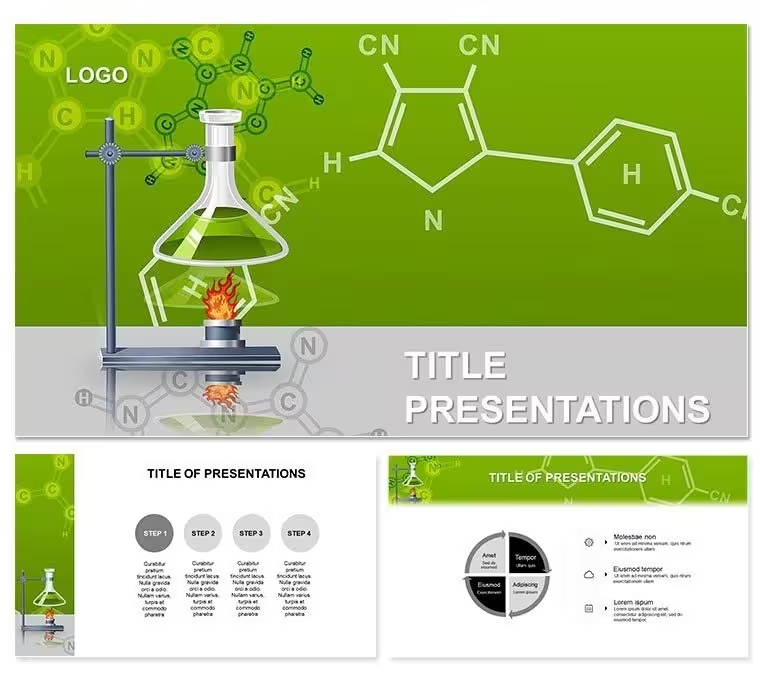
Bring chemistry lessons to life with the Chemistry Classroom Keynote Template. Features 28 editable science diagrams in 7 color schemes perfect for teachers and lecturers. Instant KEY download - customize lab illustrations and reaction visuals for engaging classroom presentations or educational workshops.
What's Included
The Chemistry Classroom Keynote Template delivers 28 professional diagrams focused on laboratory equipment, chemical reagents, and reaction processes. The package includes one KEY file with all diagrams plus 7 color scheme options embedded for quick theme switching. Every graphic uses native Keynote shapes and text boxes that remain fully editable without external tools. Download occurs instantly as a ZIP containing the complete presentation file.
Diagram Structure and Format Details
The 28 diagrams cover essential classroom chemistry topics with scalable vector elements and placeholder text. Seven color schemes range from classic lab greens to vibrant educational palettes. The native KEY format guarantees perfect compatibility with the latest Apple Keynote versions on Mac and iPad.
Key Features
Designed exclusively for classroom teaching, the template provides ready visuals for reagents, analysis, and scientific investigation topics. The 28 diagrams eliminate hours of manual creation while the 7 color schemes allow instant adaptation to school branding or lesson themes. All components stay vector-sharp at any zoom level for crisp projector display.
Editable Elements Overview
Text boxes, shape colors, line weights, and icon groups can be modified directly in Keynote. Teachers regularly update chemical formulas or add student data while keeping layout integrity intact. The built-in theme system ensures consistent styling across every diagram.
FeatureThis TemplateBuilding from ScratchDiagram Count28 ready-to-use0 - design time requiredColor Options7 schemes includedManual creationEdit Time per SlideUnder 2 minutes30+ minutesVector QualityFull scalabilityVariableCompatibilityKeynote on Mac/iPadNone until builtInstant DownloadYesNoProfessional Use Cases
A high school chemistry teacher in a California public district used the reagent and laboratory diagrams to redesign weekly lessons on chemical reactions. Students showed 25% higher test scores on visualization questions because the clear illustrations made abstract concepts tangible. University lecturers in introductory courses apply the same set when delivering online webinars, allowing them to share annotated diagrams directly with remote learners.
Teaching and Workshop Scenarios
Science outreach coordinators at museums integrate the diagrams into public workshops on everyday chemistry. Updating text placeholders with real-world examples and switching to brighter color schemes creates materials that captivate both children and adults while maintaining scientific accuracy.
How to Customize
Download the ZIP, open the KEY file in Keynote, select any diagram, and edit text or colors using the Format panel. Apply a new theme from the 7 available schemes with one click and export as PDF or video for student sharing. The workflow from download to classroom-ready presentation takes under 10 minutes.
Step-by-Step Workflow
Choose the diagram matching your lesson topic, replace placeholders with current formulas, recolor molecular icons to highlight key elements, and duplicate slides for before-and-after comparisons. Keynote`s native tools keep everything aligned automatically.
Ready to spark curiosity in your next chemistry class?
Why Choose This Template
Unlike general science packs, these 28 diagrams were created specifically for classroom chemistry instruction so terminology and visuals match standard curriculum needs. Educators save preparation time while delivering higher-quality visuals than hand-drawn slides or stock images. The 7 color schemes adapt easily to different grade levels or school color codes.
Time and Quality Advantages
Teachers who once spent evenings creating reaction diagrams now finish lesson decks in minutes and report stronger student engagement because the illustrations follow proven educational layout principles.
Elevate your science teaching materials with classroom-focused chemistry diagrams.
Is this Chemistry Classroom Keynote Template compatible with my version of Keynote?The template is built using standard Keynote shapes and themes compatible with Keynote 10 and all newer versions on Mac, iPad, and iPhone. Open the KEY file directly and begin editing without any conversion steps. Diagrams remain fully editable even when opened in older licensed copies that support basic vector graphics.
How do I change colors or text in the diagrams?Select any shape or text box and use the Format sidebar to adjust fill colors, fonts, or line styles. Switch the entire set to one of the 7 included color schemes via the Document sidebar for instant consistency. Teachers can update chemical equations or add lab safety notes while the layout stays balanced and professional.
Can I use these diagrams for commercial educational projects?Yes, the license supports both personal classroom use and commercial educational products such as paid online courses or workshop materials. Science tutors and curriculum developers incorporate the diagrams into client-facing content without additional fees. Standard copyright protects only the original files from resale.
What file format will I receive after purchase?You receive a ZIP archive with the complete KEY presentation file and all 7 color schemes already integrated. No extra images or software are required. The download is immediate and lightweight for fast access on any Apple device.
Is there a refund policy if the template does not meet my needs?We provide a 30-day money-back guarantee for all Keynote purchases. If the chemistry diagrams do not fit your lesson planning after testing in Keynote, contact support for a prompt refund. The guarantee lets educators choose specialized teaching visuals with zero risk.
Good for
- Project roadmaps and sprint plans
- Product launch timelines
- Quarterly or annual review decks
- Company history and milestone summaries
Licence
reviews
Grabbed this the night before my presentation and mostly used the timeline slides.
The charts were already placed nicely so I just changed the numbers.
Colors were okay, maybe a bit too bright for office use though.
I don’t care much about design stuff but the layout was easy to follow.
Had to delete a few extra icons because it looked busy on screen.
FAQ
Will it work in Google Slides?
Are fonts embedded?
Can I use this for client work?
What's the refund policy?
Do you update the template after purchase?
Similar templates
See all Keynote templates →

All 1 slides