What's Inside the Download
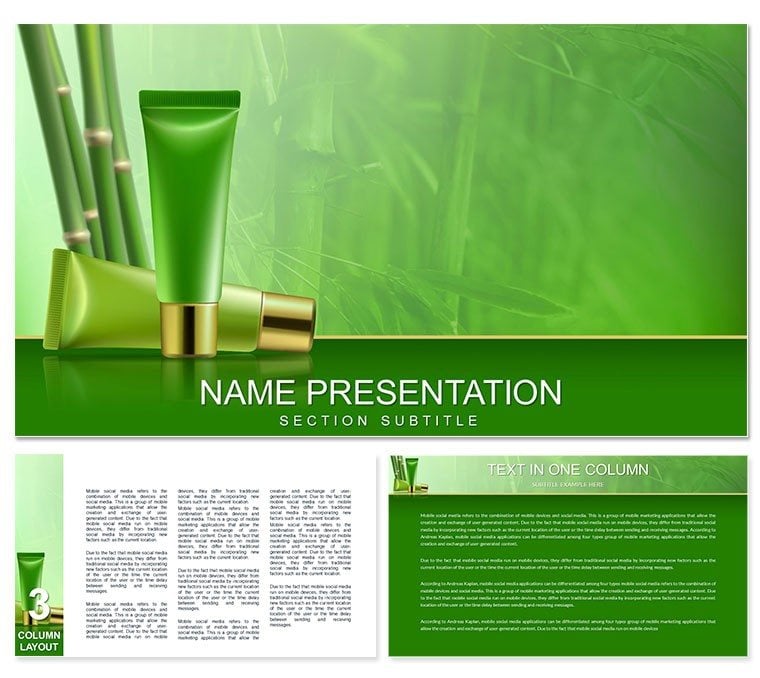
What is a cosmetics Keynote template? A cosmetics Keynote template is a pre-built .key file styled for beauty and wellness brand presentations - with product-showcase slide layouts, image placeholder zones, and color palettes calibrated for eco-conscious or natural-ingredient brand identities.
28 slides cover the full range of a beauty brand presentation: a product hero opener with a full-bleed image zone suited to product photography, ingredient story slides that pair visual infographics with natural material iconography, sales performance chart layouts using bar and line formats, retail distribution maps, and brand positioning comparison panels. Seven color schemes span from the central bamboo-green-and-white palette to warmer earth tones, ivory-and-gold variants for luxury positioning, and a high-contrast dark scheme for trade show displays. Three master backgrounds and three additional background files allow adaptation across pitch, retail, and e-commerce contexts. Files are .key and .kth - no .jpg exports.
The defining visual characteristic is the bamboo motif: geometric bamboo-stalk dividers used as section separators rather than decorative borders, organic texture overlays applied to background zones, and a typography pairing that favors clean sans-serif primary text against natural-texture secondary zones. Compared to generic wellness layouts that rely on botanical photography as decoration, this design integrates the bamboo theme structurally - the motif appears in layout geometry rather than as surface overlay, which makes brand color substitutions easier without visual fragmentation.
Format and Compatibility Details
| Feature | Details |
|---|
| Slide and layout count | 28 slides: product hero, ingredient story panels, sales charts, distribution layouts, brand comparison panels |
| Color schemes | 7 schemes: bamboo green-white, warm earth tones, ivory-gold, high-contrast dark trade show variant |
| Bamboo theme integration | Geometric stalk dividers as section separators; organic texture background overlays; structural motif, not decorative |
| Image placeholder zones | Full-bleed and contained product photography zones with locked aspect ratios |
| Chart types | Bar charts for sales data, line charts for growth trends, comparison panels for brand positioning |
| Keynote compatibility | Keynote 2016 and later on macOS; iPad Keynote supported for playback |
| File formats | .key (editing), .kth (theme installation) |
| Free vs. paid difference | Base tier ($12): 3 masters + 3 backgrounds. Full version ($20): all 28 slides + 7 color schemes |
Typical Use Cases by Role
A brand manager at an eco-cosmetics startup preparing a retail buyer pitch for a natural-grocery chain needed to present product lines, ingredient sourcing, and pricing structure in a single 20-minute deck. The product hero and ingredient story slides here reduced layout construction time by roughly 2 hours - the manager focused on populating brand-specific content rather than building visual hierarchy from blank slides.
Marketing teams at mid-size beauty brands use the sales performance chart layouts for quarterly internal reviews. One regional marketing director adapted the same file across four consecutive quarterly briefings by updating chart data and swapping between the bamboo-green and earth-tone color schemes - the visual variation made each quarter's review feel distinct without requiring a redesign.
Cosmetics consultants presenting brand strategy to salon and spa buyers find the brand-positioning comparison panels particularly suited to competitive analysis. A beauty industry consultant reused the file structure across three client proposals in a single month, changing only the brand colors via the master slide - turnaround per deck dropped from 3 hours to under 40 minutes.
Download and start editing immediately.
How to Make It Yours in Under 20 Minutes
Difficulty level: Beginner. No design experience required; standard Keynote familiarity is sufficient.
- Step 1 - Open the .key file in Keynote 2016 or later (1 minute). The file loads with the default bamboo-green-and-white palette active.
- Step 2 - Set your brand colors via the master slide (2-3 minutes). Navigate to View - Edit Master Slides, select the primary color element, and apply your brand hex value. The change propagates across all 28 slides automatically.
- Step 3 - Place product photography in image placeholder zones (3-5 minutes). Drag product images directly into the full-bleed or contained image zones; Keynote clips to the correct aspect ratio without manual cropping.
- Step 4 - Update text blocks and ingredient labels (4-6 minutes). Click any text placeholder and type; body text and headline sizes are pre-set within the master, so font hierarchy is maintained automatically.
- Step 5 - Populate chart data (3-5 minutes). Double-click bar or line charts to open Keynote's data editor; paste sales figures or growth percentages from a Numbers or Excel file.
- Step 6 - Export as .key or PDF (1 minute). PDF output for buyer handouts; .key file for live presentation with presenter notes.
The Cost of Not Using a Template
Building a product hero slide with a structured image zone, a geometric bamboo-stalk divider, and correctly positioned headline text from a blank Keynote canvas takes 45 to 60 minutes for a designer and significantly longer without design experience. The ingredient story panels - which pair icon elements with text zones in a two-column layout - add another 30 to 40 minutes each. A full 20-slide brand presentation built from scratch in Keynote typically requires 6 to 8 hours of layout work before any content is added.
The bamboo dividers in this file serve a layout function that is worth understanding. Vertical stalk elements between content zones create implicit column separation without using visible border lines. That separation aids scanning - the eye tracks down a column before moving across - which matters in product comparison slides where buyers assess multiple SKUs simultaneously. Visible divider lines in the same position would add visual noise; the stalk motif achieves the same structure with less visual weight.
Seven color schemes exist here because a bamboo-green palette reads as natural and ingredient-focused, while an ivory-gold variant reads as premium or luxury. The same product positioned in both contexts tells a different brand story to different buyer segments. A single file accommodates both without maintaining parallel presentations. Browse the full Health and Wellness Keynote theme library for adjacent beauty and wellness topics. The Skin Toning Cream Keynote template covers skincare product-specific layouts, and broader cosmetics ranges are addressed in the Cosmetics, Makeup and Skincare Products Keynote templates.
Download and start editing immediately.
Which Keynote versions open this file?
The .key file is compatible with Keynote 2016 and all later versions on macOS, including the current release on macOS Sonoma. Keynote on iPad opens the file for playback and basic text editing; master slide color changes are best done on a Mac. Keynote 2019, 2021, and 2022 on macOS Monterey and Ventura open the file without compatibility warnings. The .kth file installs as a reusable theme from the New Presentation dialog after installation.
How do I replace the bamboo green with my brand colors?
Open View - Edit Master Slides in Keynote. Click any colored shape element - the bamboo dividers, the accent bars, or the headline color blocks - and use the color picker to enter your brand's hex value. The change applies to every slide using that master element. For brands with a two-color palette, update both the primary accent and the secondary background element in the master. The full color replacement across all 28 slides takes under 3 minutes once you have your hex codes ready.
Can I use this template for commercial client presentations and retail pitches?
A single purchase permits use in commercial contexts, including retail buyer pitches, investor presentations, brand strategy proposals for clients, and internal company reviews. The license does not permit redistribution of the source .key or .kth files, resale of the template, or sublicensing to other designers. Finished presentations shared with clients as PDFs or exported slide images fall within permitted use without restriction. Contact ImagineLayout for multi-seat licensing if the source file needs to be distributed to a design team.
What does the full purchase add over the base tier?
The base tier ($12) includes 3 master slide layouts and 3 background designs - the foundational theme structure without diagram slides. The full version ($20) includes all 28 pre-built slides covering product hero layouts, ingredient story panels, sales charts, distribution maps, and brand comparison panels, plus all 7 color schemes. The complete slide library is the primary value of the full version; the structural layouts reduce presentation build time from hours to under 20 minutes for buyers who have their content ready.
Are animations included, and how do I turn them off?
Select slides include appear and dissolve build effects on text and image elements - a common choice for product reveal pacing in live pitches. To remove animations, open the Animate panel on any slide, select the build or transition effect, and click Delete. Removing all animations across the full deck takes approximately 3 to 4 minutes. PDF and image exports are unaffected by animation settings in the source .key file, so print or email handouts are always static regardless of in-file animation status.
What is the refund policy?
ImagineLayout reviews refund requests when a downloaded .key file does not open in a supported Keynote version or when the file content materially differs from what the product page shows. Submit a request via the ImagineLayout contact page with your order number and a clear description of the problem encountered. Because the product is a digital download, change-of-mind refunds are handled case by case. The full refund policy is at imaginelayout.com/refund-policy.