 Click to zoom
Music Mixing Software Keynote Template - Editable KEY
| Format | .pptx |
| Slides | 3 unique layouts |
| Aspect ratio | 16:9 |
| Compatibility | PowerPoint |
| Animated | No |
| Language | English |
| License | Commercial |
| File size | — |
| Version | v1.0 |
| Last updated | September 2026 |
What's inside
Package Contents
What is a Keynote diagram template? A Keynote diagram template is a pre-built .key or .kth file with editable diagram slides, color palettes, and master layouts - open in Apple Keynote and replace the placeholder content with your own.
28 diagrams across 7 color schemes are included, alongside 3 master slides and 3 background variants. Both .key and .kth files ship in the download, opening natively in Keynote 12 or later without additional plugins. The diagram set covers the structural range needed for a music technology or audio software business presentation: product comparison layouts, feature overview diagrams, workflow flowcharts, and audience or market segment breakdowns.
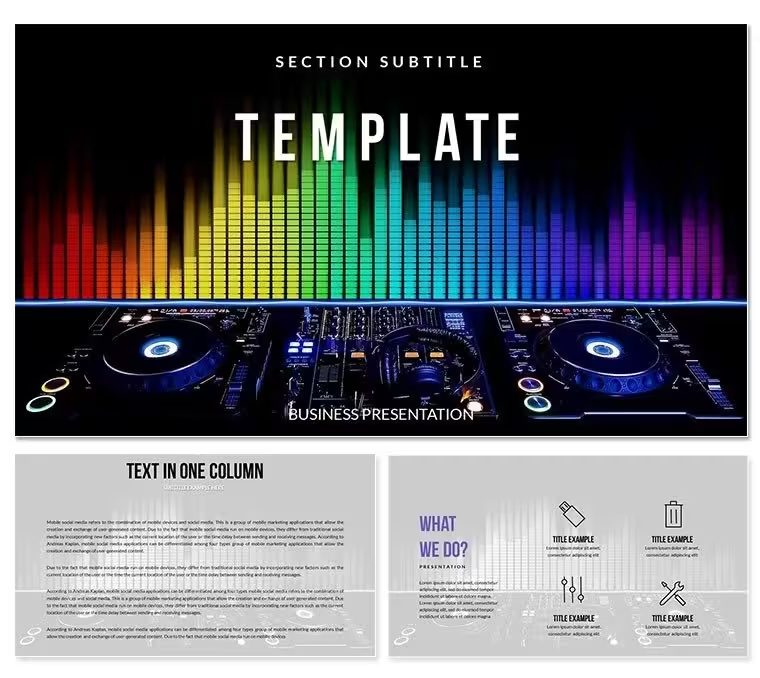
The visual language of this Keynote template is built around audio and DJ equipment imagery - dark, high-contrast backgrounds with bold color zones that echo mixing board aesthetics. That visual identity suits product launch decks, audio software pitches, and entertainment industry strategy presentations more naturally than generic corporate diagram sets, which typically use muted palettes that flatten energy-forward topics.
Unlike sets focused on a single diagram format, this collection spans 7 fully distinct color variants. A product manager presenting the same quarterly report to three different regional teams can reuse the structural layouts while swapping color schemes between presentations - keeping the deck visually fresh without rebuilding any slide from scratch.
How Consultants Use This in Client Work
A product marketing manager at an audio software company needed to pitch a new mixing application to a label partnership panel - 15 slides covering feature benefits, competitor comparison, and go-to-market timeline. Building structured comparison and timeline diagrams from a blank Keynote file would have consumed a full afternoon. Using this file's pre-built layouts, the manager adapted 8 diagram slides in 50 minutes and reused the same structural deck for two subsequent partner meetings by swapping the color scheme and updating product names only.
An entertainment industry consultant presenting a streaming platform's DJ feature roadmap to an executive team used the workflow diagram slides to map audio signal processing steps in a format non-technical executives could follow. The high-contrast visual style matched the client's brand energy and required no redesign - the consultant adapted the file directly without engaging a designer.
- Audio software product managers preparing feature launch decks
- Entertainment industry consultants presenting technology roadmaps
- Music technology educators running software demonstration sessions
- DJ equipment distributors preparing dealer pitch presentations
Download and start editing immediately - no fonts or plugins to install.
From Download to Final Deck
How do I customize this Keynote template for a music software presentation? Open the .key file in Keynote 12, duplicate the diagram slides you need, apply your brand colors via the master slide palette, replace placeholder text labels, and export. The entire process takes 20-30 minutes for a 10-slide deck.
- Step 1 - Open the .key file in Keynote 12 or later (1 minute). No setup or import wizard; file opens directly in Keynote.
- Step 2 - Select and duplicate diagram slides (2 minutes). Identify which layouts fit your content. Duplicate originals before editing - keeps the full set available for future reuse.
- Step 3 - Apply brand colors via master slide (3 minutes). View - Edit Master Slides - select active master - update fill colors in the right panel.
- Step 4 - Replace placeholder labels with your content (8-12 minutes). Click any text element and type directly. Labels sit outside diagram shapes, so editing one label does not affect adjacent elements.
- Step 5 - Export as .key or PDF (1 minute). PDF for distribution; .key for live presenting with editing access during the meeting.
Editing difficulty: Beginner. No design experience needed to adapt labels, colors, or layout choices.
The Cost of Not Using a Template
Replicating 28 structured diagram slides from scratch in Keynote - with consistent alignment, working connector lines, and 7 calibrated color variants - requires 8-14 hours of design work for an experienced Keynote user. A non-designer would face longer timelines and common output problems: connector lines that detach when shapes are moved, inconsistent font sizes across diagrams, and color combinations that look distinct on a laptop but merge visually under stage lighting.
A design observation specific to this file's visual structure: the high-contrast dark-background aesthetic is not merely thematic. Audio and entertainment presentations are frequently shown in low-light environments - conference venues, pitch rooms, and event spaces with reduced ambient light. Dark backgrounds with bold color zones perform significantly better in those conditions than the light-on-white layouts common in generic business templates. Building that contrast calibration from scratch requires testing on the actual display environment, not just a monitor preview.
The 7 color schemes provide a practical business benefit beyond aesthetics: a team running multiple presentations for different clients or events can assign one color scheme per project without any design work, keeping each deck visually distinct while sharing the same underlying structure.
Download and start editing immediately.
Frequently Asked Questions
What version of Keynote is required?The .key file requires Keynote 12 or later on macOS. Keynote 12 is available as a free update from the Mac App Store and requires macOS Big Sur or later. The .kth file is for applying the template's theme to an existing Keynote presentation and also requires version 12 or later. iPad Keynote can open .key files for viewing and light editing; master slide modifications should be done on macOS for full control. Check your current version under Keynote - About Keynote before downloading.
How do I apply my brand color palette to the diagrams?Open the master slide panel via View - Edit Master Slides. Select the master slide assigned to the diagrams you want to update. Click any filled shape in the master to open the Fill color picker in the right panel. Enter your brand hex or RGB value. All presentation slides that use that master update simultaneously. If you plan to use multiple color scheme variants from the 7 included, repeat the color update for each relevant master. The process typically takes 3-5 minutes total.
What is included in the full version vs the base version?The base version ($12) delivers 3 master slides and 3 background variants - the theme layer of the template. The full version ($27) adds the complete diagram library: 28 slides across 7 color schemes. For users who need structural content layouts (comparison tables, process flows, feature overviews), the full version is the relevant purchase. The base version suits users who want the visual theme to build their own slides on top of, without needing pre-built diagram structures.
Can this template be used for commercial client presentations?The standard license permits use in commercial presentations, including client work, business pitches, and internal corporate decks. Redistributing, selling, or sublicensing the original template files is not permitted. You may create unlimited presentations for your own use or for clients. If you need a license for a larger team or an organization-wide deployment, contact ImagineLayout support directly for licensing options.
Are animations included in the file?No built-in animations or transitions are included. All diagram slides are static by default, which keeps the file size compact and the layout stable across Keynote versions. Keynote's native Animate panel can be used to add Build In, Build Out, or Action animations to any individual element. Slide-level transitions such as Magic Move or Cube can be applied between slides without affecting diagram layout or connector alignment. The absence of pre-built animations is intentional - it avoids conflicts when importing into different macOS environments.
What are the refund conditions for this product?Refund conditions are detailed at imaginelayout.com/refund-policy/. Digital products are subject to specific eligibility rules based on download status. If the issue involves a technical problem - file not opening, missing format, or layout corruption - contact the support team first. Technical problems are typically resolved faster than refund requests and do not require any return of the downloaded files. Review the policy page before purchasing if refund availability is a factor in your decision.
Good for
- Project roadmaps and sprint plans
- Product launch timelines
- Quarterly or annual review decks
- Company history and milestone summaries
Licence
reviews
No reviews yet. Be the first!
FAQ
Will it work in Google Slides?
Are fonts embedded?
Can I use this for client work?
What's the refund policy?
Do you update the template after purchase?
Similar templates
See all Keynote templates →



All 1 slides