Dark Night Business Card Template: Sleek Design
Type: Business Cards template
Category: Neutral - Abstract
Sources Available: .ait, .dotx, .indt
Page size: 2x3,5
Product ID: BC01167
Package Contents
Three source formats ship in a single download: .ait for Illustrator, .indt for InDesign, and .dotx for Word - all built to the standard 2x3.5-inch business card size. Each file carries the same dark-background layout, so switching between applications does not require rebuilding the design from scratch. That alone removes one of the most time-consuming steps in multi-software print workflows.
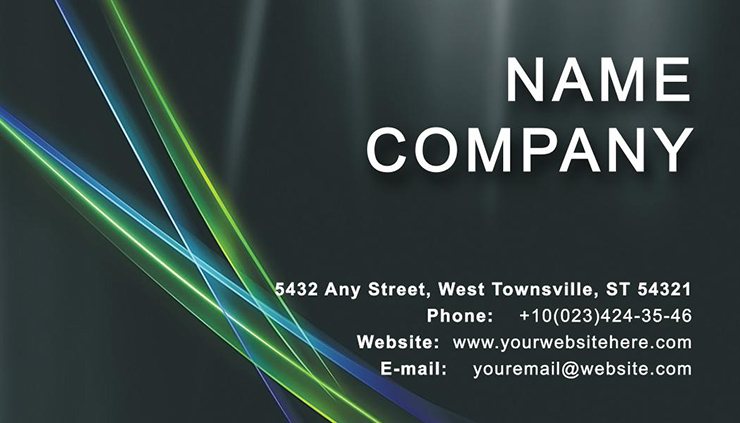
The panel structure divides front and back with clear intent. The front prioritizes name and title visibility against the deep, near-black field, while the back opens space for secondary contact details, a tagline, or a QR code. Visual hierarchy runs top to bottom on each side, with typography weight doing the organizational work rather than extra graphic elements. This keeps the layout clean when printed on both matte and gloss stocks.
At 300 DPI and CMYK color mode, the file is prepared for professional offset and digital printing without requiring any color-profile conversion before submitting to a print bureau. The deep background tones in this design - near-black with dark wave accents - require ink coverage attention on uncoated stocks, where dark areas can look duller than expected. Test on your chosen paper type before committing to a large run.
Print Specifications
| Specification | Details |
|---|---|
| Page Size | 2x3.5 inches - the standard business card format accepted by most print services in the US and Europe |
| File Formats | .ait (Illustrator), .indt (InDesign), .dotx (Word) - three editing paths covered in one purchase |
| Resolution | 300 DPI - sufficient for sharp offset and digital print output on both coated and uncoated stock |
| Color Mode | CMYK - eliminates the RGB-to-CMYK conversion step that causes unexpected color shifts at press |
| Design Category | Neutral - Abstract - broad enough for creative, corporate, and consulting professionals alike |
| Price | $6.00 - one-time payment for all three source file formats |
| Product ID | BC01167 - reference this when contacting support about the file |
Three Projects Where This Template Fits
A boutique travel consultant attending an evening industry mixer needs cards that read as premium without a custom print run. The dark background with wave motif carries the right weight for luxury positioning - no foil stamping required. She loads the .ait file, swaps placeholder text for her agency name and direct line, exports a press-ready PDF, and hands it to her local printer the same day.
A property manager distributing cards at a real estate networking event wants something that holds attention in a stack of white cards. The near-black field creates immediate contrast when pulled from a cardholder. An independent photographer shooting corporate events uses the .indt version inside an existing InDesign workflow, keeping the card design inside the same application as their invoice and rate-sheet templates.
Solopreneurs in accounting, retail, and souvenir retail - all tagged categories for this design - find the vector-based layout scales logo placement without degrading edge quality. The grid alignment within the template means adding a compass, house, or plane-ticket icon stays compositionally balanced without manual repositioning. Browse the full Neutral - Abstract business card collection for related abstract layouts that use similar dark tonal fields.
Download and start editing immediately
Edit, Brand, Print: The Workflow
The .ait and .indt files suit different skill levels. Illustrator CC 2018+ gives full vector control - isolate the wave layer, adjust anchor points, or recolor using the Swatches panel without touching the typography layers. InDesign CS6+ works better for users who manage multi-piece print projects and want the card to live in the same environment as a brochure or letterhead. Editing difficulty for both is moderate: the layer structure is clearly named, but working with dark backgrounds requires checking contrast ratios before finalizing text color.
The .dotx file opens in Word 2016+ for users who need quick text-only updates. Word handles basic font and contact-detail changes without requiring design software. Color editing in Word is limited - use the Font Color tool for text and the Shape Fill option for background adjustments. Do not attempt to rework the vector wave graphics in Word; keep those edits in Illustrator or InDesign.
For both workflows: export as PDF/X-1a for offset print, or high-resolution PDF for digital print services. Include bleed and crop marks in the export dialog. A similar abstract card - the Water Basis of Life Business Card - follows the same two-format editing path and ships at the same price point.
Building From Scratch vs. Starting Here
Setting up a 2x3.5-inch document with correct bleed, CMYK color mode, and 300 DPI from scratch takes roughly 20–30 minutes before any design work begins. A professional familiar with Illustrator can do it faster, but the dark background on this layout adds a specific complication: achieving a near-black that reads as rich black - rather than flat - requires mixing C:60 M:40 Y:40 K:100 rather than K:100 alone. Skipping this step produces a washed-out black on press, a common mistake on first print runs.
The wave vector motif also demands path precision. Hand-drawn from scratch, a similar organic curve takes time to get smooth. The template delivers that curve pre-built and pre-optimized for print resolution.
Pro Insight: Dark backgrounds with wave patterns carry real ink-limit risk on coated stocks. Total ink coverage in the darkest areas of this design can approach 280–300% if the near-black is built from four-color CMYK rather than a single-channel black. Ask your printer for their ink-limit spec - most offset shops cap at 280–300% total area coverage. Verify the CMYK values in the Swatches panel before export. The 300 DPI setup in the file signals that whoever built this template understood press requirements, not just screen display. For a complementary layout that pairs well in a brand kit, the Globe with WWW Business Card offers a lighter counterpart for different networking contexts.
Download and start editing immediately
Which software versions are required to edit this template?
The .ait file requires Adobe Illustrator CC 2018 or newer for full layer access and vector editing. The .indt file is compatible with Adobe InDesign CS6 and later versions. The .dotx file opens in Microsoft Word 2016 and above, covering both Windows and Mac environments. Using an older version of any application may cause font substitution errors or missing layer behavior, so confirm your software version before downloading.
What are the refund conditions for this template?
ImagineLayout accepts refund requests under specific conditions: if the file was never downloaded, contact support within 14 days of purchase. If the template has a serious defect that prevents normal use, submit a report within 72 hours of purchase including your order number and a clear description. Refunds are not issued once the file has been downloaded and used for an extended period. Review the full refund policy before purchasing if you have questions about eligibility.
Is this file print-ready for professional printing?
The template is set up at 300 DPI with CMYK color mode, which meets the minimum requirements for professional offset and digital printing. Bleed areas are included to prevent white edges after trimming. Before sending to press, verify the ink coverage values in the darkest areas of the design - near-black backgrounds can exceed printer ink-limit thresholds if built with full four-color CMYK. Confirm crop marks and bleed are included in your export settings.
What does the license allow and prohibit?
The license covers personal and commercial use for your own business card production. You may customize the template, add your branding, and print it for professional distribution. Reselling the original or modified template files, sublicensing them to third parties, or distributing the source files as part of another template product is prohibited. Refer to the ImagineLayout Terms of Use for the full scope of permitted activities.
How do I change the colors in this template?
In Illustrator CC 2018+, open the Swatches panel to locate the global color swatches assigned to the background and accent elements. Editing a global swatch updates every linked object simultaneously, which is the fastest method for rebranding the full card. In InDesign CS6+, use the Swatches panel in the same way. In Word 2016+, select individual text or shape elements and use the Font Color or Shape Fill tools to apply new colors. Avoid editing colors in Word for the wave vector elements - use Illustrator or InDesign for those.
What file format should I use for each editing scenario?
Use the .ait file in Illustrator when you need to modify the vector wave graphic, adjust anchor points, or apply complex color changes. The .indt file suits users who manage multiple print assets in InDesign and want the card in the same project environment. The .dotx file covers quick text and contact-detail updates in Word without needing design software installed. Each format produces the same printed result when exported correctly.