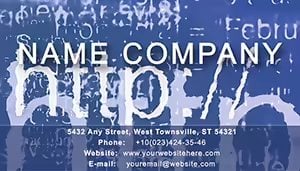
Web Message Business Card for IT & E-Commerce | ImagineLayout

Type: Business Cards template
Category: Computer - IT, Internet - E-Commerce
Sources Available: .ait, .dotx, .indt
Page size: 2x3,5
Product ID: BC01118
Layout, Formats and Fold: Full Contents
Three editable source files are included with this 2x3.5-inch business card: .ait for Adobe Illustrator CC 2018+, .dotx for Microsoft Word 2016+, and .indt for Adobe InDesign CS6+. The web-messaging visual concept appears consistently across all three format versions. Buyers open whichever application is already installed and edit from that file directly - no conversion between formats is necessary.
The front face uses bold messaging zones as the primary structural element. That layout decision creates a clear panel composition: a web-inspired background (pixel patterns or abstract digital motifs) occupies the upper visual register, while name, job title, URL, and contact details occupy a defined lower band. The separation ensures grid alignment between the decorative and informational layers without one visually overriding the other.
Every file in the download is formatted for professional printing. CMYK color mode is applied throughout, resolution meets the 300 DPI standard, and the 2x3.5-inch page size requires no resizing before submission to any commercial print vendor. Bleed and trim guide information accompanies the source files, eliminating the setup work that most non-designers skip and later regret when printed cards arrive with white edges.
File Formats and Print Specs
| Specification | Details |
|---|---|
| Page Size | 2x3.5 inches - universally accepted business card dimension for all commercial printers and card holders |
| File Formats | .ait (Illustrator template), .dotx (Word template), .indt (InDesign template) - each is a standalone editable document |
| Color Mode | CMYK - required for offset printing and digital print; prevents the color shift that RGB files produce at the press |
| Resolution / DPI | 300 DPI - ensures crisp text rendering and sharp graphic edges at the small scale of a business card |
| Bleed / Trim Guides | Included - machine-cut cards without bleed guides frequently show white border artifacts; this file avoids that risk |
| Price | $5.00 - single purchase, all three source format files delivered together |
| Product ID | BC01118 - use this when contacting ImagineLayout support about this specific template |
Typical Use Cases by Project Type
A freelance web developer attending a regional startup networking event needed cards that communicated technical credibility at a glance. The web-pattern background handled the positioning instantly - no title explanation needed before handing over the card. She edited the .ait file in Illustrator CC 2023, updated the URL field with her portfolio link, and added a QR code linked to her GitHub profile in the back contact zone. Cards printed on matte 16pt stock with a minimal layout.
A small e-commerce studio owner used this layout for a product launch event where she was meeting retail buyers. The digital-messaging theme reinforced her company's online-first positioning. She used the .indt file and had her InDesign operator adjust the background tones from blue to a brand-specific dark teal, maintaining CMYK values throughout. The panel composition kept product URL and email address prominent without reducing the visual hierarchy of the digital motif.
A mobile services provider representative distributed these cards at a trade expo where contacts expected visually distinctive materials from tech vendors. The web-hosting and internet service context was immediately readable from the card's visual language, which shortened the introductory conversation. She used the .dotx file for a quick internal run and later ordered a professional batch from the PDF export.
Download and start editing immediately.
Adapting the Layout to Your Brand
Illustrator Workflow (.ait - Illustrator CC 2018+)
- Open the .ait file in Adobe Illustrator CC 2018 or later. The file launches as an untitled new document, keeping the master template safe.
- Select text placeholders with the Type tool (T) and replace name, title, website URL, phone, and email. Editing difficulty: low - all text layers are accessible.
- Navigate to Window > Swatches to recolor background patterns or text elements. All fills are in CMYK mode; do not convert to RGB at any stage.
- To add a QR code, export your code as a PNG at 300 DPI, then place it via File > Place into the designated contact zone on the back.
- Verify trim and bleed guides via View > Guides, then export as PDF/X-1a for offset or PDF/X-4 for digital printing.
Word Workflow (.dotx - Word 2016+)
- Open the .dotx file in Microsoft Word 2016 or later. A new working document opens automatically from the template.
- Click into each text placeholder and type your contact details. Editing difficulty: very low - suitable for users with no design background.
- Use the Font Color tool in the Home ribbon to update text color. For background graphics, right-click the image and use Format Picture.
- Export as PDF via File > Export > Create PDF/XPS. Verify that the PDF page size is 2x3.5 inches before sending to print.
- Confirm with your printer that Word-originated PDFs are accepted. For richer color output, the Illustrator or InDesign workflow is preferable.
Compared to Starting From Zero
Building a web-themed business card from a blank Illustrator or InDesign document means sourcing or constructing digital-pattern graphics that render sharply at 300 DPI, establishing CMYK color mode from the first document setting, adding bleed manually, and testing typography balance within a 2x3.5-inch panel composition. An experienced designer completes that groundwork in roughly two hours before any content is touched. A developer or e-commerce operator without design training commonly skips the CMYK and bleed steps, which surfaces only after a print run arrives with color shift or white-edged cards.
The layout structure, white space, and visual hierarchy in this file are already calibrated for the format. The web-messaging background occupies its zone, the contact block occupies its zone, and the grid alignment between layers prevents either from overwhelming the other. The editable text layer structure means fields update cleanly without disturbing the background composition.
Pro Insight: The web-pattern background in this template carries bright, saturated tones - likely electric blues, cyan accents, or deep digital gradients in CMYK. On gloss-coated stock, these values print close to the screen preview. On uncoated or matte stock, saturated CMYK backgrounds can appear deeper and more muted due to ink absorption. If you are printing on matte or soft-touch laminate stock - common for tech-sector cards aiming for a premium tactile feel - request a press proof before a large run. Ink limit on matte uncoated stock is typically 260–280% TAC; consult your printer's specification sheet and ask for a soft-proof if background saturation is a concern. The 300 DPI specification in the source file confirms the artwork was prepared with print output in mind, not just digital preview.
Buyers browsing similar layouts will find a curated range on the Computer - IT Business Cards category page. A closely related option covering internet and connectivity themes is the Modern Internet Access Business Cards template. For complementary tech-sector networking materials, the Tech Network Business Card Template covers innovation-focused design contexts.
Download and start editing immediately.
What software is needed to open and edit these files?
Adobe Illustrator CC 2018 or later is required for the .ait file; earlier versions may not render web-pattern layers or color accurately. Adobe InDesign CS6 or later opens the .indt file, with InDesign CC recommended for reliable preflight and PDF export. Microsoft Word 2016 or later handles the .dotx file and is sufficient for text replacement without any design software knowledge. Confirm your installed version meets these minimums before purchasing - files opened in incompatible software versions fall outside refund eligibility.
What are the conditions under which a refund is issued?
ImagineLayout processes refunds under documented conditions only. If the file does not download, contact support within 14 days of purchase to open a non-delivery case. If the template contains a defect that makes it unusable, report the issue within 72 hours of purchase with your order number and a specific description of the problem. Preference for a different visual style after downloading is not a qualifying reason, as buyers are expected to evaluate product images before purchase. Reviews take 7–10 business days after the case is submitted.
Does the file meet print-ready requirements out of the download?
The source files are pre-configured with CMYK color mode, 300 DPI resolution, and bleed and trim guides - the three elements commercial printers check during preflight. After updating your text fields, export the document to PDF and submit it to your printer. No color mode conversion, resolution adjustment, or bleed setup is required. The 2x3.5-inch document size matches the standard accepted by online and local commercial printers without modification.
What uses are permitted and prohibited under the license?
One purchase permits personal and commercial use within a single business or practice - you may customize, print, and distribute cards for yourself and your team members. Reselling the source files, sharing the download with clients or other businesses, and building derivative templates from the assets for commercial resale are all prohibited. If you manage cards for multiple client brands as a designer or agency, review the ImagineLayout Terms of Use page before purchasing to determine whether your use case requires additional licensing.
How do I update the color palette in this template?
In Adobe Illustrator, use Window > Swatches to open the color panel. Select any background pattern element or text object, then assign a new CMYK swatch or enter custom CMYK values via the Color panel. Do not switch the document to RGB mode at any point - that change would cause all colors to shift on print. In Microsoft Word, the Font Color tool in the Home ribbon adjusts text colors. Web-pattern background graphics in the Word file have limited color editability; use the .ait or .indt file for full control over the digital background palette.
Can I add a QR code or URL to the card layout?
Adding a QR code is straightforward in all three formats. Generate your QR code using any free QR generator, export it as a PNG at 300 DPI minimum, then place it into the card layout. In Illustrator, use File > Place to insert the image; in InDesign, use File > Place similarly; in Word, use Insert > Pictures. Position the code in the contact zone on the back panel or in a lower corner of the front face where it does not compete with the main visual. URL text fields are already present in the layout and update directly via the Type tool or text click.