Asian Food Business Card Template - Culinary & Restaurant | ImagineLayout
Type: Business Cards template
Category: Food & Beverage
Sources Available: .ait, .dotx, .indt, .jpg
Page size: 2x3,5
Product ID: BC00969
X Pages, Y Formats: What You Get
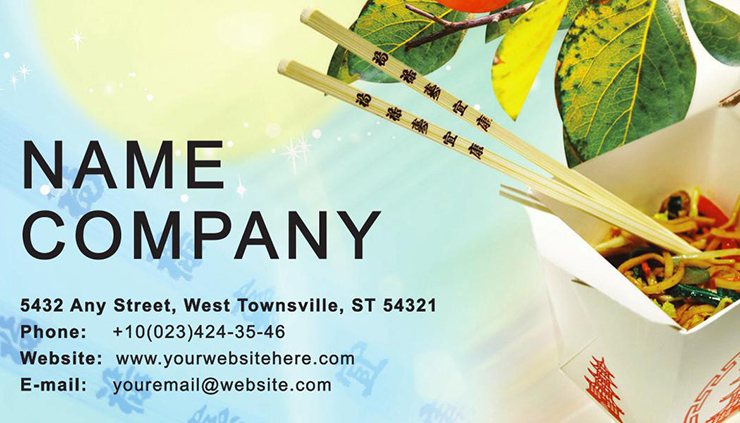
Four source files come with this 2x3.5-inch card: .ait for Adobe Illustrator CC 2018+, .indt for InDesign CS6+, .dotx for Microsoft Word 2016+, and .jpg for digital preview and sharing. The Asian food theme draws on warm earth tones, botanical and culinary motifs - bamboo leaf forms, lotus elements, and stylized food vessel shapes - layered as vector graphics over the card background. All four formats carry the same design; the file you open depends on your available software.
The panel composition allocates the visual background to the cultural motif layer and the foreground to a clean contact block: name, business title, phone, email, website, and a dedicated QR code placeholder. That structural decision removes the manual step of integrating an Asian-themed illustration with readable text. The typography balance between the decorative background and the foreground contact data is already set and tested at actual card dimensions.
The .ait and .indt sources are fully vector-based, meaning every botanical and culinary motif scales without loss of detail. The .dotx file gives food business owners who do not use Adobe software a direct path to a print-ready output. The .jpg supports immediate digital use - sharing on a restaurant's social media, embedding in a proposal to a catering client, or sending a mock to a menu designer for brand consistency review.
What the File Includes
| Specification | Details |
|---|---|
| Page size | 2x3.5 inches - the standard accepted by most commercial print services without custom cutting fees |
| File formats | .ait (Illustrator CC 2018+), .indt (InDesign CS6+), .dotx (Word 2016+), .jpg - covering design studio and solo restaurant workflows |
| Color mode | CMYK - required for accurate professional printing; prevents warm-color shifts in earth tones and reds when moving from screen to press |
| Resolution / DPI | Not specified on the product page - verify with your print service; 300 DPI minimum is standard for commercial card printing |
| Bleed / trim guides | Not specified on the product page - add 0.125-inch bleed in export settings if your printer requires it |
| Product ID | BC00969 - cite this reference when contacting ImagineLayout support about this specific file |
| Price | $5.00 - one-time purchase covering all four source formats |
Three Projects Where This Template Fits
A Restaurant Owner running a family dim sum dining room distributes cards during a local food festival. The bamboo and vessel motifs in the layout signal Chinese culinary heritage immediately, without the owner needing to add explanatory text. She opens the .ait file, enters the restaurant name, her mobile number, and the booking website URL, replaces the background's warm ochre with the restaurant's signature red, and sends the PDF to the printer a day before the event.
A freelance catering specialist who covers Southeast Asian cuisine for private events uses the card at a wedding-industry networking evening. The QR code placeholder links directly to an online portfolio with photo coverage of past events, turning the physical card into a gateway to digital proof of work. The food and beverage business cards category holds additional options for culinary and hospitality professionals.
A food blogger who covers pan-Asian cooking distributes cards at a media and brand partnership event. The layout structure supports a personal brand as effectively as a business brand - the foreground contact block has room for a blog URL and one social handle alongside a name. For a tea-house or café owner who needs a complementary card for a business partner with a different role, the Cozy Cup of Tea Business Card Template covers a related beverage and hospitality theme. Dietary and wellness food professionals can compare this design against the Dietary Guidance Business Card Template.
Download and start editing immediately
Customization in 4 Steps
Adobe Illustrator Workflow (CC 2018+)
- Open the .ait file in Illustrator CC 2018 or later. The Layers panel will show a motif background group containing the botanical and culinary graphics, and a separate text group for contact data. Lock the background layer before editing text to avoid accidental repositioning of the motif elements.
- Select the background layer and unlock it when ready to adjust color. Open the Swatches panel and modify the dominant CMYK swatch - warm red (C:0 M:85 Y:80 K:0) reads as Chinese culinary heritage; deep jade green (C:80 M:0 Y:60 K:20) reads as pan-Asian botanical. Stay within CMYK to preserve press accuracy across warm-toned designs.
- Switch to the text layer. Use the Type Tool to enter your restaurant name, role, phone, email, and website. The QR code placeholder is already sized; generate your code at 300 DPI or higher and place it in that zone via File > Place.
- Export as PDF/X-1a with crop marks. Confirm bleed requirements with your printer before sending the file. Editing difficulty: accessible for users with basic Illustrator experience.
Microsoft Word Workflow (Word 2016+)
- Open the .dotx file in Word 2016 or later. The file creates a new document, preserving the template for future reprints when contact information changes.
- Click each text placeholder and enter your restaurant name, your name, phone, email, and website URL. Use the Font Color tool in the Home tab to adjust text color to match your brand.
- Insert your restaurant logo via Insert > Pictures. Set text wrap to In Front of Text and resize to fit the header zone without overlapping the contact lines.
- Export to PDF at the highest available quality setting and send to your commercial printer. Editing difficulty: accessible with standard Word skills.
What You'd Need to Set This Up Yourself
Creating an Asian-themed culinary card from a blank Illustrator artboard involves sourcing or drawing botanical and food-vessel vector illustrations, building them at a weight that reads cleanly at 2x3.5 inches without crowding the contact block, and setting up the CMYK color profile to handle the warm reds and earthy greens that define this aesthetic. A professional designer with access to the right assets spends 45 to 90 minutes on that process. A restaurant owner without design experience would spend significantly longer and is more likely to produce artwork that fails at the printer - either because the file dimensions are wrong, the color mode is RGB, or the resolution is too low.
The .ait source file removes every one of those setup decisions. The motif layer is already built. The color profile is CMYK. The card dimensions are set. The buyer's contribution is the business name, contact details, and brand color - work that typically takes 20 to 30 minutes.
Pro Insight: Warm-red backgrounds - a natural choice for Chinese and pan-Asian culinary branding - carry a specific CMYK print risk. A vivid red built at C:0 M:85 Y:80 K:0 prints well on coated gloss stock. On uncoated matte card, the same values can look slightly orange or flat because the paper absorbs the Magenta and Yellow channels at different rates. If your print service uses uncoated stock, ask for a physical proof before committing to the full run, and request the color target in CMYK rather than sRGB. The .ait file exposes each ink channel directly in the Swatches panel so you can adjust M and Y independently - a level of color control that confirms the file was built with commercial printing conditions in mind, not just for screen display.
Download and start editing immediately
Which software versions are needed to edit this template?
The .ait file requires Adobe Illustrator CC 2018 or any later version. The .indt file needs InDesign CS6 or later; opening in an earlier InDesign version may result in font substitution or motif-layer reflow. The .dotx file is compatible with Microsoft Word 2016 and all versions released after. If you work in older software, check the application version before purchasing to avoid compatibility problems that alter the card's layout structure and typography balance.
What are the refund conditions for this product?
Refunds are available in three situations: the file cannot be downloaded within 14 days of purchase; the file has a serious defect reported within 72 hours of purchase with the order number and a description of the problem; or the file does not match the product description. Refunds are not issued after extended use, when no reason is provided, or outside the stated time windows. Each request is reviewed individually within 7 to 10 business days.
Are the files ready for professional printing?
The color mode is CMYK and the dimensions are 2x3.5 inches, both matching standard commercial print requirements. Bleed settings and exact DPI are not confirmed on the product page, so verify those details with your print service before ordering. Most commercial card printers require 300 DPI minimum and a 0.125-inch bleed; apply those settings when exporting to PDF from Illustrator or InDesign. Request a single proof before placing a large print run, particularly if using warm reds on uncoated stock.
What does the purchase license permit and prohibit?
The license allows every person within the purchasing organization to edit and print cards for individual professional use. Finished printed cards and exported PDF files may be distributed freely to customers, event contacts, and catering clients. Reselling the original source files is not permitted in any form, whether modified or not. Creating derivative templates for sale on third-party design marketplaces is also prohibited. The full licensing terms are available in the ImagineLayout Terms of Use.
How do you change the colors in this design?
In Adobe Illustrator, open Window > Swatches and double-click any global swatch to edit its CMYK values. All objects using that swatch update at once, which is useful for shifting the dominant warm red or earth tone consistently across every motif on the card. In InDesign, the Swatches panel works identically. In Microsoft Word, select the shape or text you want to recolor and use the Font Color or Shape Fill tool in the Home or Format tab. Apply every color change consistently to both the front and back of the card to maintain visual hierarchy and the culinary brand identity established in the original layout.
Does this design include a QR code placeholder?
A dedicated QR code placeholder is built into the layout. Generate your QR code at 300 DPI or higher - most free QR generators allow PNG or SVG export at that resolution - then place it in the designated zone using File > Place in Illustrator or InDesign, or Insert > Pictures in Word. The placeholder is sized to maintain the card's panel composition and white space; avoid scaling the QR code beyond the designated zone, as enlarging it disrupts the typography balance of the contact block. Test the printed QR code with at least two different smartphone apps before approving the final print run.