Internet Speed Brochure Template - 3 Formats | ImagineLayout
Type: Brochures template
Category: Internet - E-Commerce
Sources Available: .ait, .dotx, .indt
Product ID: BT01516
Package Contents: Formats, Panels and What You Receive
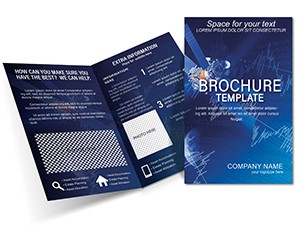
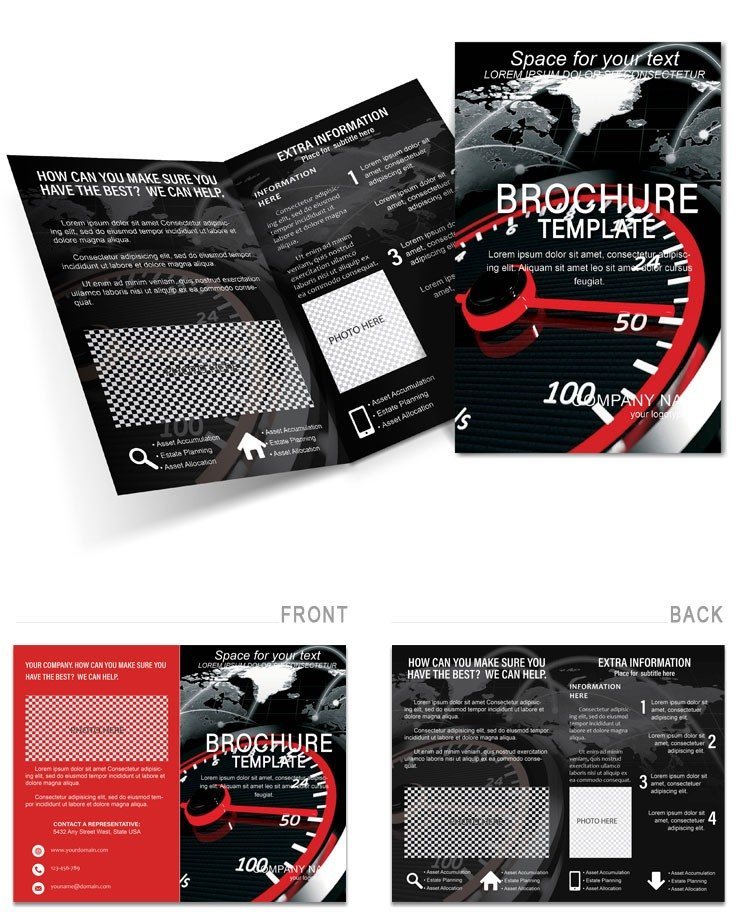
3 editable source files ship in this download: .ait for Adobe Illustrator CC 2018+, .dotx for Microsoft Word 2016+, and .indt for Adobe InDesign CS6+. The layout structures diagnostic information across multiple panels, with one side dedicated to common bottlenecks - Wi-Fi channel congestion, router placement errors, DNS latency - and the opposite side walking through numbered optimization steps. The visual concept behind this brochure draws from the speedometer metaphor visible in the cover artwork: a large gauge graphic anchors the cover, its needle pointing into a high-speed zone rendered in electric blue and silver. That single image communicates the promise before a word is read.
Panel composition follows a left-to-right diagnostic flow. The opening panel introduces the problem with a bold bandwidth visualization; interior panels break solutions into scannable grid rows, each row pairing a symptom icon with a plain-language fix. White space is used deliberately between grid rows to prevent visual hierarchy collapse - a layout decision that keeps even non-technical readers oriented throughout. Typography uses geometric sans-serif fonts for all command-style instructions, which mirrors the precision language of router interfaces without requiring any technical background to follow.
The buyer receives three source files plus a layout built for offset printing or home printing on satin stock. Color mode and DPI are not specified on the product page. Bleed and trim guides are not specified. Price is $15.00. All editable text fields, speedometer graphics, flowchart paths, and icon sets are included in the download package.
Technical Specifications
| Specification | Details |
|---|---|
| File Formats | .ait (Illustrator CC 2018+), .dotx (Word 2016+), .indt (InDesign CS6+) - three separate workflows, one purchase |
| Fold Type | Not specified on page - layout suggests bi-panel configuration from described interior spread |
| Color Mode | Not specified - dominant palette is electric blue and silver; verify CMYK conversion before sending to offset press |
| Resolution / DPI | Not specified - for professional printing, confirm 300 DPI minimum on all placed raster images |
| Bleed / Trim Guides | Not specified - add 3mm bleed in Illustrator or InDesign before submitting to a print bureau |
| Price | $15.00 - single purchase covers all three source formats |
| Product ID | BT01516 - use this reference when contacting support |
| Category | Internet - E-Commerce - relevant for ISPs, tech educators, and network consultants |
Who Reaches for This Design
A home-network consultant running weekend router-optimization workshops prints 40 copies on satin card stock for each session. The diagnostic panel structure removes the step of building a handout from scratch - slides, print materials, and leave-behinds all come from one edited source file. Participants keep the brochure as a reference card after the session ends, extending the consultant's brand presence beyond the room.
An ISP customer support manager adapts the .dotx version to embed company-specific tier speeds and support phone numbers. Word's mail-merge feature lets the team generate localized variants for different regional packages in under an hour. The before-after speed bars on the interior panel become proof-of-upgrade visuals distributed inside new modem packaging.
A university IT department uses the .indt version for a print-ready file distributed at student orientation. InDesign's paragraph styles lock typographic consistency across 500 printed copies. The speedometer cover graphic doubles as a digital preview image for the department's intranet download page, keeping visual hierarchy consistent across both channels.
Download and start editing immediately
Customization in 4 Steps: Illustrator Workflow
Editing difficulty: low to moderate. Open the .ait file in Adobe Illustrator CC 2018 or later. All text frames and graphic elements are grouped by panel layer for clean isolation.
- Open and unlock layers: In the Layers panel, unlock the text layer. Lock the background speedometer artwork to avoid accidental repositioning while editing copy.
- Replace placeholder text: Click into any text frame with the Type tool. Swap diagnostic descriptions, tip headers, and step labels with your own content. Use the Character panel to maintain the geometric sans-serif font at existing sizes for consistent visual hierarchy.
- Adjust color accents: Open the Swatches panel. The electric blue and silver global swatches control all accent elements simultaneously. Replace blue with your brand color by double-clicking the swatch and entering new CMYK values - every dependent object updates instantly.
- Export print-ready file: Go to File > Save As > Adobe PDF (Print). Select the PDF/x-1a preset, enable crop marks and bleed, and set bleed to 3mm on all sides before submitting to your print bureau.
Word Workflow (.dotx)
Editing difficulty: low. Open the .dotx file in Microsoft Word 2016 or later. The template loads as a new document to prevent overwriting the source.
- Enable editing: Click Enable Editing if prompted. Navigate through the document using the panel page flow.
- Replace text: Click each text placeholder and type your content. Use the Font Color tool to match your brand colors in heading elements.
- Insert images: Right-click any placeholder image and select Change Picture to swap in your own graphics without disrupting layout alignment.
- Save and export: Use File > Save As PDF for a portable version suitable for digital distribution or sending to a local print shop.
Compared to Starting From Zero
Building a two-panel diagnostic brochure from a blank Illustrator document requires setting up artboards, defining a typographic scale, sourcing or drawing speedometer graphics, and establishing a grid system for the icon-and-tip rows. That work typically takes a designer 4-6 hours before any content is written. A non-designer using Word faces the same blank page with fewer tools and a higher risk of misaligned columns and inconsistent spacing.
Common from-scratch mistakes include setting body copy too small for comfortable reading at arm's length, using RGB colors that shift unpredictably when sent to an offset press, and placing images at screen resolution (72 DPI) rather than the 300 DPI minimum required for professional printing. The layout here sidesteps the color risk by using an electric blue and silver palette built around high-contrast ratios that retain legibility even when printed on uncoated stock - a practical production decision that reflects experience with real print runs rather than screen-only design.
The speedometer and flowchart elements are vector paths, which means they scale to any size without pixelation. Recreating that level of graphic precision from scratch in Word is not feasible; in Illustrator it takes several hours. The CMYK ink coverage on the dark background areas of this layout is worth checking before large print runs - deep blues and silvers on coated stock can push toward heavy ink density, so ask your printer for a density reading if ordering more than 200 copies on uncoated paper.
Download and start editing immediately
Frequently Asked Questions
Which software versions are required to edit this brochure template?
The download includes three source files, each matched to a different application. The .ait file opens in Adobe Illustrator CC 2018 or any later version - older versions such as CS6 may have compatibility issues with certain effects. The .indt file requires Adobe InDesign CS6 or later for full feature support, including paragraph styles and master pages. The .dotx file works in Microsoft Word 2016 or later; earlier versions may not render text frames correctly. If you are unsure which version you have, check the Help > About menu in your software before purchasing.
What is the refund policy for this template?
ImagineLayout's refund policy covers purchases where the downloaded file is technically defective or does not match what was shown on the product page. Because digital templates are delivered instantly and cannot be returned in the traditional sense, refunds are evaluated on a case-by-case basis. Contact support through the site's Contact page with your order number and a description of the issue. Refunds are not typically granted simply because the design style does not suit your project after download, so review the preview image carefully before purchasing.
Is this template print-ready, and what should I verify before sending it to a printer?
The template is designed for professional printing, but color mode and bleed settings are not confirmed on the product page. Before sending to an offset print bureau, open the Illustrator or InDesign file and confirm the document color mode is set to CMYK - not RGB. Add 3mm bleed on all sides if it is not already present. Verify that all placed raster images are at least 300 DPI. Ask your printer for a digital proof before approving a full run, especially if printing on uncoated stock where the electric blue accents may appear slightly lighter than on screen.
What does the license permit and prohibit?
The standard ImagineLayout license permits use for personal and commercial projects - creating printed brochures for clients, employers, or your own business. Reselling the template files themselves, distributing them as part of a design bundle, or sublicensing them to third parties is prohibited. If you need to clarify specific use cases such as large-scale agency redistribution or white-labeling, contact ImagineLayout support before purchasing to confirm the license terms apply to your situation.
How do I change the color scheme in this template?
In Adobe Illustrator, open the Swatches panel (Window > Swatches). The electric blue and silver tones are set as global swatches, meaning a single edit updates every object that references that color simultaneously. Double-click the swatch, enter your CMYK values, and check the Preview box to see changes live before confirming. In InDesign, use the Swatches panel identically. In Word, select heading text and use the Font Color dropdown to apply your brand colors - note that Word does not support global swatch updates, so color changes must be applied element by element.
What file formats are included and what is each used for?
Three formats ship in the download. The .ait file (Illustrator template) is best for advanced graphic edits - modifying the speedometer vector paths, repositioning panel elements, or adjusting the icon grid. The .indt file (InDesign template) suits layout professionals who need precise typographic control and master page management for multi-copy print runs. The .dotx file (Word template) covers rapid text edits and is practical for non-designers who need a quick turnaround without design software. All three open as new documents rather than overwriting the source, preserving the original for future use.
Browse more designs in the Internet - E-Commerce brochure templates category. For a socially themed alternative, the Twitter-inspired brochure template uses a similar digital-communication visual language in a tri-fold format. If your project also covers network infrastructure, the ISP Service Brochure Design Template covers provider-level service presentations with a complementary layout structure.