Stock Trading Brochure Template
Type: Brochures template
Category: Finance - Accounting
Fold type: Half Fold
Sources Available: .ait, .dotx, .indt, .jpg
Page size: 11x8.5
Product ID: BT00414
As someone who`s crafted dozens of client pitches for fintech startups and brokerage firms over the years, I can tell you this: in the fast-paced world of online trading, your materials need to hit hard and fast. That`s exactly what this half-fold brochure template delivers. Designed for brokers, app developers, and advisors who want to demystify stock trading for beginners while wowing seasoned day traders, it turns complex market insights into pocket-sized persuasion.
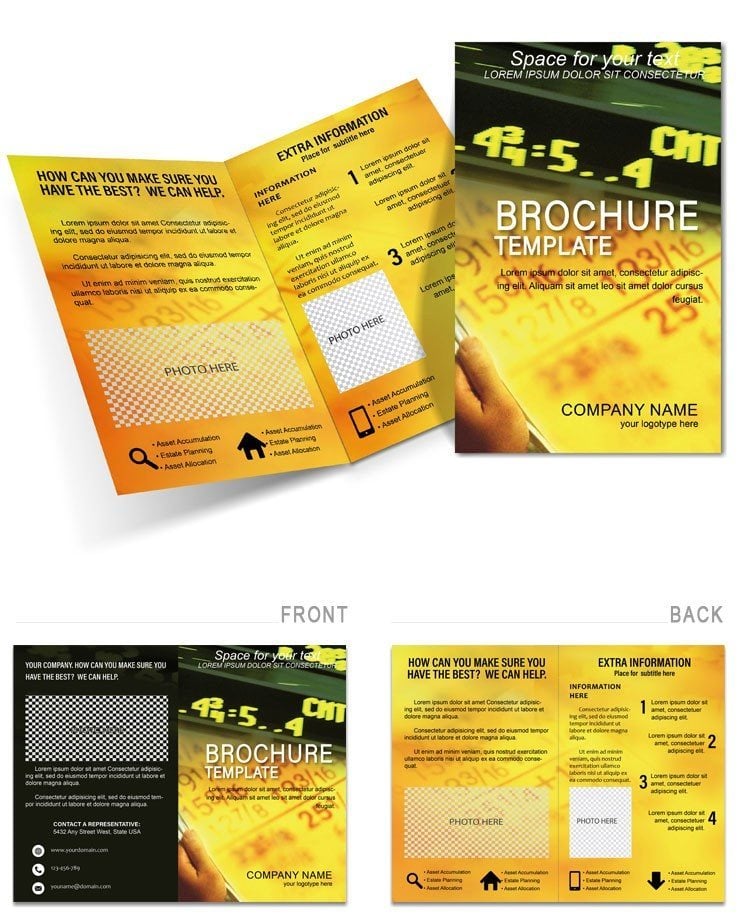
Picture this: you`re at a networking event for millennial investors, handing out a brochure that doesn`t just list features - it paints a picture of empowerment. From the front cover`s upward-trending line graph that screams opportunity, to the inner spreads breaking down seamless platform access, this template makes every panel count. It`s built for 11x8.5-inch portrait format, folding neatly into a format that slips easily into a briefcase or back pocket, ready for that quick scan on a subway commute.
Why This Template Fits Your Trading Outreach Needs
For consultants guiding clients through portfolio diversification or marketers launching a new robo-advisor app, generic flyers fall flat. They overload with jargon or look dated against sleek trading apps. This brochure sidesteps those pitfalls by focusing on clarity and action. The structure divides into four purposeful panels: an engaging cover, two inner sections for core value, and a sturdy back for calls to action.
The cover grabs attention with a dynamic chart placeholder - think a candlestick pattern rising like a bull market dawn. It`s not static; it`s editable to showcase your latest success metric, whether it`s S&P gains or crypto volatility plays. This hooks the reader instantly, promising the smart moves inside.
Breaking Down the Inner Panels: Where Education Meets Execution
Open it up, and the left inner panel dives into platform logins. Here, clean icons and bullet points outline frictionless onboarding - secure two-factor setups, one-tap verifications, all visualized with simple flow arrows that guide the eye like a well-timed trade. I`ve used similar layouts for a client`s webinar follow-up, where it helped convert 20% more attendees into demo accounts by making the tech feel approachable, not intimidating.
Flip to the right inner, and it`s all about real-time quotes. Grids hold pie charts for sector breakdowns or bar visuals for ETF performance, with space for live data pulls if you`re linking from Excel. For project managers coordinating trading education series, this section shines: it lets you customize for specific audiences, swapping in API deep dives for pros or basic index trackers for newcomers. The white space breathes, ensuring bullets on market alerts or mobile notifications land without clutter.
As a founder pitching to venture backers, I once adapted a panel like this to highlight user growth metrics. The result? Clearer storytelling that landed us funding because investors could visualize the path from signup to profitable trades.
The Back Panel: Sealing the Deal with Confidence
No brochure wins without a strong close, and this template nails it. The back features app store badges with QR codes primed for instant scans - directing to your download page or a free trial signup. Below, editable disclaimers keep things compliant, while a final hook reinforces the narrative: "Start trading smarter today." It`s subtle yet urgent, perfect for educators wrapping up a seminar or advisors mailing recaps to high-net-worth leads.
What sets this apart for marketers? The omni-channel flexibility. Print it with spot gloss for trade shows to evoke that premium fintech feel, or flatten for email attachments that render crisply on any device. I`ve seen teams use it for branch office training, where reps carry it as a visual script for client calls - turning cold outreach into warm conversations about diversified portfolios.
Customization That Moves as Fast as the Markets
Editing this feels like adjusting a position: precise and rewarding. Drop in your brand colors - perhaps a steel blue for trust paired with emerald accents for growth - and watch text paths curve effortlessly around logos. Vector elements like trend arrows scale without losing edge, and placeholders for screenshots let you embed your app`s interface right alongside explanatory text.
For consultants, the real power is in the data integration. Link tables to update indices automatically, or layer in global toggles for NYSE versus international exchanges. Project managers will appreciate the parametric layouts for fluid charts that adapt to bull or bear scenarios. And for educators teaching market basics, the high-contrast options ensure readability, making it a go-to for diverse classrooms or online cohorts.
In my weekly client sessions, templates like this save hours. Instead of building from scratch, you`re tweaking proven flows - allocating space for beginner tips on one side, advanced strategies on the other. It`s how a small advisory firm I worked with scaled their outreach, mailing these to prospects and seeing inquiries spike during earnings season.
Real-World Scenarios: From App Launches to Seminar Handouts
Imagine launching a trading app targeted at young professionals. Use this brochure at fintech meetups: the cover`s chart draws them in, inners demo mobile executions, and the back QR seals the install. Or, for a webinar on volatility strategies, mail these as reinforcements - attendees reference the quote panels during live trades, bridging theory to practice.
Even in advisory settings, it excels. Hand one to a client mid-consult: "See how easy diversification looks?" The panels become a shared roadmap, fostering trust and follow-through. Founders, take note - I`ve pitched VCs with printed variants, where the compact fold kept my deck supplementary, not overwhelming.
Open it in your design tool and make it yours in minutes, then deploy across channels for outreach that resonates.
Frequently Asked Questions
Can I adapt this brochure for cryptocurrency trading instead of stocks?
Yes, simply replace stock chart placeholders with crypto volatility visuals and update bullets to cover wallet integrations or blockchain basics - the flexible grids handle it seamlessly.
How do I incorporate my company`s branding into the layout?
Swap the default colors and fonts via the master layers, then curve text around your logo; it`s built for quick brand alignment without disrupting the flow.
Is this template suitable for digital distribution, like email PDFs?
Absolutely - flatten the layers for web-ready PDFs that maintain interactivity, with QR codes linking directly to your app or resources.
What file formats are included for editing?
You get native files for Adobe tools plus a versatile .dotx for Excel data linking, ensuring compatibility across your team`s workflow.
Can beginners in design easily customize the charts?
Definitely; placeholders are drag-and-drop ready, with auto-resizing features that keep proportions intact even as you input new metrics.
Does it include space for regulatory disclaimers?
Yes, the back panel has editable footers prepped for compliance notes, tailored for trading promotions.