Film Industry Half-Fold Brochure - Fully Editable | ImagineLayout
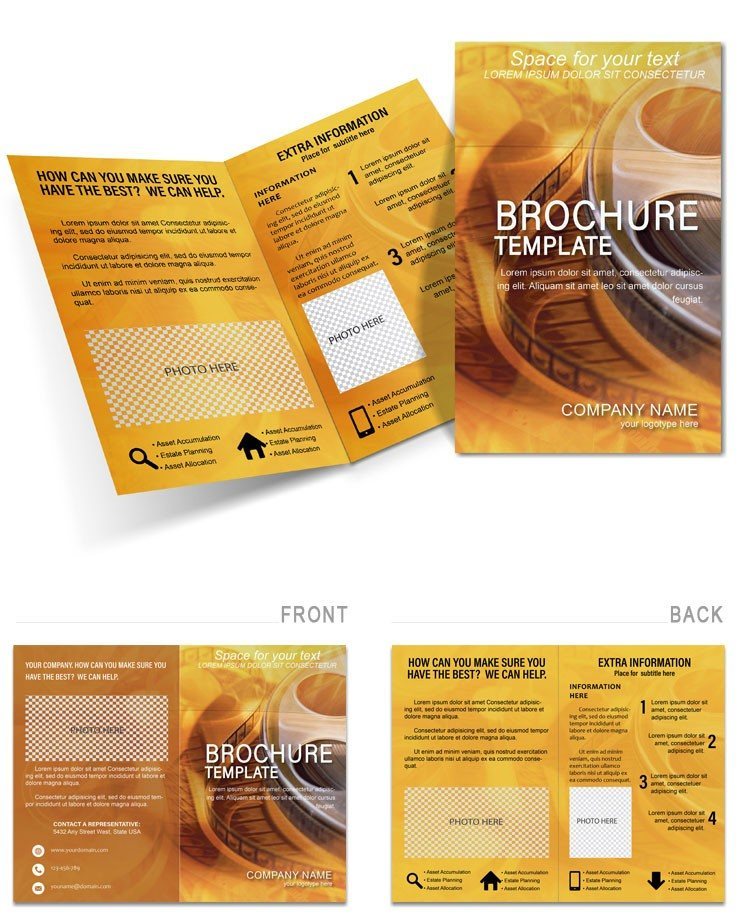
Type: Brochures template
Category: Art & Entertainment
Fold type: Half Fold
Sources Available: .ait, .dotx, .indt, .jpg
Page size: 11x8.5
Product ID: BT00235
What's Inside the Download
Four panels across an 11x8.5-inch half-fold layout arrive in four file formats: .ait for Adobe Illustrator, .indt for Adobe InDesign, .dotx for Microsoft Word, and a .jpg preview. The download contains a single ZIP with all four formats and no additional purchase required. CMYK color mode and 300 DPI are set from the first layer - no color profile adjustments needed before sending to a print shop.
The half-fold structure gives a filmmaker or creative agency two interior panels and two exterior panels to work with. The exterior cover carries the primary visual and headline; the interior left panel handles service descriptions or project credits; the interior right panel suits testimonials, pricing tiers, or a contact block; and the back panel provides logo placement and social handles. That four-panel sequence matches the reading flow of a standard portfolio leave-behind or event handout without requiring any restructuring after download.
Compared to multi-column or tri-fold layouts built around dense body text, this file uses a grid that favors large image zones and generous white space - a layout choice that suits industries where visual portfolio work needs room to breathe rather than compete with crowded paragraph blocks. The typography balance is set with clear visual hierarchy between headline, subhead, and body sizes, which reduces the need for manual sizing adjustments when replacing placeholder text.
Print Specifications
| Specification | Details |
|---|---|
| Fold type | Half Fold - unfolds to reveal 4 panels in reading sequence |
| Finished size | 11x8.5 inches folded; 22x8.5 inches unfolded |
| Color mode | CMYK - calibrated for professional offset and digital printing |
| Resolution | 300 DPI - print-ready without upscaling |
| Bleed and trim | Trim guides and 3mm bleed included in all file formats |
| Editable software | Adobe Illustrator CC 2018+, InDesign CS6+, Microsoft Word 2016+ |
| File formats | .ait (Illustrator), .indt (InDesign), .dotx (Word), .jpg (preview) |
| Font handling | Fonts embedded in .ait and .indt files; Word version uses system fonts |
| Price | $12.00 - one-time purchase, all formats included |
Three Projects Where This Template Fits
A freelance production designer working on a short-film festival circuit needed a leave-behind for a director they represented. The four-panel half-fold gave enough room for a film still on the cover, a two-paragraph project summary on the interior left, a credit block on the interior right, and contact details on the back. The file was adapted in Adobe Illustrator CC, exported as PDF/X-1a, and sent to print three days before the festival deadline. No bleed setup was needed on their end.
A marketing coordinator at a production company reused the same panel structure across four seasonal campaign handouts by swapping the color palette in the Swatches panel and replacing the image in the Links panel each time. The underlying grid alignment and typography balance stayed intact across all four versions, which removed the need to rebuild layout structure for each campaign cycle. Each version took under twenty minutes to adapt from the previous one.
Event planners producing a film screening night at an independent cinema combined this half-fold with a Art & Entertainment brochure category for a coordinated print set. The two-column interior panel structure of this file kept the event programme readable at a small folded size, while the large image zone on the cover held a film still without cropping issues. Teams working on the same type of campaign regularly also reference a cinema ticketing brochure to round out a full print set for venue display.
Download the Film Industry Half-Fold Brochure now
How to Make It Yours in Under 20 Minutes
Illustrator and InDesign Workflow (.ait / .indt)
- Open the .ait file in Adobe Illustrator CC 2018+ or the .indt file in InDesign CS6+ (1 minute)
- Replace placeholder text using the Type tool (5 minutes)
- Swap brand colors using the Swatches panel - global swatches update all instances at once (3 minutes)
- Replace placeholder images via the Links panel; re-link to your own high-resolution files (4 minutes)
- Check bleed and trim marks in Print Preview or the Separations Preview panel (2 minutes)
- Export as PDF/X-1a for offset or digital print output (2 minutes)
Word Workflow (.dotx)
- Open the .dotx file in Microsoft Word 2016 or later (1 minute)
- Replace placeholder text in each text box using normal typing (5 minutes)
- Swap logo and images using Insert > Picture (3 minutes)
- Adjust font colors using the Font Color tool in the Home ribbon (2 minutes)
- Export as PDF using File > Export for digital sharing or home printing (1 minute)
Word version suits home or office printing. For professional offset or digital print output, use the Illustrator or InDesign file.
Moderate difficulty. Under twenty minutes.
Building From Scratch vs. Starting Here
Setting up a half-fold brochure from a blank document requires configuring the artboard or page size to 22x8.5 inches, placing fold guides at the 11-inch centre mark, building a grid for each panel, setting bleed to 3mm on all four sides, and confirming that the document color mode is CMYK rather than RGB before placing a single image. That setup alone can take forty-five minutes for a designer who has not built print files before - and longer if the wrong color mode is caught only at the print shop preflight stage.
Many designers open a new Illustrator document and leave it in RGB because that is the default setting and it appears correct on screen. A monitor displays color in transmitted light; an offset press applies ink to paper. When an RGB file reaches a print provider, the RIP software converts the values automatically using a generic conversion profile - and the result frequently shifts in dark tones and saturated mid-tones, producing a printed piece that looks noticeably different from the screen proof. The CMYK values in this file are already set for print output, which removes that conversion variable from the production chain.
Font embedding is a second common source of preflight failures. A file sent to a printer with unembedded fonts triggers a substitution warning or, in some workflows, automatic font replacement that changes line breaks and text fit across panels. The .ait and .indt files in this download have fonts embedded, so the layout arrives at the print provider exactly as built. No font installation required on the printer's end.
Three formats. One download.
Download the Film Industry Half-Fold Brochure now
Frequently Asked Questions
Which software versions are needed to open and edit the files?
The .ait file requires Adobe Illustrator CC 2018 or later. The .indt file requires Adobe InDesign CS6 or later. The .dotx file requires Microsoft Word 2016 or later - earlier versions of Word may not render text boxes and linked images correctly. Opening any of the professional formats in a version older than listed can result in missing layers, broken links, or font substitution warnings that affect the layout before you make a single edit.
Under what conditions are refunds available?
Refunds are available within 14 days of purchase if the downloaded file does not match the listed specifications - for example, if the fold type, page size, or file formats differ from what is described on this page. To request a refund, submit the order ID and a screenshot showing the discrepancy via the contact form on ImagineLayout.com. Refunds are not issued once the file has been downloaded and opened, and they do not apply to change-of-mind requests after the download has been accessed.
Is the file truly print-ready or will I need to configure bleed and color settings?
The file is set to CMYK color mode and 300 DPI across all professional formats. Trim guides and 3mm bleed are included in the .ait and .indt files. When exporting from Illustrator or InDesign, select PDF/X-1a and confirm that the bleed settings match the document bleed - the guides in the file already specify the correct values. The Word version does not include bleed and is intended for home or office printing rather than commercial print production.
What does the license allow - can I use this for client projects?
The license permits use on unlimited personal and commercial projects, including work produced for paying clients. A marketing coordinator can adapt the file for multiple client campaigns; a freelance designer can use it across different client brands. The license does not permit resale of the original template file, redistribution of the source files as a design asset, or inclusion of the unmodified layers in another template product for sale. Printed copies for end clients are not limited in quantity.
How do I change the colors to match my brand palette?
In Adobe Illustrator, open the Swatches panel (Window > Swatches), double-click a swatch to edit its CMYK values, and confirm the change - because the file uses global swatches, all objects referencing that swatch update simultaneously. In InDesign, use the Swatches panel in the same way. In Word, select a text box or shape, then use the Font Color or Shape Fill tool in the Home or Format ribbon to apply a new color. For brand consistency across all panels, update the swatch values once in Illustrator or InDesign rather than changing individual objects.
What does each file format in the download do?
The .ait file is an Adobe Illustrator template - opening it creates a new unsaved document rather than overwriting the original, which protects the base layout. The .indt file works the same way in InDesign. The .dotx file is a Word template that opens as a new document when double-clicked, ready for text editing without design software. The .jpg file is a flat preview image used for reference only and is not intended for editing or print output.