 Haz clic para ampliar
Menú Pizza Keynote Template: Despierta apetitos con una fiesta visual
| Formato | .pptx |
| Diapositivas | 3 diseños únicos |
| Relación de aspecto | 16:9 |
| Compatibilidad | PowerPoint |
| Animado | No |
| Idioma | English |
| Licencia | Commercial |
| Tamaño del archivo | — |
| Versión | v1.0 |
| Última actualización | agosto de 2026 |
Qué contiene
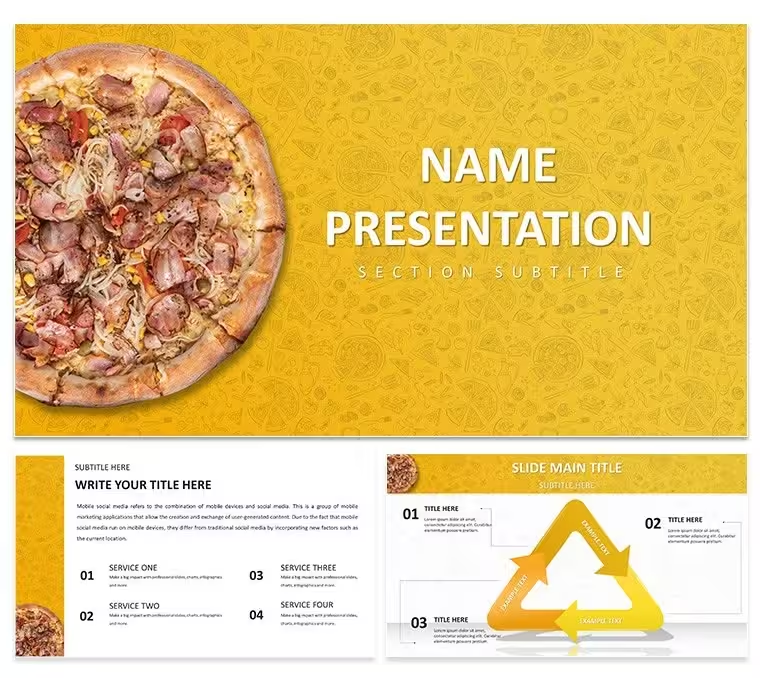
Imagine walking into a room full of potential customers, your latest pizza creations bursting onto the screen in a symphony of colors and textures that make mouths water before the first slice is even mentioned. That's the power of the Menu Pizza Keynote Template, crafted specifically for pizzeria owners and food enthusiasts who want to turn ordinary menu reveals into unforgettable experiences. This template isn't just a collection of slides - it's a strategic tool to highlight your crust's golden crisp, the melt of fresh mozzarella, and the vibrant scatter of toppings that define your brand. With 28 meticulously designed diagrams across seven color schemes, it offers flexibility to match your pizzeria's vibe, whether it's a cozy neighborhood spot or a bustling urban hotspot.
At its core, this template solves the common frustration of bland presentations that fail to convey the passion behind your pizzas. Instead of static lists, you'll have dynamic visuals that guide viewers through your menu like a guided tasting tour. Picture a slide where pepperoni curls invitingly against a bed of sauce, paired with simple text placeholders that let you drop in prices and descriptions without breaking a sweat. It's designed for those high-stakes moments - like pitching to investors for expansion or unveiling seasonal specials to loyal patrons - where every detail counts. And because it's fully compatible with Keynote on macOS, you can tweak it on the fly during rehearsals, ensuring your delivery is as smooth as your dough.
Unlocking the Template's Core Features for Irresistible Presentations
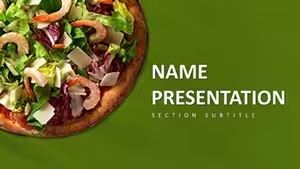
Diving deeper, the Menu Pizza Keynote Template shines through its thoughtful elements that blend aesthetics with functionality. Start with the high-resolution pizza images: each one captures the steam rising from a just-baked pie, drawing eyes instantly and evoking that universal craving. These aren't generic stock photos; they're selected to complement a vibrant color palette of fiery reds, earthy browns, and pops of green from fresh herbs, mirroring the lively energy of a busy kitchen.
Customization is where it truly excels. The simple-to-edit text placeholders mean you can swap in your menu items - say, "Margherita Classic: $12.99, heirloom tomatoes and basil" - in seconds, without wrestling with formatting. The completely adjustable design extends to layouts, allowing you to resize graphics or shift elements to fit your narrative flow. Whether you're building a 10-slide quick pitch or expanding to the full 28 diagrams, everything scales seamlessly.
- Delicious Pizza Images: 28 unique visuals showcasing diverse toppings and styles, from classic cheese to gourmet veggie-loaded masterpieces.
- Vibrant Color Schemes: Seven options to align with your branding, ensuring consistency from slide one to the finale.
- Editable Elements: Drag-and-drop icons for utensils, delivery icons, or rating stars to add personality.
- Master Slides: Three pre-built masters for headers, footers, and transitions that keep your presentation polished.
These features aren't just bells and whistles; they directly address pain points like time-consuming design from scratch. A restaurateur in Chicago, for instance, adapted the gallery-style diagram to create an interactive menu walkthrough during a franchise meeting, turning skeptics into partners by making the visuals as compelling as the taste test that followed.
Step-by-Step: Crafting Your First Menu Showcase
Getting started is straightforward, empowering even those new to Keynote to produce pro-level results. First, open the .key file and select the title slide - a bold pizza slice framing your pizzeria’s name. Replace the placeholder text with your logo and tagline, then choose a color scheme that echoes your signage.
- Select Your Base: Browse the 28 diagrams and pick a menu overview slide. Insert your core offerings into the text boxes, adjusting font sizes for readability on projectors.
- Layer in Visuals: Drag high-quality pizza photos onto ingredient highlight slides. Use the built-in masks to crop for focus, emphasizing that signature sauce swirl.
- Add Pricing and Promotions: On the specials diagram, input limited-time deals with animated transitions - Keynote's fade-in effect makes prices appear like they're emerging from the oven.
- Finalize Flow: Link slides with hyperlinks for non-linear navigation, like jumping from appetizers to desserts, and preview in presentation mode to time your delivery.
This workflow integrates effortlessly into your prep routine, cutting hours off what used to be all-nighters before big events. The result? A presentation that not only informs but inspires action, like increased orders or buzzworthy social shares.
Real-World Applications: From Pizzeria Pitches to Community Events
The versatility of this template extends far beyond basic menus, making it a go-to for various scenarios in the food world. For pizzeria managers unveiling a new location, the infographic-style diagrams break down operational flows - from dough prep to delivery - using pizza-themed icons that keep the theme alive without overwhelming data dumps.
Marketing pros in the food and beverage sector can leverage it for campaign launches. Envision a slide deck for a "Pizza Night" promo: timeline diagrams trace the event schedule, while comparison charts pit your wood-fired pies against competitors, all wrapped in that enticing red palette. It's particularly effective for digital formats too - export to PDF for email blasts or video for Instagram Reels, maintaining crisp quality across devices.
In educational settings, like a culinary workshop, instructors use the content slides to detail recipes step-by-step. One slide might zoom on dough tossing techniques with overlaid annotations, turning abstract instructions into visual stories. This approach mirrors how top chefs like those at Domino's training sessions structure their materials: clear, thematic, and audience-captivating.
Compared to starting with a blank Keynote canvas, this template saves the hassle of aligning elements manually. Basic slides often end up cluttered; here, the pre-aligned grids ensure balance, letting you focus on storytelling. Plus, the three background options - subtle patterns of flour dust or cheese pulls - add depth without distracting from your message.
Tailored Use Cases for Maximum Impact
Consider a busy event planner coordinating a food festival: the gallery slides become a virtual booth tour, each frame a different vendor's specialty, with your pizzeria stealing the show via a central pizza montage. Or for internal team huddles, repurpose the charts for sales tracking - pizza slices representing quarterly goals, making metrics as fun as a family dinner.
These applications highlight the template's user-focused design: every element serves to enhance communication, whether you're convincing suppliers of quality ingredients or wooing diners with seasonal twists. Download this template today for $22 and transform how you present your passion for pizza.
Enhancing Engagement with Pro Tips and Integrations
To elevate your presentations further, pair the template with Keynote's native tools like hyperlinks for QR codes linking to online ordering. For a touch of interactivity, embed short video clips of your pizza-making process on media slides - viewers love the behind-the-scenes glimpse.
Workflow-wise, it slots into tools like Canva for quick graphic additions or Google Drive for team collaboration. A tip from design pros: always test on different screens; the high-contrast colors ensure vibrancy even in dim dining rooms. And for that extra polish, use the adjustable masters to embed your contact info consistently, turning every deck into a subtle lead generator.
In essence, this Menu Pizza Keynote Template isn't merely about slides - it's about crafting narratives that linger like the aroma of garlic knots. Whether you're a solo operator dreaming big or a chain refining your brand story, it equips you to deliver with confidence and flair.
Frequently Asked Questions
What software is required to use this Menu Pizza Keynote Template?
This template is fully compatible with Apple Keynote on macOS and iOS devices, including versions from 2016 onward.
How many slides are included, and can I add more?
It comes with 28 diagrams ready to use, plus masters for easy expansion - you can duplicate and customize as needed for longer presentations.
Are the images editable, and do they require additional licenses?
Yes, all images are high-quality and embedded for easy swapping; they're royalty-free for commercial use within your presentations.
Can I change the color schemes to match my brand?
Absolutely, with seven built-in schemes and full adjustability, tweaking hues takes just a few clicks in Keynote's color editor.
Is this template suitable for printing menus?
While optimized for digital displays, you can export slides to PDF for high-res prints, maintaining the vibrant details.
Ideal para
- Hojas de ruta de proyectos y planes de sprint
- Cronogramas de lanzamiento de productos
- Presentaciones de resultados trimestrales o anuales
- Historia de la empresa y resúmenes de hitos
Licencia
reseñas
The high-res pizza images and vibrant reds made my menu look absolutely mouth-watering.
Used the editable text placeholders to quickly update the prices for my seasonal specials.
The gallery-style diagram is great for a visual walkthrough of the ingredients.
The pepperoni graphics are a bit specific but you can swap them out.
My franchise meeting went great after they saw the interactive menu on the big screen.
Ayuda a otros compartiendo tu experiencia. Las reseñas solo se aceptan de usuarios registrados.
Preguntas frecuentes
¿Funciona en Google Slides?
¿Las fuentes están incluidas?
¿Puedo usarla en proyectos para clientes?
¿Cuál es la política de reembolso?
¿Se actualiza la plantilla después de la compra?
Plantillas similares
Ver todo Keynote templates →
Las 1 diapositivas