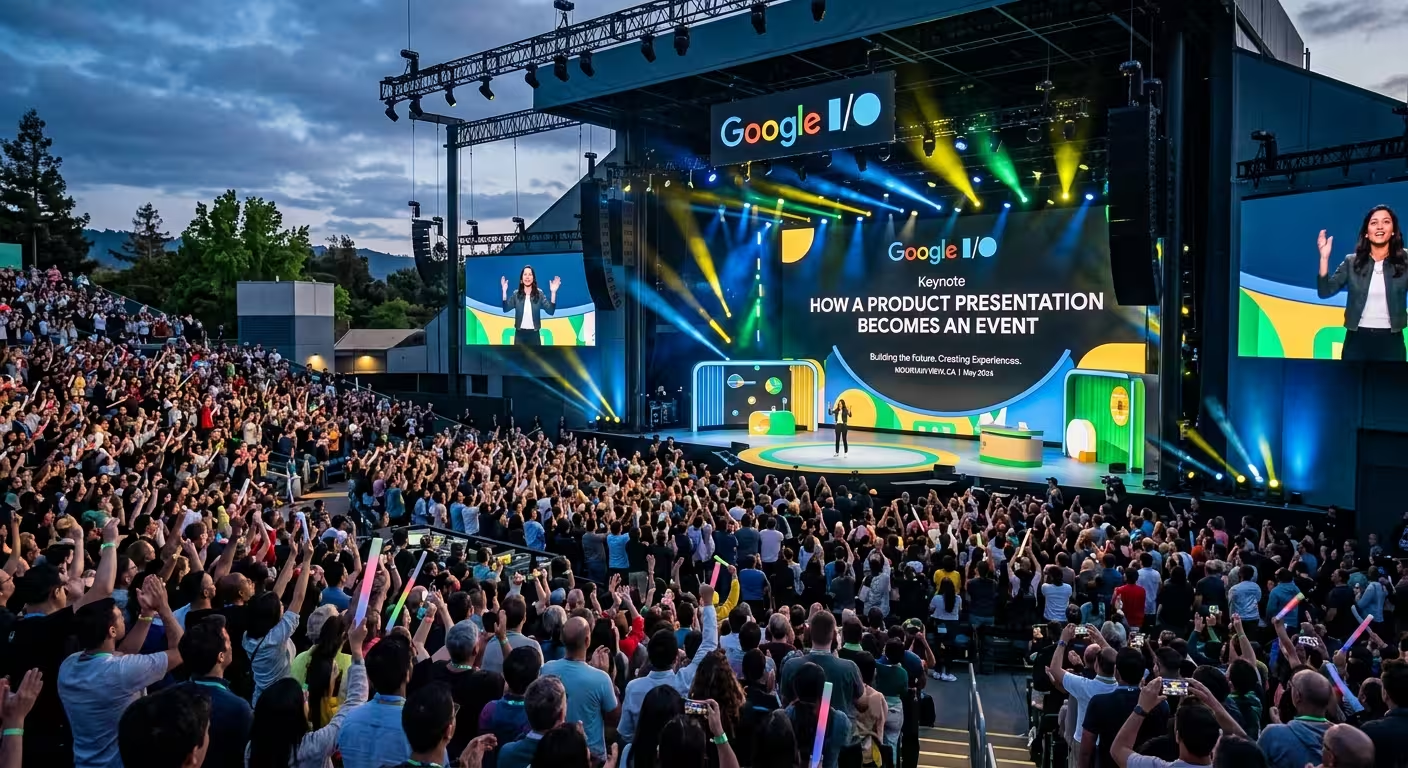
Google I/O Is More Than a Product Presentation
A product presentation normally has a practical job: explain what was built, why it matters, and what happens next. Google I/O operates on a different scale. The product information is still there, but the presentation is constructed as an experience that moves an audience from anticipation to discovery.
That distinction is useful for anyone creating a technology keynote. The goal is not to copy Google's visual style. It is to understand the presentation mechanics that make a product announcement feel like an event rather than a collection of slides.
Google I/O combines keynote presentations with product demonstrations, sessions, and other event formats. In 2026, Google presented both a main keynote and a separate developer keynote, with announcements spanning AI, Search, Android, Chrome, and developer technologies.
The Event Starts Before the Product Reveal
The first product slide does not have to carry the entire burden of creating interest. A strong keynote can establish context before revealing the product itself.
Think of the opening as a sequence:
- Establish the world or problem.
- Show why the problem matters now.
- Introduce the larger direction.
- Build a question in the audience's mind.
- Only then reveal the product or feature.
This changes the role of the opening slides. Instead of immediately displaying specifications, they create a reason to care about the information that follows.
For a technology company, this can be especially effective when the product solves a problem that the audience already recognizes. The presentation first makes the problem visible, then makes the product feel like the next logical development.
A Product Reveal Needs a Change in Rhythm
One of the easiest mistakes in a keynote is giving every slide the same visual and verbal treatment. If everything is presented with equal intensity, the actual reveal has nowhere to go.
A product presentation becomes more event-like when its rhythm changes around important moments.
For example, a sequence might move from:
- Short statement
- Large visual
- Problem explanation
- Quiet pause
- Product reveal
- Demonstration
- Technical explanation
The important point is not the exact sequence. It is the contrast. A reveal feels significant because the presentation creates enough space for the audience to recognize that something has changed.
This is where presentation design becomes closer to stage direction. The slide is no longer just a container for information; it becomes part of the timing of the announcement.
Demos Turn Claims Into Experiences
A specification tells the audience what a product can do. A demonstration lets them see the claim operating in context.
This is particularly important for technology products. Instead of explaining a feature through several paragraphs of text, the presenter can establish a situation, perform the task, and let the audience watch the result.
The structure is straightforward:
Situation → action → product response → result.
The demonstration should therefore be treated as part of the story rather than inserted between two unrelated groups of slides.
Google's own I/O material repeatedly places product announcements alongside demonstrations and onstage moments. The company's 2026 I/O recap, for example, describes major announcements together with keynote reveals and demonstrations.
For a smaller company, the same principle can work without a huge stage. A screen recording, interactive prototype, device demonstration, or carefully prepared before-and-after example can perform the same storytelling function.
The Visual System Has to Support the Story
When a presentation contains several products or features, visual consistency becomes more complicated than simply choosing the same background on every slide.
The audience needs to recognize which slides belong to the same story and when the presentation has moved into a new chapter.
A useful keynote system can therefore have several visual levels:
- Chapter slides that signal a major change in subject.
- Product reveal slides that give the new idea maximum visual space.
- Explanation slides for diagrams, architecture, or product details.
- Demo slides that keep supporting information out of the way.
- Data slides that provide evidence after the emotional or visual reveal.
This is one reason technology-focused presentation templates can be useful as a starting framework. ImagineLayout's Technology Innovation Keynote Template provides editable layouts for technology products, product launches, data, charts, and systematic storytelling. The page specifies PowerPoint compatibility and editable presentation elements.
The template does not create the narrative by itself. Its value is that the structural components are already available, leaving the presentation team to concentrate on the story.
From Product Story to Shared Event
The biggest difference between a product presentation and an event is participation.
An ordinary product deck can be consumed passively: slide one, slide two, slide three. An event creates moments the audience is expected to notice, anticipate, remember, and discuss.
That can happen through several mechanisms:
- A reveal that answers a question established earlier.
- A live demonstration that changes the audience's understanding of the product.
- A visual transition that signals the beginning of a new chapter.
- A surprising comparison that gives the audience a reference point.
- A clear final message that connects individual features to a larger product direction.
The principle is simple: do not make every moment equally important. Give the audience peaks and valleys so that the major moments have somewhere to land.
For presentations delivered at conferences or company events, an event-oriented template can also help establish the visual environment around the story. ImagineLayout's Conference Hall PowerPoint Template is designed for conferences, meetings, lectures, and corporate events, with editable PowerPoint layouts and presentation backgrounds.
Technology Keynotes Need Two Stories at Once
A sophisticated product keynote usually has two narratives running simultaneously.
The first is the product story: what is being introduced, how it works, and what it changes.
The second is the audience story: what the audience should understand, feel, expect, and remember at each stage.
These stories can conflict. A technical team may want to explain every capability immediately, while the audience needs a simpler sequence before it can absorb the technical detail.
A useful solution is to separate the presentation into layers. First establish the product idea. Then demonstrate it. Then provide the technical depth for the people who need it.
ImagineLayout's Business Technology Keynote Template follows this broader presentation problem: combining technology-oriented content with structured visual layouts intended for business communication.
What a Google I/O-Style Approach Means for Your Next Presentation
You do not need a massive conference, a giant screen, or dozens of product announcements to make a presentation feel like an event.
Start with the structure instead.
Give the audience a reason to pay attention before showing the product. Create a clear moment for the reveal. Use a demonstration when seeing the product in action is more persuasive than describing it. Separate major chapters visually. Then reserve your strongest visual and verbal moments for the information you most want the audience to remember.
That is the useful lesson behind Google I/O: a presentation becomes an event when the audience is not simply receiving information, but experiencing a sequence of discoveries.
The slides support that sequence. They do not have to be the event by themselves.
Comments (0)