 Click to zoom
Holiday Buffet PowerPoint Template - Fully Editable | Instant Download | ImagineLayout
| Format | .pptx |
| Slides | 3 unique layouts |
| Aspect ratio | 16:9 |
| Compatibility | PowerPoint |
| Animated | No |
| Language | English |
| License | Commercial |
| File size | — |
| Version | v1.0 |
| Last updated | September 2026 |
What's inside
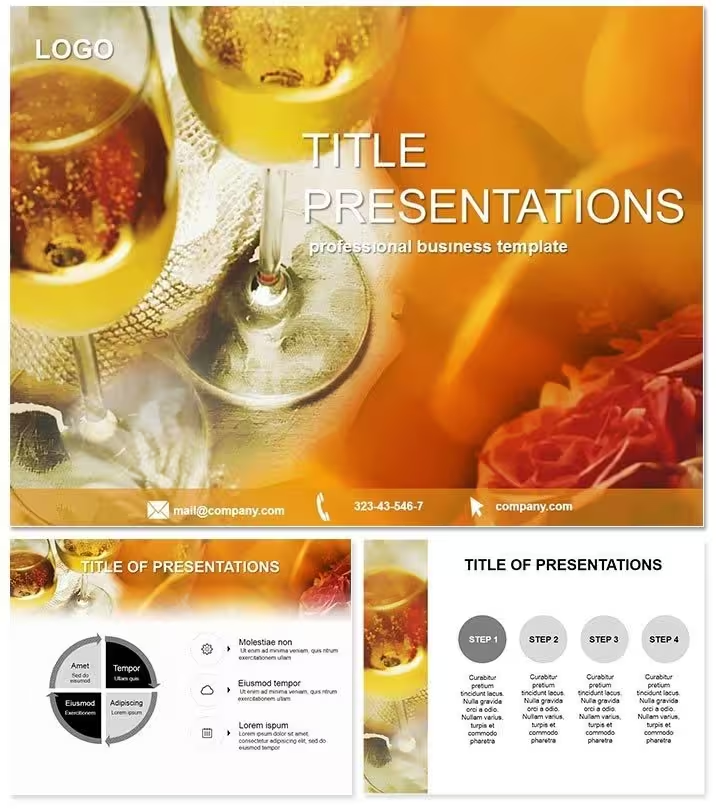
Download the Holiday Buffet PowerPoint Template featuring 28 editable diagrams in 7 color schemes. Perfect for chefs and caterers presenting holiday feasts, menus, and plating ideas. Instant download for $5 with full commercial use rights.
What's Included
The Holiday Buffet PowerPoint Template package delivers exactly 28 diagrams built for holiday feast presentations along with 7 distinct color schemes that you can switch between instantly. You receive the primary PPTX file plus supporting POT and POTX master templates and high-resolution JPG previews for every diagram. All diagrams come with text placeholders, icon layers, and shape elements already arranged for food and beverage topics so you open the file and begin editing without building layouts from scratch. This set is the complete download for any chef or catering professional needing holiday-specific visuals.
No extra assets are required. The diagrams cover buffet arrangements, ingredient highlights, and table setups in a format that scales perfectly for any screen size or printed handout.
Key Features
Every one of the 28 diagrams is fully vector-based and editable in standard PowerPoint. The 7 color schemes let you match your restaurant branding or seasonal theme in seconds by selecting a preset. File formats include native PPTX for direct editing, POTX for reusable masters, and JPG for quick reference. The template supports both widescreen and standard slide sizes without distortion. Text and icon layers remain crisp at any zoom level. Diagrams are grouped for easy rearrangement during your presentation build.
FeatureDetailsNumber of Diagrams28 ready-to-use for holiday buffetsColor Schemes7 fully switchable presetsFile FormatsPPTX, POT, POTX, JPGSoftwarePowerPoint 2010 and newerEditable ElementsText placeholders, color fills, icon layersInstant DownloadAvailable immediately after purchaseProfessional Use Cases
A head chef at a five-star resort used the holiday buffet diagrams to outline the seasonal menu for 200 guests during an investor meeting, replacing placeholder text with exact dish names and switching to the warm red color scheme to match the venue decor, resulting in secured bookings for the entire holiday period. A catering manager at a corporate events company presented buffet options to a large client using the template, customizing one diagram to show ingredient sourcing and another to illustrate table flow, which helped close a six-figure contract within the same week. These real-world examples show how the 28 diagrams solve the exact problem of presenting food arrangements quickly and professionally.
How to Customize
Download the file from your ImagineLayout account, open it directly in PowerPoint, select any of the 28 diagrams, click on text placeholders to replace them with your own menu items or pricing, then choose one of the 7 color schemes from the variants panel to update fills and accents across the entire slide. You can drag icons into new positions or delete unused elements without breaking the layout. Once finished, save the file as your branded version and export to PDF or share directly. The entire process from download to final presentation takes under 15 minutes for most users.
Why Choose This Template
Building holiday buffet visuals from scratch would require hours of drawing shapes, aligning icons, and testing color palettes across multiple slides. This template provides the 28 diagrams already arranged and tested in 7 color schemes so you focus only on content updates. The difference is immediate: professional layouts that look custom-designed versus obvious amateur efforts. The food-and-beverage focus sets it apart from general restaurant templates in the related section, giving you holiday-feast specific arrangements that competitors do not offer. A single purchase delivers everything needed for repeated use across events and client pitches.
Ready to present your next holiday menu with confidence? Add to cart above for instant access.
Frequently Asked Questions
Is the Holiday Buffet PowerPoint Template fully editable in standard PowerPoint versions?Yes, all 28 diagrams open and edit without issues in PowerPoint 2010 and every newer version including Microsoft 365. You can change every text placeholder, recolor shapes using the 7 built-in schemes, move icons, and resize elements while keeping the original alignment intact. The POTX master file lets you apply your own company theme across the entire deck in one click. Users report the diagrams remain stable even after heavy customization and exporting to PDF for client handouts. No third-party plugins are required at any step.
What file formats are delivered with this template?The download includes the main editable PPTX file, reusable POT and POTX master templates, and JPG preview images for all 28 diagrams. These formats cover every common workflow from direct editing to importing into other design tools if needed. The JPG files are high-resolution so you can reference exact layouts even before opening PowerPoint. Everything downloads as a single ZIP archive immediately after payment so you can start working within minutes of purchase.
How many color schemes can I actually use and switch between?You receive seven complete color schemes already built into the template file. Switching between them updates every diagram consistently in seconds through the PowerPoint variants panel. The schemes are designed specifically for food and holiday themes so warm tones work for festive buffets while cooler options suit modern catering presentations. You can also create your own eighth scheme by modifying one preset and saving it as a custom theme for future projects.
Is this template licensed for commercial use in client presentations?Yes, the standard license allows unlimited personal and commercial use including client pitches, event proposals, staff training, and printed materials. You may not resell or redistribute the original template files themselves. The diagrams you create after editing become your own work product for any business purpose. This covers chefs, caterers, restaurants, and hospitality companies using the 28 diagrams in paid or unpaid presentations.
How long does it take to download and start editing?Download begins instantly after checkout and usually completes in under 30 seconds on standard connections. Once unzipped you open the PPTX file and the 28 diagrams are ready on separate slides. Most users replace text and choose a color scheme in under ten minutes before saving their first custom version. The process requires no registration or additional software beyond PowerPoint.
Good for
- Project roadmaps and sprint plans
- Product launch timelines
- Quarterly or annual review decks
- Company history and milestone summaries
Licence
reviews
The JSON diagram icons and object diagrams were perfect for my data exchange presentation.
Used the array flowcharts for a structure review.
The 7 color schemes included some nice lightweight tones but the layout is pretty standard.
The value comparison charts and type diagrams were useful.
It's okay for JSON but not for detailed data modeling.
FAQ
Will it work in Google Slides?
Are fonts embedded?
Can I use this for client work?
What's the refund policy?
Do you update the template after purchase?
Similar templates
See all PowerPoint Templates →

All 1 slides