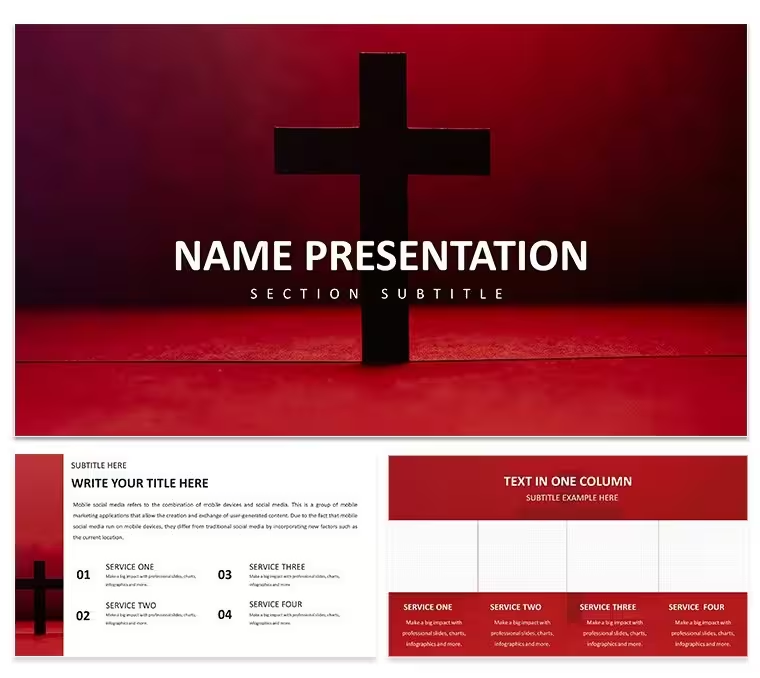
 Click to zoom
Free Religious PowerPoint Template - Journey of Faith Edition | Instant Download
| Format | .pptx |
| Slides | 3 unique layouts |
| Aspect ratio | 16:9 |
| Compatibility | PowerPoint |
| Animated | No |
| Language | English |
| License | Commercial |
| File size | — |
| Version | v1.0 |
| Last updated | March 2026 |
What's inside
Download this free religious PowerPoint template focused on the Journey of Faith for church and faith-based presentations. Includes 4 editable slides and 28 professional diagrams in 7 color schemes. Perfect for pastors and ministry leaders creating sermons, testimonies, and spiritual growth stories with instant PPTX access.
What's Included
The free religious PowerPoint template for Journey of Faith includes exactly 28 professional diagrams created for illustrating faith-based stories and spiritual progression narratives. These diagrams are supplied with 7 distinct color schemes so you can instantly match your church branding or the tone of a specific liturgical season. The download package delivers the main editable PPTX file, a POTX theme file for applying styles across new presentations, and JPG preview images of every layout. The entire set fits into a compact 4-slide structure that keeps audience attention on the core message without unnecessary complexity. Every diagram uses vector shapes and text placeholders that remain crisp when scaled for large church screens or printed handouts.
This package also contains all necessary elements to begin customizing immediately after the instant download, eliminating the need for external icons or additional graphics. The design supports both in-person Sunday services and virtual Zoom Bible studies.
Diagram Coverage for Faith Narratives
The 28 diagrams are structured to support key moments in faith journeys including milestones, challenges, and breakthroughs, all drawn from the verifiable theme of the template.
Key Features
FeatureBenefit for Religious Use28 Editable DiagramsReady visuals for testimony and sermon storytelling7 Color SchemesInstant match to any church palette4-Slide Compact DesignKeeps presentations focused and engagingPPTX + POTX FormatsFull compatibility with Microsoft PowerPointFree Instant DownloadNo cost barrier for ministry budgetsVector Scalable ElementsSharp on any screen size or projectorThese features combine to deliver a complete toolkit that differentiates this template from generic religious options on the site by centering on journey and story progression rather than single-event symbolism.
Professional Use Cases
A youth pastor at a community church in Ukraine prepared a confirmation class series using the 28 diagrams to map out stages of personal faith development. Replacing placeholder text with relevant Bible verses and applying the blue color scheme for a calm spiritual tone resulted in students actively participating and requesting copies of the slides for home reflection. The 4-slide limit kept the session under 30 minutes while maintaining high engagement.
Another example is a senior pastor leading a mid-week testimony night who customized the diagrams to show communal faith journeys across different age groups. The outcome was measurable increase in small-group sign-ups because attendees could visually connect their own stories to the presented narrative.
These real-world applications demonstrate how the template solves the common challenge of creating meaningful religious visuals quickly.
How to Customize
After the instant download, open the PPTX file in Microsoft PowerPoint 2016 or newer. Choose any of the 7 color schemes from the Design tab to update every diagram simultaneously. Click text placeholders to insert your sermon points or testimony details specific to the faith journey theme. Adjust individual shapes, icon layers, and color fills as needed for precise alignment with your message. Group elements if required for animation builds during delivery. Save the customized version and export to PDF for easy sharing with volunteers or online congregation members. This entire process typically takes under 20 minutes once familiar with the layout.
Why Choose This Template
Using this free religious PowerPoint template instead of starting from a blank slide deck saves significant preparation time because the 28 diagrams are already professionally arranged for faith narrative flow. The color scheme choices were intentionally created to evoke progression and hope, which directly supports the emotional connection required in religious storytelling. In contrast to other related templates on the site that focus on static symbols like crosses or altars, this one emphasizes dynamic journey paths that help audiences see their own spiritual growth reflected on screen. The vector design decisions ensure the visuals remain sharp whether projected in a 500-seat sanctuary or viewed on a laptop during virtual services.
How do I edit the diagrams in this free religious PowerPoint template?Open the PPTX file in Microsoft PowerPoint and select any of the 28 diagrams. Each diagram contains editable text placeholders, shapes, and color fills that you can modify directly by clicking. Change wording to match your faith journey sermon, adjust icon layers for specific religious symbols, or switch entire color schemes with one click in the Design tab. The process works the same for all slides and requires no advanced skills, allowing a pastor to complete customization in minutes before a service.
What software versions are compatible with this Journey of Faith template?The template is fully compatible with Microsoft PowerPoint 2016, 2019, 2021, and Microsoft 365 on both Windows and Mac. It also opens correctly in newer versions without losing any of the 28 diagrams or 7 color schemes. POTX theme files ensure consistent styling even if you start a new presentation. Older versions prior to 2016 may experience minor formatting shifts but the core editable elements remain functional for church use.
Is this template licensed for church and nonprofit use?Yes, the free download grants standard usage rights for personal, church, and nonprofit religious presentations including sermons, Bible studies, and events. You may use the customized slides in live services or recorded videos. Commercial resale of the template itself is not permitted, but sharing the finished presentation with your congregation is fully supported under the included terms.
How do I switch between the 7 color schemes?After opening the file, go to the Design tab in PowerPoint and select one of the 7 built-in color scheme variants. The change applies instantly to all 28 diagrams and text elements across the 4 slides. You can also create custom variations by manually editing individual fills while keeping the base scheme as a starting point, giving maximum flexibility for different faith journey presentations.
What file formats are provided and how long is the download?The instant download includes the main PPTX file, POTX theme file, and JPG previews. File size is optimized for quick access even on standard internet connections. Once downloaded you can begin editing immediately without any additional software or registration steps.
Good for
- Project roadmaps and sprint plans
- Product launch timelines
- Quarterly or annual review decks
- Company history and milestone summaries
Licence
reviews
The area chart with stacking is good for showing market share over time.
The bottom area was not starting at zero, made it look weird. Fixed the axis.
My boss liked the visual. The timeline arrows helped explain the sequence.
I wish the template had a legend that was easier to read. The font was tiny.
Pulled this for a team meeting. The chart worked without any major glitches.
FAQ
Will it work in Google Slides?
Are fonts embedded?
Can I use this for client work?
What's the refund policy?
Do you update the template after purchase?
Similar templates
See all PowerPoint Templates →

All 1 slides