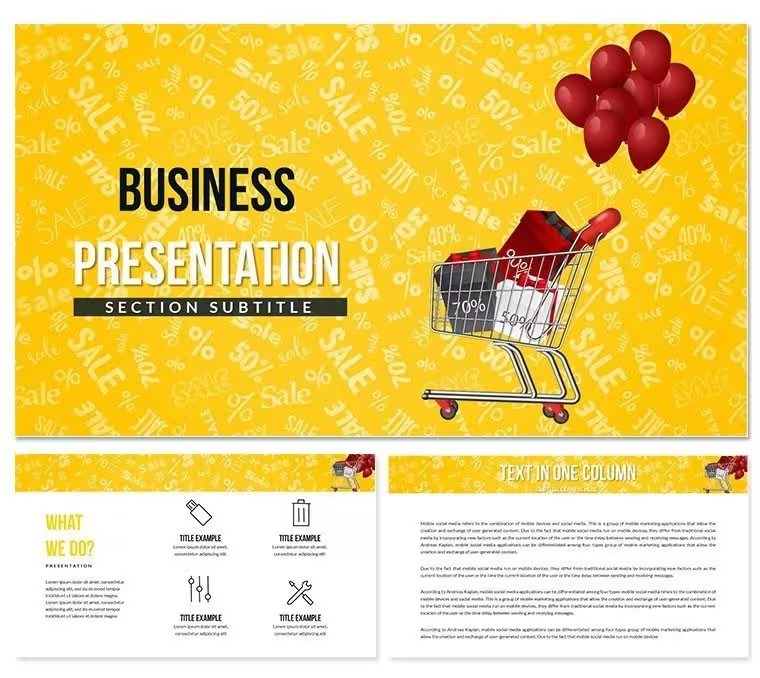
 Click to zoom
Black Friday Sale PowerPoint Template - Fully Editable | ImagineLayout
| Format | .pptx |
| Slides | 3 unique layouts |
| Aspect ratio | 16:9 |
| Compatibility | PowerPoint |
| Animated | No |
| Language | English |
| License | Commercial |
| File size | — |
| Version | v1.0 |
| Last updated | August 2026 |
What's inside
Files and Formats Included
Bold discount-badge layouts and high-contrast color zones define what makes this download stand out before a single slide is edited. The paid tier includes 28 diagrams across 7 color schemes - deep black, electric yellow, crimson red, and four additional presets built specifically for promotional retail contexts. Three slide masters and three backgrounds are included in both the free and paid tiers; the paid version adds the full diagram set and all color variants.
The 28 diagrams cover the range a retail or marketing team needs during a seasonal campaign: title slides, agenda layouts, data comparison grids, coupon-style callout frames, icon-supported feature lists, and timeline sequences for multi-day sale events. Each diagram type serves a distinct communication task, so a team can build an end-to-end Black Friday deck - from campaign overview to deal breakdown to results summary - without switching files.
Unlike single-layout promotional sets that offer one primary visual frame, this package separates content structure from color scheme, meaning the same diagram works across 7 distinct color palettes without rebuilding. That separation is what makes it reusable across different brand or campaign variants rather than locked to one look.
What is a Black Friday PowerPoint template? A Black Friday PowerPoint template is a pre-built presentation file with slide layouts, color schemes, and diagram structures designed specifically for retail promotion, discount campaigns, and seasonal sales events - ready to edit in Microsoft PowerPoint 2016 or later.
Key Specifications At a Glance
FeatureDetailsDiagrams included28 across promotional, data, and layout categoriesColor schemes7 presets; black, yellow, red, and four alternatesEditable shapesCoupon frames, badge callouts, and comparison grids resize and recolor independentlyText placeholdersHeadline and body labels update without ungrouping diagram elementsSlide masterGlobal color changes apply via PowerPoint slide master; individual overrides available per shapeFile formats.pptx and .potx for editing; .jpg previews includedCompatibilityMicrosoft PowerPoint 2016, 2019, Microsoft 365 (Windows and Mac)Free vs. paidFree tier: 3 masters + 3 backgrounds; Paid ($18): adds 28 diagrams + 7 color schemesAspect ratioStandard widescreen 16:9From Download to Final Deck
Scenario: Same file, three campaign variants
Before: a retail marketing coordinator spent 4 hours rebuilding slide decks from scratch for each product category - electronics, apparel, home goods - with inconsistent badge sizing and misaligned color fills across all three. After: using this template's 7 color scheme presets, all three variants were completed in under 90 minutes total. The slide master handled global color swaps; individual coupon-frame slides required only text replacement.
A regional e-commerce manager at a mid-size fashion retailer needed to brief three department heads on Black Friday strategy, deal structure, and inventory targets in one 30-minute session. The timeline diagram and comparison grid slides covered all three topics without custom design. Prep time dropped from 3 hours to 40 minutes.
Download and start editing immediately
Why This Template, Not a Blank Slide
Building a Black Friday deck from scratch requires sourcing a high-contrast color palette, constructing badge and coupon frame shapes manually, and ensuring text legibility over dark promotional backgrounds - tasks that individually take 20-40 minutes each before any content is added. Starting from this file, those structural decisions are already resolved.
Color contrast in promotional slide design is not a decorative choice - it is a legibility requirement. Black-background slides with white or yellow headline text follow a specific contrast ratio that keeps text readable on projected displays and screen recordings alike. A badge-style callout shape that uses a colored fill border to frame a discount percentage encodes the visual hierarchy before the audience reads a single word: the number is the primary message, the supporting text is secondary. That pre-attentive encoding collapses in slides built from default blank layouts where all text elements carry equal visual weight.
Moderate editing skill is required - label replacement and color changes are beginner-level; custom shape resizing or master slide edits take basic PowerPoint familiarity. No design tool beyond PowerPoint is needed at any stage.
Download and start editing immediately
Frequently Asked Questions
Which versions of PowerPoint open this file correctly?The .pptx and .potx files are compatible with Microsoft PowerPoint 2016, 2019, and Microsoft 365 on both Windows and Mac. PowerPoint 2013 can open the files but may not render all shape effects identically. Google Slides can import .pptx files, though font substitution and some shape fills may shift. For best results, use PowerPoint 2016 or later where the slide master color controls function as intended.
How do I change the color scheme across all slides at once?Open the file in PowerPoint, go to View - Slide Master, and select the top-level master slide in the left panel. From there, navigate to Slide Master - Colors and select one of the 7 built-in presets or define a custom theme color. Closing the master view applies the change globally. Individual slides can still override master colors by selecting a shape, opening Format - Shape Style, and entering a hex value directly - this overrides only that element.
What does the free version include, and what does the paid version add?The free tier is not available for this product; the entry tier at $8.00 includes 3 slide masters and 3 background layouts. The paid version at $18.00 adds 28 diagrams and all 7 color schemes for those diagrams. The masters and backgrounds are the structural foundation; the diagram set is where the campaign layouts, comparison grids, timeline slides, and coupon-frame slides reside. Teams that need only a branded background can use the $8.00 tier; teams building full decks need the $18.00 package.
Can this template be used in paid client work or commercial projects?The standard license permits use in presentations for internal business purposes and client-facing presentations where the template is embedded in a delivered deck. Reselling the template file itself, distributing it as a standalone download, or sublicensing it to third parties is not permitted under the standard license. For agencies delivering decks to multiple clients, one license per project applies. Review ImagineLayout's Terms of Use page for the full license conditions before commercial deployment.
What is the refund policy if the file does not work as expected?ImagineLayout's refund policy covers purchases where the delivered file does not match the product description or cannot be opened in the specified software. Refund requests must be submitted through the support contact before any significant edits are made to the file. Digital downloads are generally non-refundable once accessed, but technical issues with the file itself qualify for review. Check the Refund Policy page on ImagineLayout for current conditions and the submission process.
Can multiple team members use the same license for this template?The standard license is intended for use by a single purchaser or within a single organization's internal workflow. Sharing the downloaded file across multiple team members within the same company for a shared project is generally within the standard license scope. Distributing the file to external contractors, partner agencies, or across separate company entities requires review of the license terms. When in doubt, contact ImagineLayout support to confirm the permitted scope before distribution.
Good for
- Project roadmaps and sprint plans
- Product launch timelines
- Quarterly or annual review decks
- Company history and milestone summaries
Licence
reviews
Put together a project portfolio review pretty fast using the roadmap slides.
The matrix charts are okay, but they are a pain to recolor if you have a brand guide.
Simple, straightforward, no weird animations. Just the way I like it.
The bar chart variations are good, but I found the axis labels a bit small by default.
Got this for a team meeting about efficiency, the lean canvas slide was a nice surprise.
FAQ
Will it work in Google Slides?
Are fonts embedded?
Can I use this for client work?
What's the refund policy?
Do you update the template after purchase?
Similar templates
See all PowerPoint Templates →



All 1 slides