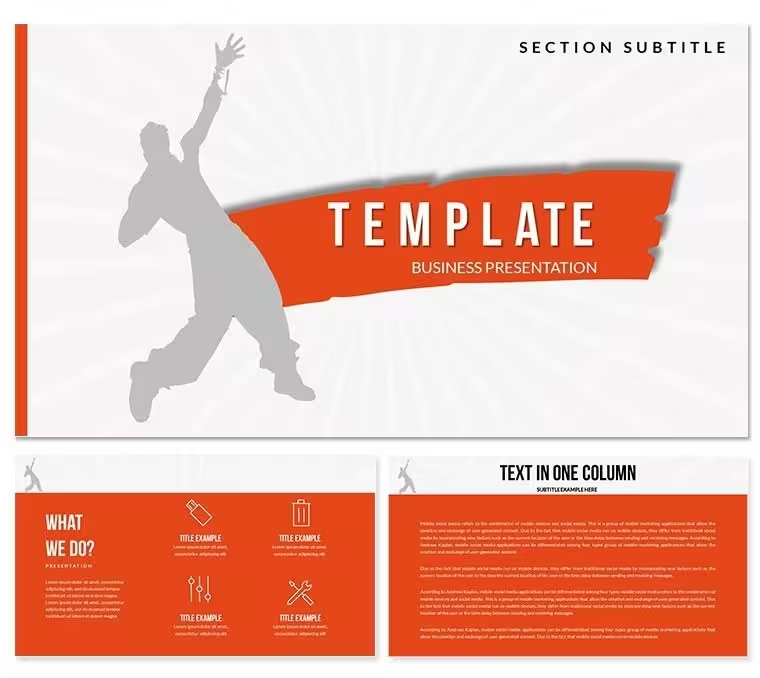
 Click to zoom
Break Dance Diagram Template - Editable PPTX | ImagineLayout
| Format | .pptx |
| Slides | 3 unique layouts |
| Aspect ratio | 16:9 |
| Compatibility | PowerPoint |
| Animated | No |
| Language | English |
| License | Commercial |
| File size | — |
| Version | v1.0 |
| Last updated | August 2026 |
What's inside
What's Inside the Download
28 diagrams arrive with 7 color schemes and master slides ready for PowerPoint 2016 or newer.
Dynamic pose illustrations and rhythm lines combine into layouts that support both step sequences and movement comparisons.
Unlike static art sets this one uses directional flow lines and angled connectors that mirror actual break-dance motion.
Real Scenarios
The project lead asked for a move breakdown slide by end of day.
The dance instructor had never built one.
Here is what happened: opened the file, replaced icons with freeze poses and finished in 20 minutes.
Download and start editing immediately
From Download to Final Deck
Open the file and spend the first two minutes orienting to the master slide structure - this is where all color changes happen globally.
The most common mistake is editing individual slide colors directly; going through the master saves 15 minutes of repeated work.
Once content is in place the export step depends on the destination platform.
Building From Scratch vs. Starting Here
Nodes in a movement diagram are most useful when the connecting lines carry semantic weight - not just related but shows transition or power move.
Building manually would take a choreographer four hours per deck.
Common errors include overlapping shapes and unclear flow direction that confuse workshop participants.
Download and start editing immediately
What is a break dance diagram template? A PowerPoint diagram template built with energetic pose illustrations and flow lines that helps dance professionals present routines clearly.
How to change the color scheme in this file?
- Open the file in PowerPoint.
- Go to View - Slide Master.
- Select the top master slide.
- Update the theme colors.
- Close master view and all slides update.
PowerPoint 2016 or newer on both Windows and Mac opens every slide without issues. Earlier versions may lose some gradient effects but core shapes and text remain fully functional. Test the file first in your installed version before a live session.
How do I change the color scheme globally?Open the slide master view and adjust the seven theme colors once. Every diagram updates automatically. Individual overrides remain possible on any single slide if needed for emphasis.
What license terms apply?Purchasers may use the template in paid client work and internal presentations. Redistribution or resale of the original file is not permitted. One license covers one user or team account.
What is the difference between free and paid versions?The paid download includes all 28 diagrams and all seven color schemes with full master slide access. Free preview files contain only sample slides and watermarks that must be removed manually.
What is your refund policy?Refunds are available within 14 days if the file does not open in your version of PowerPoint. Contact support with proof of purchase and version details for fast processing.
Good for
- Project roadmaps and sprint plans
- Product launch timelines
- Quarterly or annual review decks
- Company history and milestone summaries
Licence
reviews
Wine glass and cheese plate graphics are really high resolution. I used this for a menu presentation for a restaurant chain.
The vineyard layout maps are detailed but I had to do a lot of ungrouping to edit the grape cluster colors.
Decent for a beverage distribution meeting. The bottle label mockups are a nice touch for packaging design pitches.
I like the "Tasting Notes" slide layout. It made my wine club presentation feel a lot more premium than just a Google Doc.
A specific use case but if you need it
you need it. The leaf and barrel icons saved me from hunting on stock photo sites.
FAQ
Will it work in Google Slides?
Are fonts embedded?
Can I use this for client work?
What's the refund policy?
Do you update the template after purchase?
Similar templates
See all PowerPoint Templates →

All 1 slides