 Click to zoom
Keynote Renewable Energy Template - Editable Keynote | ImagineLayout
| Format | .pptx |
| Slides | 3 unique layouts |
| Aspect ratio | 16:9 |
| Compatibility | PowerPoint |
| Animated | No |
| Language | English |
| License | Commercial |
| File size | — |
| Version | v1.0 |
| Last updated | April 2026 |
What's inside
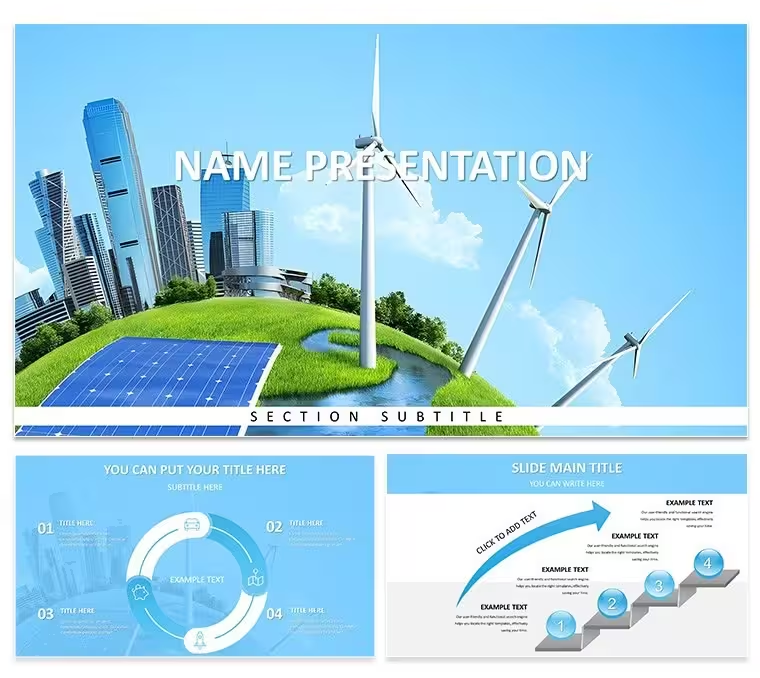
28 diagrams across 7 color schemes - that is the diagram layer of this Keynote template for renewable energy presentations, sold at $20 for the full paid version or $10 for the base package with 3 masters and 3 backgrounds only.
A Keynote diagram template in this context means a set of pre-built data layouts - timelines, process flows, cycle diagrams, and proportional charts - embedded in a themed presentation file rather than a blank slide deck. The renewable energy theme here uses photography-based backgrounds of turbines and solar installations, combined with a modern sans-serif type hierarchy, to anchor the diagrams in a specific industry context. That is useful when the audience is already familiar with the sector: the visuals signal domain fluency immediately.
The 7 color schemes let you adapt the same diagram structures to different client branding or regional reporting standards without rebuilding layouts from scratch. Color changes at the diagram level work through Keynote's master slide system - update the theme colors in the master and all 28 diagrams inherit the change. Individual shape overrides remain possible for single-slide exceptions. Both .key and .kth file formats are included, so the file opens directly in Keynote on macOS or imports as a theme into an existing presentation.
The free tier ($10 base) includes 3 master slides and 3 background variants - enough to set a visual tone for a short deck. The paid upgrade at $20 adds all 28 diagrams and the 7-scheme diagram library, which is where the real editing value sits for anyone building data-heavy slides around investment returns, energy-mix analysis, or project milestone tracking.
Energy consultants, ESG analysts, and sustainability researchers preparing investor-facing materials or conference presentations will find the diagram variety sufficient to cover most narrative structures without duplicating layouts. The .key format requires Keynote running on macOS with a compatible version; check the specification table for version requirements.
For a free entry point in the same design family, the Power of Innovation Keynote template offers 3 masters and 3 backgrounds at no cost. For a solar and wind-specific visual treatment see the Eco-Friendly Energy Solar and Wind Power Keynote template.
Download and start editing immediately
Specifications
FeatureDetailsDiagrams28 - timelines, process flows, cycle diagrams, proportional chartsFile format.key, .kthSoftware versionKeynote for macOS (version not specified on page)Color schemes7 - switch via Keynote master slide theme colorsEditable elementsAll diagram shapes, text placeholders, and background layers edit independentlyAspect ratioNot specified on pageFree vs Paid$12 base: 3 masters + 3 backgrounds. $25 full: adds 28 diagrams + 7 color schemesMasters / Backgrounds3 masters, 3 backgrounds included in both tiersFrequently Asked Questions
Which Keynote version and macOS do I need to run this template?The template is built for Keynote on macOS. The product page does not specify a minimum Keynote version number, so opening it in Keynote 12 or later is recommended to ensure full theme-color and master-slide functionality. The .kth file can also be imported as a theme into an existing Keynote presentation from any recent macOS version. If you experience layout shifts on an older Keynote release, re-opening in the most recent version will resolve most compatibility issues.
How do I switch between the 7 color schemes?Open the slide master by going to View - Edit Master Slides in Keynote. From there, select the color palette associated with the active master and replace the theme colors with any of the 7 pre-built schemes or a custom brand palette. Closing the master view propagates the new colors to all 28 diagrams simultaneously. Applying color changes at master level rather than to individual diagram shapes saves significant time and ensures consistency across the full deck when reusing the file for different clients or reports.
What does the license allow, including for client work?The license covers use in internal business presentations and in presentations delivered to or on behalf of paying clients. The original template files may not be resold, repackaged into another template collection, or sub-licensed. One purchase covers one user; team or enterprise use cases requiring shared access across multiple users should be discussed with ImagineLayout support before deployment.
What is the difference between the $10 and $20 versions?The $10 base tier includes 3 master slides and 3 background variants - the thematic framework for the deck without the diagram library. The $20 paid tier adds 28 diagram slides covering timelines, process flows, cycle charts, and other data layout types, plus access to all 7 color schemes for those diagrams. For anyone building data-heavy investor or sustainability presentations, the full tier is the practical choice since the diagram variety is where the template differentiates from a generic themed deck.
What is the refund policy?Refunds are available within 14 days of purchase when the file does not open correctly or does not match the description on the product page. A refund request must include proof of purchase and a description of the specific issue. Files that have been successfully downloaded and used are treated as non-refundable digital goods. Contact ImagineLayout support directly for refund requests or billing questions.
Good for
- Project roadmaps and sprint plans
- Product launch timelines
- Quarterly or annual review decks
- Company history and milestone summaries
Licence
reviews
The photography-based backgrounds of turbines and solar installations signal domain fluency right away. Used this for an energy investment pitch and the 7 color schemes let me adapt to different client branding without rebuilding anything.
The .key and .kth formats opened fine on my Mac. The 28 diagrams include timelines and process flows that covered most of what I needed for an ESG analyst report. Not having to rebuild layouts from scratch saved me a lot of time.
The free tier includes 3 masters and 3 backgrounds which is enough to set the visual tone for a short deck. The paid upgrade at $20 adds all the diagrams and that is where the real value is for data-heavy slides.
The renewable energy theme uses modern sans-serif typography which looks professional. The diagram variety is sufficient to cover investment returns and project milestone tracking without duplicating layouts. Color changes through the master slide system work well.
Used this for a sustainability research presentation and the proportional charts and cycle diagrams worked great. The 7 color schemes let me switch the whole deck to match a client's brand in one action. The .kth file imported as a theme without any layout issues.
These chart templates made my monthly KPI review much more visual and easier to present. Data updates were straightforward.
The typography maintains hierarchy across different chart complexities. Colors feel fresh and appropriate.
Solid variety though some icons could be more diverse. Editing is user-friendly.
A few alignment guides were missing but I managed easily. Worth downloading.
Used successfully for executive summary presentations.
FAQ
Will it work in Google Slides?
Are fonts embedded?
Can I use this for client work?
What's the refund policy?
Do you update the template after purchase?
Similar templates
See all Keynote templates →
All 1 slides