 Click to zoom
Keynote Power Generation Template - Editable Keynote | ImagineLayout
| Format | .pptx |
| Slides | 3 unique layouts |
| Aspect ratio | 16:9 |
| Compatibility | PowerPoint |
| Animated | No |
| Language | English |
| License | Commercial |
| File size | — |
| Version | v1.0 |
| Last updated | April 2026 |
What's inside
For quarterly energy-sector briefings with no designer on staff, this Keynote diagram template ships 28 diagrams in 7 color schemes with 3 master slides and 3 backgrounds, all in .key and .kth format. The $10 version covers masters and backgrounds only; $20 unlocks the full diagram set. Both open in Apple Keynote on macOS and iOS without font substitution or layout drift.
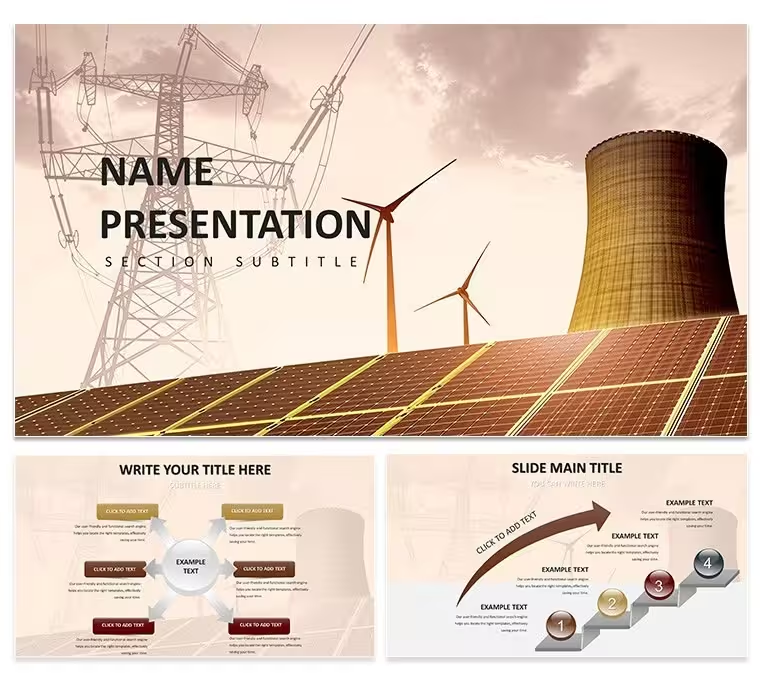
The cover slide for this template places a wide-angle photograph of an industrial power plant or generation facility against a darkened sky, with the title set in large white type anchored to the upper third of the frame - a heavier, more industrial aesthetic compared to the softer wind-and-green imagery common in this series. The background variants follow a similar logic: one shows transmission towers at dusk with orange-tinted clouds, another a turbine array photographed at ground level with dramatic perspective, and the third an overhead shot of a solar field. This gives the template a distinctly forward-looking, infrastructure-focused mood rather than a nature-conservation angle.
The diagram slides use a light ground with navy and teal accents, keeping the darker cover photography separate from the data visualization area. Color changes work through the slide master - adjust the primary accent in master view and all 28 diagrams inherit the update without slide-by-slide editing. The 7 preset color schemes offer alternatives from the default navy: emerald, slate, amber, and three additional tonal variants.
The 28 diagrams include process flows suitable for explaining energy conversion chains, timeline slides for grid modernization roadmaps, bar and column chart layouts for capacity comparisons, and multi-step funnel diagrams useful for policy pipeline presentations. Icons throughout are outlined rather than filled, giving them a technical-drawing quality that aligns with engineering and infrastructure audiences.
Energy policy analysts, grid engineers, and corporate sustainability teams presenting generation capacity plans will find the diagram range directly applicable without significant modification. The .kth theme file also allows applying the visual system to existing slide decks built for recurring reports.
Download and start editing immediately
Frequently Asked Questions
Does this template work on Keynote for Mac and iOS?The files are delivered as .key (editable presentation) and .kth (Keynote Theme), both native Apple formats. Opening in Keynote on macOS gives full access to master editing, animation, and color scheme switching. The Keynote iOS app on iPad or iPhone supports content editing - text, images, basic layout - but master-level edits such as changing the global accent color or modifying background photo placements are more reliable when done on a Mac running a current macOS version.
How do I change the color scheme across all slides at once?In Keynote, navigate to View → Edit Master Slides. The primary accent color - used across diagram fills, chart bars, and heading elements - is set at master level. Click the color swatch, choose your replacement color or enter a hex code, and close the master editor. All 28 diagram slides that inherit from that master update immediately. The 7 included color scheme sets are each stored as a distinct master group, so switching between the pre-built schemes means selecting a different master set rather than adjusting individual colors.
Can I use this template for client projects and paid work?Yes, the standard license permits use in client-facing presentations, pitch decks, internal corporate reports, and educational materials. You may include slides built from this template in deliverables billed to clients. The license does not cover redistribution of the source files - you cannot resell, sublicense, or share the .key or .kth files with other users. For team-wide deployment or redistribution scenarios, reach out to ImagineLayout via the Services page before purchase.
What is the difference between the $10 and $20 versions?The $10 purchase delivers 3 master slides and 3 photo backgrounds - the visual framework without pre-built content slides. The $20 version includes everything in the $10 tier plus 28 diagram slides spanning 7 color schemes. For users who need to build slide content using their own layouts, $10 covers the design system. For users who want to pull in ready-made process flows, timelines, and chart layouts and populate them with their own data, the $20 version provides that immediately usable starting point.
What is the refund policy?ImagineLayout processes refunds when a delivered file is technically broken or materially misrepresented on the product page. Digital download products are not refunded on the basis of preference or changed requirements after download. Before purchasing, review the slide previews and the free/paid tier breakdown to confirm the product matches your needs. Technical issues should be reported through the Contact page with your order number included.
Good for
- Project roadmaps and sprint plans
- Product launch timelines
- Quarterly or annual review decks
- Company history and milestone summaries
Licence
reviews
The structure of this template is very clean. Dropped in my data and the diagrams updated without any issues. The color palette was easy to adjust in the master.
Used this for a team presentation and the layout held up well. The icons are minimal which I liked. Took about ten minutes to get it ready for the meeting.
Not the fanciest template but it gets the job done. The charts are easy to edit and the flow is logical. Worked fine for a client presentation.
The free version gave me a good preview. Ended up buying the paid one for the extra slides. The master slide controls are easy to use.
The diagram variety is decent. Used it for a quarterly report and the timeline slides were particularly useful. The file opened without any issues on my Mac.
FAQ
Will it work in Google Slides?
Are fonts embedded?
Can I use this for client work?
What's the refund policy?
Do you update the template after purchase?
Similar templates
See all Keynote templates →


All 1 slides