 Click to zoom
Global Network Keynote Template - Instant Download
| Format | .pptx |
| Slides | 3 unique layouts |
| Aspect ratio | 16:9 |
| Compatibility | PowerPoint |
| Animated | No |
| Language | English |
| License | Commercial |
| File size | — |
| Version | v1.0 |
| Last updated | March 2026 |
What's inside
28 Diagrams Across 7 Layouts: Full Contents
What is a global network Keynote template? A global network Keynote template is a pre-built .key presentation file structured around internet infrastructure, digital connectivity, and web-service product themes - with slide layouts using globe visuals, data flow diagrams, and network topology formats suited to tech, e-commerce, and digital infrastructure presentations.
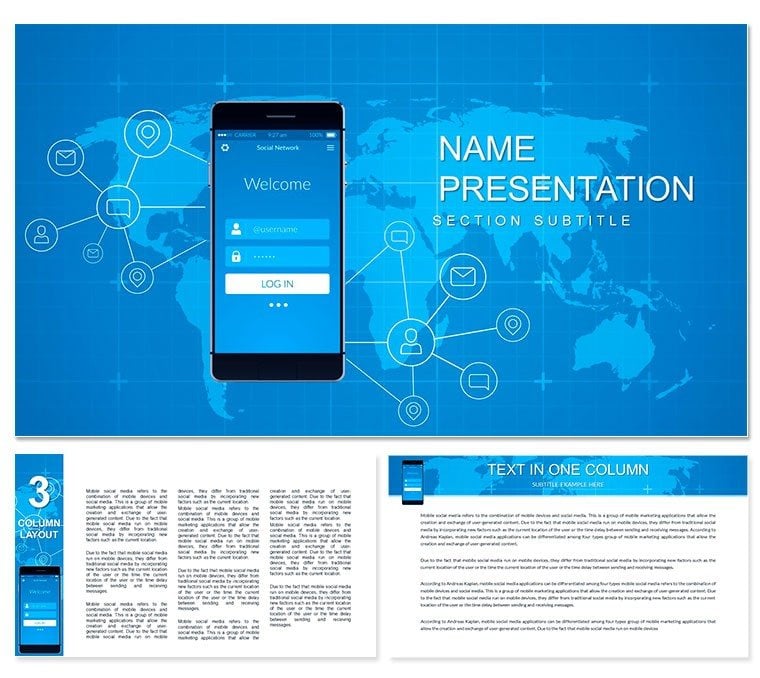
28 slides address the range of a global connectivity narrative: a world-map hero opener with network node overlay, data flow diagrams illustrating web hosting architecture from server to end user, product feature comparison panels for internet service or SaaS offerings, market reach slides with regional coverage indicators, and quarterly reporting layouts for e-commerce performance data. Seven color schemes run from the primary muted-blue-and-energetic-green combination through navy corporate variants, high-contrast dark backgrounds for conference use, and lighter palettes for investor deck contexts. Three master backgrounds and three additional background files shift between globe-centric and abstract-network visual modes. Files are .key and .kth - no .jpg export tier.
The distinguishing visual element is the globe-plus-node structure: network connection lines radiating from a central world map graphic rather than the abstract geometric patterns common in generic tech templates. That structure communicates global reach and infrastructure simultaneously in a single hero image - something a generic blue-gradient tech layout cannot convey without additional design work. The muted-blue-and-green color pairing is calibrated to read as technical without sliding into cold or clinical territory, which makes it appropriate for both internal IT briefings and external product launch contexts.
How Consultants Use This in Client Work
A solutions architect at a managed hosting provider preparing a platform overview for an enterprise procurement committee needed slides that conveyed infrastructure scope - server locations, redundancy paths, and uptime data - without building network topology diagrams from a blank canvas. The data flow and world-map layouts here accepted the architecture specifics in under 30 minutes; the full 16-slide procurement deck was presentation-ready in 90 minutes total.
E-commerce teams at international retail brands use the market reach slides to present geographic expansion plans to regional leadership. One digital growth director reused the same file across five consecutive board meetings by updating the regional indicators and swapping between the blue-green and navy color schemes - the visual variation distinguished each meeting's focus area without requiring a rebuild.
Technology educators and corporate trainers use the data flow diagram slides to explain web hosting architecture, DNS routing, and CDN structure to non-technical audiences. A corporate IT trainer reported that the node-and-connection visual model reduced the time spent explaining infrastructure concepts by roughly 35% - the diagram pre-loaded the mental model the audience needed before the verbal explanation began.
Download and start editing immediately.
Customization in 5 Steps
Difficulty level: Beginner. No design experience required beyond standard Keynote familiarity.
- Step 1 - Open the .key file in Keynote 2016 or later (1 minute). The file loads with the muted-blue-and-green default scheme; the globe hero slide appears first.
- Step 2 - Apply a color scheme via master slides (2 minutes). Navigate to View - Edit Master Slides; select among 7 color variants stored as separate master sets. The navy corporate scheme suits formal procurement contexts; the light palette works for investor decks.
- Step 3 - Replace text content in diagram labels and panels (5-8 minutes). Click any label, feature item, or market region name and type; grouped network-node elements maintain their positions without unlocking.
- Step 4 - Update chart data (3-5 minutes). Double-click any bar or line chart to open Keynote's data editor; paste performance figures from a Numbers or Excel file directly.
- Step 5 - Export as .key or PDF (1 minute). PDF preserves layout integrity for email distribution to remote stakeholders; .key for live presenter mode with notes.
Compared to Starting From Zero
Drawing a globe-with-network-node diagram in Keynote from a blank slide requires a vector globe graphic source, manual placement of node circles, routing of connection line paths between nodes, and consistent stroke weight across all connections - a minimum of 2 to 3 hours for a single clean hero slide that reads accurately at 1080p. The data flow diagram with server-to-endpoint routing adds another hour. Most non-designers attempting this from scratch end up with misaligned connection paths and inconsistent node sizes that undercut the infrastructure credibility the diagram is meant to establish.
The globe-centric layout solves a specific communication problem. When presenting global infrastructure to an executive audience, the question "where are your servers located?" is answered faster by a visual showing connection nodes on a world map than by a list of data center cities in a text block. The eye locates the relevant geography in seconds; the text list requires reading and mental mapping. That efficiency matters in procurement presentations where decision-makers are scanning for risk indicators, not reading slide-by-slide.
Download and start editing immediately.
The .key file is compatible with Keynote 2016 and later on macOS, including the current release on macOS Sonoma and macOS Ventura. Keynote on iPad opens the file for playback; master slide editing requires a Mac. Keynote 2019, 2021, and 2022 releases on macOS Monterey open the file without layout warnings. The .kth file installs the design as a reusable Keynote theme accessible from the New Presentation dialog after double-clicking the file to install it.
How do I change the color scheme for different audience contexts?Open View - Edit Master Slides in Keynote. Seven color variants are stored as separate master slide sets within the file. To apply a different scheme, select all slides in the navigator (Command + A), right-click, and choose the target master. The navy corporate scheme suits formal enterprise or procurement presentations; the high-contrast dark variant works for conference room projection with ambient light; the light palette reads cleanly in bright investor meeting rooms. The full scheme change takes under 2 minutes for the complete 28-slide deck.
Can this template be used for internal IT briefings and external product launches?The layouts are suited to both contexts. Internal IT briefings benefit from the data flow and network topology slides for explaining infrastructure to technical and semi-technical audiences. External product launch presentations use the hero opener, product feature comparison panels, and market reach slides to communicate global service scope. The seven color schemes allow the same file to shift visual register between internal and external contexts without maintaining separate files. A single purchase covers both use cases without additional licensing.
What is included in the full version versus the base tier?The base tier ($12) includes 3 master slide layouts and 3 background designs - the visual theme without pre-built diagram slides. The full version ($22) includes all 28 slides covering world-map heroes, data flow diagrams, product comparison panels, market reach indicators, and reporting layouts, plus all 7 color schemes. The globe-and-network hero diagram and the data flow slides are not available in the base tier; they represent the main practical value of the full purchase for buyers who need those specific layout types.
Are animations included, and can they be removed?Select slides include build animations on data flow diagram elements - network nodes appear sequentially to simulate data routing, which suits live technical explanations where step-by-step revelation aids comprehension. To disable animations, open the Animate panel on any slide, select the transition or build effect, and press Delete. Removing animations from the full 28-slide deck takes approximately 3 to 5 minutes. PDF and image exports are unaffected by animation status, so distributed handouts are always static.
What is the refund policy?ImagineLayout reviews refund requests when a downloaded .key file does not open in a compatible Keynote version or when the file content differs materially from what is shown on the product page. Submit a request via the ImagineLayout contact page with your order number and a description of the issue. Digital downloads that have been opened and used are reviewed case by case for refund eligibility. The complete refund policy is available at imaginelayout.com/refund-policy.
Good for
- Project roadmaps and sprint plans
- Product launch timelines
- Quarterly or annual review decks
- Company history and milestone summaries
Licence
reviews
The Global Network Keynote has clean node connection diagrams in cool blues and greens that made my tech presentation look pro. The 7 color schemes let me match my brand quickly. Saved me hours before the client meeting.
Used the internet network slides yesterday - icons are sharp but some layouts feel a bit crowded on widescreen. Overall solid for networking topics. Student on a deadline appreciated the instant download.
These network diagrams with glowing connection lines are exactly what I needed for my infrastructure pitch. Colors pop nicely on dark backgrounds. Practical and modern without being gimmicky.
The Global Network template's diagrams are detailed but took time to customize text sizes. Good variety though. Mixed feelings but useful for IT consulting gigs.
Really liked the world map integration with network overlays in this Keynote file. Professional look, easy to edit shapes. Helped me finish my e-commerce strategy deck fast.
The neural network related slides feel a tad generic but the core connection icons work well. 28 diagrams give plenty options. Would buy again for similar tech talks.
FAQ
Will it work in Google Slides?
Are fonts embedded?
Can I use this for client work?
What's the refund policy?
Do you update the template after purchase?
Similar templates
See all Keynote templates →



All 1 slides