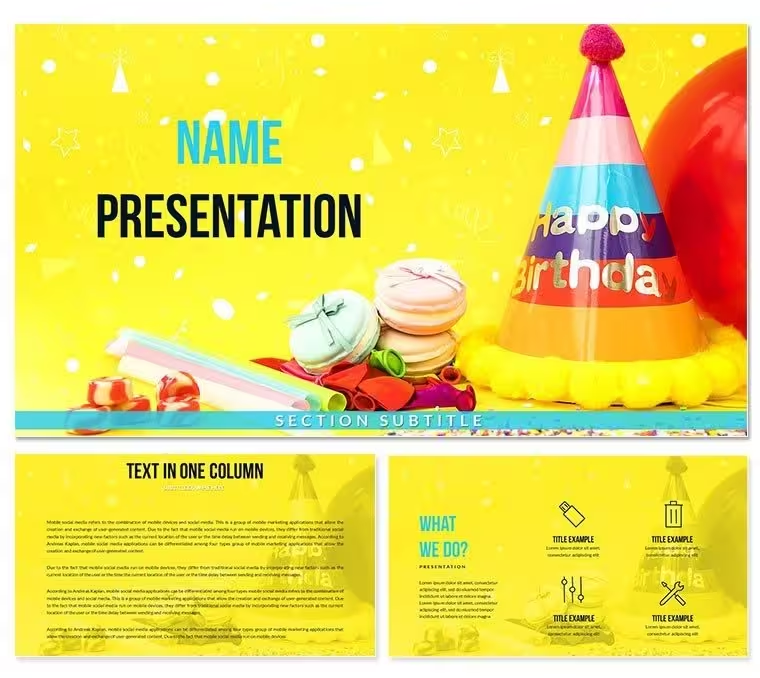
 Click to zoom
Birthday Keynote Template Happy Patty - Instant Download
| Format | .pptx |
| Slides | 3 unique layouts |
| Aspect ratio | 16:9 |
| Compatibility | PowerPoint |
| Animated | No |
| Language | English |
| License | Commercial |
| File size | — |
| Version | v1.0 |
| Last updated | September 2026 |
What's inside
28 Slides, 7 Color Schemes: What You Get
What is a birthday Keynote template? A birthday Keynote template is a pre-designed .key file built around celebration visual elements - festive color palettes, decorative motifs, and layout structures suited to party planning, tribute slideshows, and event presentations - so a user can build a finished birthday deck without sourcing graphics or building backgrounds from scratch.
The download includes 28 diagrams across 7 color scheme variants, plus 3 master slide layouts and 3 distinct backgrounds, delivered as both a .key file and a .kth Keynote theme. The master layouts establish the structural frame - title slide, content layout, and closing - while the backgrounds carry the celebratory aesthetic through every page without per-slide manual adjustment.
28 diagram types cover the range of content structures useful in birthday and celebration contexts: photo-frame placeholders for memories and event images, timeline layouts for milestone sequences, icon-backed list slides for party program agendas, and countdown or number-highlight slides for age callouts. Unlike generic event sets that rely on a single color or balloon graphic repeated across slides, the 7 color variants here provide distinctly different palette tones - from warm gold-and-white to bolder saturated festive combinations - allowing the same file to suit a children's party, a corporate milestone anniversary, or a personal tribute presentation with only a scheme switch. The free version provides the three masters and backgrounds; the full paid version ($22) adds all diagrams and color variants.
Who Reaches for This Template
An event planner organizing a 50th birthday celebration for a corporate client needed a structured slideshow for the venue's display screens - a looping deck featuring milestone photos, a life timeline, and a program for the evening. The photo-frame and timeline layouts in this file provided the exact slide types needed. Adapting the color scheme from the default to the client's preferred warm gold palette took under 20 minutes, and the completed deck ran on the venue's Apple TV without conversion or compatibility issues.
A human resources manager preparing a staff anniversary recognition presentation used the number-highlight slides to feature individual years of service and the icon list slides to summarize team achievements per year. The consistent layout spacing across all 28 diagrams meant slides could be assembled in any order without visual inconsistency - a practical constraint when building tribute decks where content sequence changes up until the day of the event.
A teacher building an end-of-year classroom celebration slideshow used the agenda and photo-frame layouts to structure a timeline of class activities alongside student photos. The 7 color scheme options meant the aesthetic could shift from the default scheme to something matching the school's colors without any design work beyond a palette swap.
Download the .key file and build your celebration slideshow today.
From Download to Final Deck
How do I customize the Happy Birthday Patty Keynote template for a specific event or person? Open the .key file, update the master palette to your preferred color scheme, replace text placeholders with names and dates, insert photos into frame placeholders, and export.
- Step 1 - Open the .key file in Keynote 12 or later (1 minute): Double-click the file. Confirm any font substitutions before editing if prompted.
- Step 2 - Choose a color scheme (2 minutes): The 7 pre-built variants are available as diagram slide groups within the file. Select the scheme that matches the event tone - warmer golds for adult milestone celebrations, brighter saturated palettes for children's parties.
- Step 3 - Replace text and names (3-5 minutes): Click any heading or body text placeholder and type. Event name, date, person's name, and program items all update with a single click per field.
- Step 4 - Insert photos (3-5 minutes): Select a photo-frame placeholder, use Format > Image > Replace to drop in a high-resolution photo. Keynote's crop tool adjusts fit within the frame boundary.
- Step 5 - Export or present (1 minute): Present live from Keynote using the built-in presenter display, export to PDF for email distribution, or export to .pptx for Windows recipients.
Editing difficulty: Beginner. No prior Keynote experience required beyond basic file navigation.
Compared to Starting From Zero
A birthday slideshow built from scratch in Keynote requires sourcing or creating decorative elements, selecting a coherent color palette, building photo frame layouts that hold images without distorting aspect ratios, and testing every slide layout for readability at the display size where it will run - a venue screen, a laptop, or a TV. That process takes 3-5 hours for a non-designer assembling a 15-slide deck, with the highest time cost concentrated in sourcing graphics that visually match each other.
Starting from a pre-built file reduces the work to text replacement, photo insertion, and a color scheme selection. Most users reach a presentation-ready deck in under 45 minutes. The structural decisions - layout proportions, element spacing, background contrast levels - are already made and tested for the most common display scenarios.
A design observation worth noting: many celebration templates use decorative elements at full saturation across the entire slide. Full-saturation backgrounds compete with inserted photos - particularly at the warm skin tones common in birthday photography - causing the images to visually sink into the background. The more restrained decorative approach in this set uses festive elements as accents in corners and borders rather than full-bleed fills, which keeps photo subjects readable regardless of image tone.
Download now and have your birthday presentation finished well before the celebration.
Frequently Asked Questions
Which version of Keynote is needed to open this template?Keynote 12 or later is required for full editing functionality. This version ships with macOS Monterey (12.0) and is available as a free update from the App Store on compatible Mac hardware. Keynote for iPad and iPhone can open and present the file, but master slide color editing - the fastest way to apply your preferred palette globally - is a macOS-only workflow. For Windows recipients, use File > Export To > PowerPoint to deliver a .pptx version.
What is included in the free version versus the paid version?The free version includes 3 master slide layouts and 3 backgrounds - the visual shell of the template. The paid version ($22) adds 28 diagrams covering photo-frame layouts, timelines, icon lists, and number highlights, plus 7 complete color scheme variants. If the presentation only needs a few title-and-text slides, the free tier may be sufficient. For a structured event slideshow with multiple layout types, the paid version provides the diagram variety needed.
Can I use this template for a children's birthday party presentation?Yes. The 7 color scheme variants include bolder, more saturated palettes suited to children's celebration aesthetics alongside the warmer, more restrained options suited to adult milestone presentations. Switch to the brighter color variant (available as a diagram group in the file), replace placeholder text with the child's name and age, insert photos into the frame placeholders, and the deck adapts to a children's party context without any structural modification. The editing workflow is the same regardless of the color scheme selected.
Is the license valid for use in professionally organized events?The standard license covers presentations used in professional and commercial event contexts - including event planning businesses, venue presentations, corporate milestone celebrations, and educational settings. Distributing the source .key or .kth files to third parties, or reselling the template as a standalone digital product, falls outside the standard license. For high-volume event production agencies using the template across many client projects, contact ImagineLayout to confirm the appropriate licensing arrangement.
Does the template include pre-set animations?No transitions or object animations are pre-applied. This is intentional - pre-set animations frequently require removal before a file is usable because they conflict with the presenter's timing preferences. Every Keynote animation type (Magic Move, Appear, Dissolve, Move In) is fully compatible with the file elements and can be added from the Animate panel in under two minutes per slide. For a looping display-screen presentation, Keynote's document-level auto-advance and loop settings are available in the Play menu.
What is the refund policy for this download?ImagineLayout processes refund requests for digital downloads on a case-by-case basis. If the file does not open, content differs from the product description, or a technical issue prevents use, contact ImagineLayout support with your order number and a clear description of the problem. Checking Keynote version compatibility (12+) and macOS version (Monterey+) before purchase avoids the most common reasons a file might not open as expected.
Good for
- Project roadmaps and sprint plans
- Product launch timelines
- Quarterly or annual review decks
- Company history and milestone summaries
Licence
reviews
I only needed a few slides from this pack but they worked well.
The charts were simple and readable.
Didn’t really like some of the icons honestly.
Still finished my report faster because of it.
The overall layout felt organized.
FAQ
Will it work in Google Slides?
Are fonts embedded?
Can I use this for client work?
What's the refund policy?
Do you update the template after purchase?
Similar templates
See all Keynote templates →

All 1 slides