Package Contents
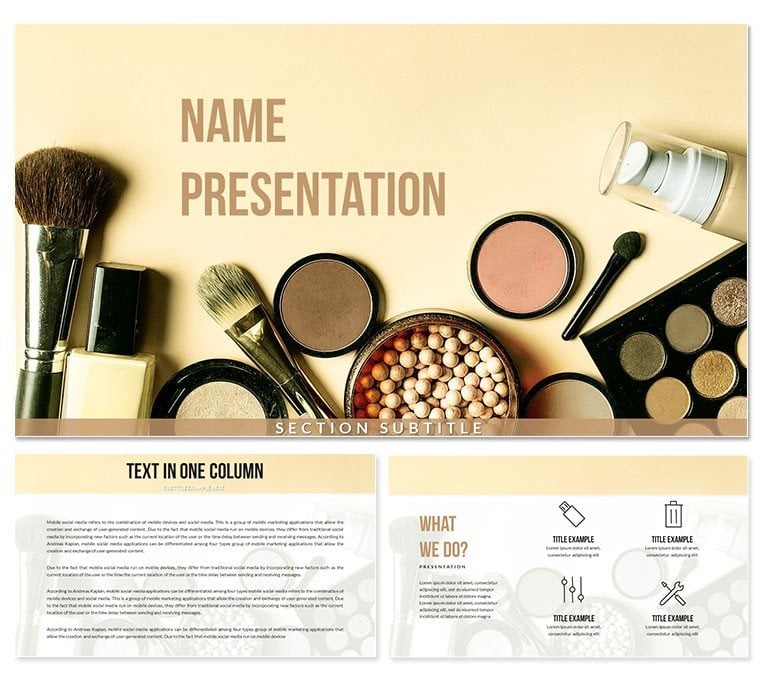
What is a cosmetics Keynote template? A cosmetics Keynote template is a pre-built .key file designed around the visual language of the beauty and wellness industry - soft skin-tone palettes, clean white space, and product-focused layouts - so a brand manager, beauty educator, or salon owner can build a business presentation without starting from an empty canvas.
28 diagrams and 7 color schemes are included in the paid tier, delivered as a .key file for direct editing and a .kth file for saving as a reusable Keynote theme. Three master slide layouts handle the structural skeleton - cover, content page, and closing - while three background options establish the visual register: clean light neutrals and tonal beauty-industry aesthetics that frame product photography and brand typography without competing with them.
The diagram library spans the presentation types most common in wellness and beauty business contexts: comparison tables for product line positioning, timeline slides for launch roadmaps, icon-backed feature lists for product benefit claims, and percentage-based infographic layouts suited to market share and consumer survey data. Unlike single-product showcase sets built around one dominant photograph, this file provides a full structural toolkit - meaning a beauty brand consultant can move from a product introduction slide straight to a competitive analysis layout within the same deck, using color scheme variants to match different client branding without rebuilding from scratch. The free version covers the three masters and three backgrounds; the paid version ($27) adds all diagrams and color variants.
Pair this with other beauty-focused resources in the Health and Wellness Keynote theme collection for a broader library of compatible layouts.
Key Specifications At a Glance
| Feature | Details |
|---|
| Diagrams included | 28 layouts covering comparisons, timelines, icon lists, and percentage infographics |
| Color schemes | 7 complete palette variants for the diagram set; switch via slide master |
| Master slides | 3 layout masters - cover, content, and closing - with editable background layers |
| Editable text fields | All heading and body placeholders edit independently; no ungrouping required |
| Shape editing | Vector-based diagram elements; resize and recolor via Keynote Format panel |
| File formats | .key for editing in Keynote 12+; .kth for saving as a reusable global theme |
| Export options | PDF for print distribution; .pptx via File > Export if PowerPoint recipients require it |
| Aspect ratio | 16:9 widescreen - standard for laptop and external display presentations |
Three Situations Where This Pays Off
A brand development consultant preparing a pitch for a mid-size skincare label needed to present a full go-to-market plan - product positioning, competitive landscape, and a 12-month launch calendar - in a single 45-minute client session. The neutral-toned masters in this file worked as a neutral canvas over which the client's own brand colors could be layered via slide master palette adjustments in under 15 minutes. The consultant reused the same structural deck across four subsequent client pitches by switching color schemes, avoiding a full rebuild each time.
A beauty academy educator building a curriculum presentation on professional makeup techniques used the icon-backed list slides to illustrate tool sets, product categories, and application sequences. The consistent layout spacing meant students following along on tablets could read each step without zooming - a practical consideration that generic blank-canvas slides frequently fail at screen sizes below 11 inches.
A regional perfume retailer preparing a sales presentation for a wholesale buyer used the comparison table layouts to position three fragrance lines against each other across five criteria. The clean white-space composition in the diagram frames let product imagery sit alongside data without visual competition - an outcome that typically requires significant manual layout work when built from a blank slide.
Download the file and start editing for your next beauty brand presentation.
Adapting the Template to Your Brand
How do I adapt the Makeup Cosmetics Keynote template to my brand colors and fonts? Open the master slides, replace the palette with your brand values, update the typeface in Format > Font, and all 28 diagram slides reflect the changes automatically.
- Step 1 - Open the .key file in Keynote 12 or later (1 minute): Double-click the downloaded file to launch. If prompted about missing fonts, either install them or confirm substitution before editing.
- Step 2 - Access master slides and update brand colors (3 minutes): View > Master Slides. Select each master layout, open Format > Fill, and input your hex or RGB brand values. All slides tied to that master update globally.
- Step 3 - Replace text placeholders with your content (5 minutes): Click any text field and type. Headings, subtitles, and body areas are independent - no nested groups to unlock.
- Step 4 - Edit diagram content (5-8 minutes): Select a diagram element, update fill colors via Format panel, and click text labels to replace them. Use proportional scaling (hold Shift while dragging) to resize without distorting aspect ratios.
- Step 5 - Export (1 minute): File > Export To > PDF for client distribution, or keep .key for live presenting. Export to .pptx if recipients use PowerPoint.
Editing difficulty: Beginner to Moderate. Familiarity with Keynote's Format panel speeds the color-replacement step significantly.
Why This Template, Not a Blank Slide
Building a beauty brand presentation from scratch in Keynote means making decisions about color harmony, layout proportions, icon sourcing, and typography pairing before writing a single word of content. For a non-designer, those decisions frequently produce slides that look fine on a laptop but lose visual coherence on a projected screen or when shared as a PDF. A realistic time estimate for assembling 12 structured slides with consistent formatting from a blank canvas: 3-5 hours.
Starting from a pre-built file shifts all of that work to the customization layer - where decisions are faster because the structural logic is already in place. The full editing cycle from download to presentation-ready deck runs under an hour for most users.
A design observation relevant to beauty industry presentations specifically: the diagram color zones in this file use tonal contrast rather than hue contrast to separate information areas. Hue-heavy palettes - multiple saturated colors side by side - read well on screen but can clash with product photography dropped into placeholder frames. Tonal separation keeps the visual hierarchy intact even when high-saturation product images are inserted, which is a layout consideration that rarely comes up until a user is halfway through building a deck from scratch and realizes the colors are fighting the photos.
The Cosmetics: Makeup, Skincare, Beauty Products Keynote template covers closely related territory for teams needing a complementary file for skincare-specific presentations alongside this one.
Download and have your cosmetics presentation ready before your next client meeting.
Frequently Asked Questions
Which Keynote version is required to open this file?
The .key file requires Keynote 12 or later, available on macOS Monterey and above. The .kth theme file can be imported as a global Keynote theme on slightly older versions, though master slide editing functions are most complete in Keynote 12+. Keynote for iOS and iPadOS opens the file for presenting and basic text editing, but master slide customization is better handled on macOS for full palette control.
What does the paid version include that the free version does not?
The free version provides 3 master slide layouts and 3 backgrounds - the structural and visual shell of the template. The paid version ($27) adds 28 diagrams covering the full range of business presentation slide types used in wellness and beauty contexts, plus 7 color scheme variants for those diagrams. The free tier is useful for testing the aesthetic fit with your brand; the paid tier is what enables a fully structured multi-slide presentation with data, comparison, and process layouts.
How do I switch between the 7 color schemes?
Each of the 7 color schemes is delivered as a separate set of diagram slides within the file. To switch schemes, select the diagram slides in the slide navigator that correspond to the color variant you prefer and copy them into your working deck. Alternatively, use the master slide palette (View > Master Slides > Format > Fill) to manually remap any color zone to a different value. The second approach gives finer control if none of the 7 pre-built variants exactly matches your brand palette.
Can this be used for commercial client presentations?
Yes. The standard license covers presentations delivered to clients, including paid consulting engagements, brand pitches, and sales presentations where the template is used as a design base for original content. The restriction is on redistribution of the template itself - the .key or .kth files cannot be resold, shared as a freebie, or bundled into another product without a separate commercial license agreement with ImagineLayout.
Does the template support animations?
No animations are pre-applied in the download. This avoids the common problem of downloaded templates arriving with transitions that conflict with the presenter's pacing and require removal before the file is usable. Keynote's full animation library - Magic Move, Appear, Wipe, Blinds, and others - is compatible with every element in the file. Add transitions from the Animate panel on a slide-by-slide basis to match your presentation rhythm.
What is the refund policy if the file does not work as expected?
ImagineLayout handles refund requests on a case-by-case basis for digital downloads. If the file fails to open, content is missing, or the delivered product does not match the description, contact ImagineLayout support with your order number and details of the issue. Verifying Keynote version compatibility (12+) and macOS version (Monterey+) before purchase resolves the most frequent technical mismatches without needing a refund.