 Click to zoom
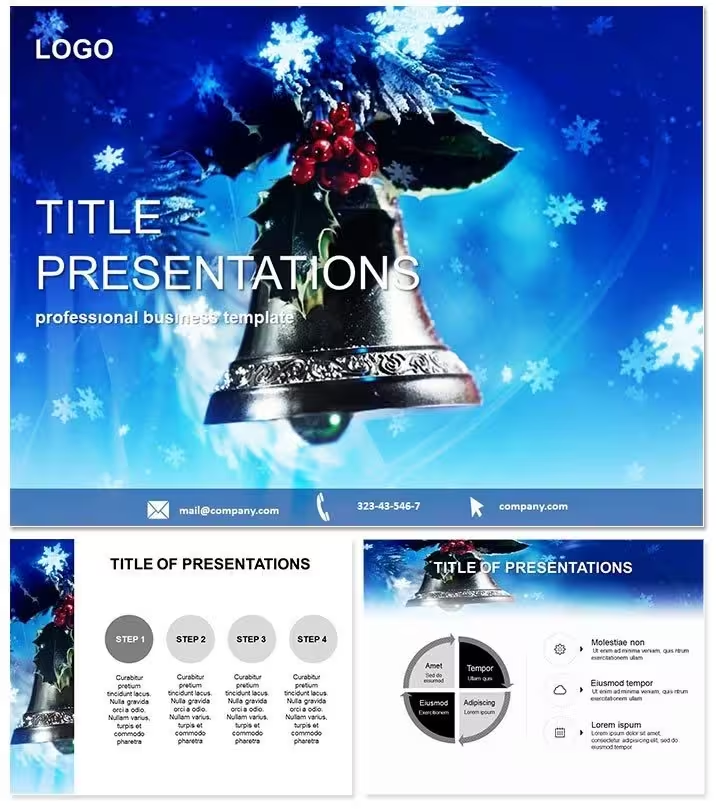
Christmas Bell Keynote Template - Fully Editable
| Format | .pptx |
| Slides | 3 unique layouts |
| Aspect ratio | 16:9 |
| Compatibility | PowerPoint |
| Animated | No |
| Language | English |
| License | Commercial |
| File size | — |
| Version | v1.0 |
| Last updated | September 2026 |
What's inside
What is a holiday Keynote template? A holiday Keynote template is a pre-built .key or .kth file containing editable diagrams and master slides styled around a seasonal visual theme - in this case, Christmas and winter celebration motifs - designed for use in Apple Keynote 12 or later for festive presentations, year-end briefings, and celebration-themed events.
28 diagrams ship across 7 color schemes, alongside 3 masters and 3 backgrounds in .key, .kth, and .jpg formats. The $18 full version delivers all diagrams and color variants; the $10 base version provides the 3 masters and 3 backgrounds only. For event hosts, teachers, and corporate teams preparing a visually complete holiday presentation, the full 28-diagram set is the core asset.
The diagram types cover a range of structures adaptable to seasonal and general-purpose presentation tasks: timeline layouts for year-end review sequences, team and organizational charts for holiday event planning, data summary panels for annual performance wrap-ups, and comparison diagrams for presenting year-over-year results. The 7 color schemes span from deep crimson reds and forest greens to silver-white and gold-accented variants - each a pre-tested combination that maintains visual clarity on projectors and screens without manual color calibration.
Where single-motif holiday templates focus entirely on decorative backgrounds with minimal editable structure, this set pairs the Christmas Bell visual identity with 28 fully functional diagram layouts. An event coordinator running a year-end corporate meeting can use the timeline diagrams to present Q4 results and the org chart layouts to introduce team structure - within the same festive visual framework - without switching between files.
How Event Hosts Use This Template
A corporate communications manager prepares the company's annual year-end presentation for a 200-person all-hands meeting. She needs slides that feel celebratory without looking unprofessional - a balance that generic office presentation templates don't achieve. The Christmas Bell layout provides a structured visual framework for the year-in-review timeline and department highlight panels, with the festive color scheme applied through the master palette in under 3 minutes. She exports the final file as a PDF for the event screen operator 45 minutes after opening the downloaded .key file.
A primary school teacher running a holiday assembly session needs 8 slides - a class timeline, a team chart for the event roles, and 6 content slides - produced in under an hour with a visual style appropriate for a school audience. The .key file opens in Keynote 14 on her Mac, she selects the green-and-gold color scheme, replaces all placeholder text with class names and event details, and has a complete presentation ready with 20 minutes to spare.
For nonprofit organizations running year-end donor briefings, the data summary and comparison diagram layouts adapt to impact reporting - showing project outcomes, donor contribution breakdowns, and year-over-year metrics - within the warmth of a holiday visual framework that matches the event tone. Pair with a Christmas Tree decorating Keynote template when a presentation needs both structured data slides and purely decorative background content across different presentation sections.
Download and start editing immediately - .key, .kth, and .jpg files all included.
Adapting the Template to Your Brand
How do I customize the Christmas Bell Keynote template for a corporate event? Open the .key file in Keynote 12 or later, apply your organization's brand colors or the event's color scheme via the master slide editor, replace placeholder labels with event names, dates, and content, and select the 8-12 diagrams relevant to your specific program. For a standard year-end all-hands meeting deck, total customization time runs 20-35 minutes.
- Step 1 - Open the .key file in Keynote 12 or later (1 minute)
- Step 2 - Select your preferred color scheme from the 7 pre-built variants via Edit Master Slides (2 minutes)
- Step 3 - Replace all text placeholders - event names, dates, team names, metrics - with your content (8-12 minutes)
- Step 4 - Choose the relevant diagram slides for your event program; delete unused layouts (2 minutes)
- Step 5 - Export as .key for live presentation, PDF for printed programs, or .jpg for individual slide use in event signage (1 minute)
Editing difficulty: Beginner. All text fields are accessible without ungrouping diagram elements. The .jpg files provide a straightforward option for teams who need to insert individual diagram slides into a hybrid presentation that mixes Keynote slides with other file formats.
Compared to Starting From Zero
Building a visually cohesive holiday presentation from a blank Keynote slide requires sourcing a Christmas visual motif, applying it consistently across all slide backgrounds, then constructing timeline and org chart structures from individual shapes. For a 10-slide year-end corporate deck with a festive visual theme, that production process takes 3-5 hours for a non-designer - before any event content has been written.
The design approach in this template places the holiday visual motif in the background and master slide layers, keeping the diagram content area clean and uncluttered. That separation is deliberate: holiday templates that embed decorative elements inside diagram zones make text labels harder to read and diagram structures harder to follow. The Christmas Bell visual identity here acts as a frame rather than a fill - diagrams remain legible while the overall presentation maintains a clear seasonal character.
The 7 color schemes cover the range of scenarios where a holiday-themed Keynote template is actually used: crimson and green for traditional Christmas events, silver-white for winter celebrations without specific religious association, and gold-accented variants for corporate gala settings. Pre-testing each scheme against both projector and printed output conditions avoids the common problem of holiday colors that look vibrant on a laptop screen but muddy on a conference room projector.
Download and start editing immediately - full 28-diagram set in the $18 version.
Frequently Asked Questions
Which Keynote versions open this template?The .key and .kth files work with Keynote 12 and later on macOS and iPadOS. The product page notes compatibility from Keynote 2016 onward. Any Mac running macOS Monterey, Ventura, or Sonoma satisfies this requirement - Keynote 12 shipped with Monterey in 2021. Keynote is a free download from the Mac App Store, so updating from an older version to the current release costs nothing. Opening these files in Keynote 9 or earlier may produce layout inconsistencies in master-slide-linked elements.
What is included in the $10 vs $18 version?The $10 version contains 3 masters and 3 background slides - the visual theme structure without diagram content. The $18 version adds all 28 diagram slides across 7 color schemes, plus the same masters and backgrounds. For anyone preparing a year-end review, a holiday event program, or a school assembly presentation, the $18 version is the functional choice. The $10 tier suits buyers who need only the Christmas Bell visual aesthetic applied to their own custom slides.
Can this template be used for school and nonprofit presentations?The license covers educational use - including school assemblies, classroom presentations, and teacher-prepared event materials - as well as nonprofit and corporate use where the template is embedded in a finished presentation. Distributing the raw .key or .kth files to students, parents, or other organizations as a standalone download is not permitted under the standard license. A single purchase covers all presentation uses within your organization or institution without per-event fees.
Is this template only usable for Christmas presentations?The core visual identity is Christmas and winter-themed, but the 28 diagram structures - timelines, org charts, comparison panels, data summaries - are functional layouts that work for any general presentation. The holiday motif is applied through the master slide layer, not embedded inside the diagram content areas. Teams who need a festive-looking but structurally solid presentation for year-end reviews, charity events, or school recaps use this template precisely because it handles both the decorative and functional requirements of a seasonal business or educational presentation in one file.
What are the .jpg files included for?The .jpg exports are static image versions of each diagram slide. They're useful for inserting individual slides into email newsletters, event programs designed in other software, printed flyers, or social media posts where the full .key file isn't required. They also work for teams who need to share specific diagrams with colleagues who don't have Keynote installed - the .jpg format opens in any image viewer without requiring Apple software.
What is the refund policy?Refunds apply to confirmed technical defects where the file cannot be opened in the compatible software stated on the product page. Digital download products are not eligible for change-of-mind refunds once downloaded. To report a technical issue qualifying for a refund, contact ImagineLayout support with your Keynote version number and a description of the problem encountered. The complete refund terms are published in the "Refund policy" link in the site footer.
Good for
- Project roadmaps and sprint plans
- Product launch timelines
- Quarterly or annual review decks
- Company history and milestone summaries
Licence
reviews
My corporate year-end all-hands used the timeline diagrams with the crimson red scheme and it felt very festive.
The org chart layouts were great for introducing the new team structure after a merger.
Used the data summary panels for a donor briefing and they were very impressed with our impact.
The forest green color scheme is classic but the silver-white one is more elegant for a formal gala.
Pretty good template but the comparison diagrams for year-over-year results were a bit too simplistic for our complex data.
FAQ
Will it work in Google Slides?
Are fonts embedded?
Can I use this for client work?
What's the refund policy?
Do you update the template after purchase?
Similar templates
See all Keynote templates →


All 1 slides