 Click to zoom
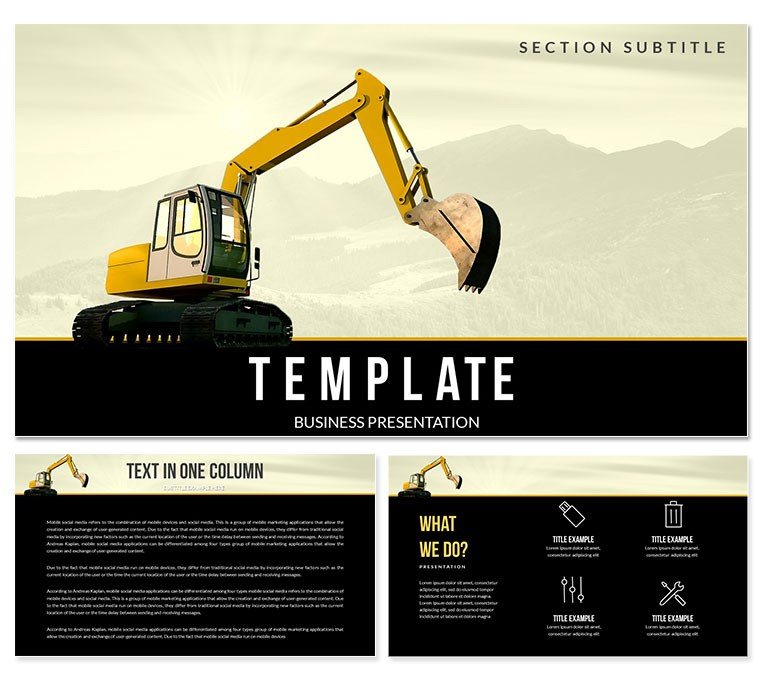
Hydraulic Excavator Keynote Template - Instant Download
| Format | .pptx |
| Slides | 3 unique layouts |
| Aspect ratio | 16:9 |
| Compatibility | PowerPoint |
| Animated | No |
| Language | English |
| License | Commercial |
| File size | — |
| Version | v1.0 |
| Last updated | March 2026 |
What's inside
Files and Formats Included
What is a Keynote diagram template? A Keynote diagram template is a pre-built .key or .kth file with editable diagram slides, master layouts, and color palettes - open in Apple Keynote and fill with your project content.
28 diagrams organized across 7 color schemes come in this download, alongside 3 master slides and 3 background variants. Both .key and .kth files are provided, opening natively in Keynote 12 or later on macOS. The diagram types cover the structural range needed for a construction, engineering, or heavy equipment presentation: project timeline layouts, equipment specification overviews, process step diagrams, and comparative performance charts.
The visual identity draws on industrial color palettes - deep neutrals anchored with bold accent colors that echo heavy machinery aesthetics. That visual language suits construction project pitches, engineering firm capability presentations, and equipment procurement briefings more directly than the light, pastel-dominant corporate templates that dominate generic Keynote libraries. A project manager presenting an excavation timeline to a client panel gets a visual tone that reinforces the subject matter rather than contradicting it.
Compared to single-image background sets that provide only one visual environment, this file combines an industry-specific thematic foundation with 28 structured diagram slides. That combination allows a construction engineer to deliver both a credible visual identity and a fully structured information architecture without building either element from scratch.
Key Specifications At a Glance
FeatureDetailsDiagrams included28 total across 7 color schemes (4 per scheme)Text placeholder editingClick-to-edit labels; no shape ungrouping requiredColor theme adjustmentMaster slide palette update applies brand colors across all diagram slides simultaneouslyShape and connector behaviorIndividual diagram elements resize without breaking connector alignmentMasters and backgrounds3 masters + 3 backgrounds in both base and full purchase tiersFile formats.key for live editing in Keynote; .kth for applying as a theme to an existing deckAspect ratio16:9 widescreenBase vs full versionBase ($12): masters + backgrounds. Full ($24): adds 28 diagrams + 7 color schemesFrom Strategy Decks to Boardroom Pitches
A civil engineering project manager preparing a client handover presentation for a large-scale excavation project needed to communicate a 6-phase construction sequence and equipment deployment plan in under 30 slides. Constructing timeline and process step diagrams in Keynote from scratch would have taken most of a working day. Using the pre-built layouts from this Keynote template, the manager assembled and adapted 10 diagram slides in 70 minutes - reusing the same structural layout for two follow-up client reviews by updating phase labels and swapping the color scheme.
A construction equipment sales director presenting a fleet comparison to a municipal procurement committee used the specification comparison diagrams to lay out excavator capacity data across four product tiers. The diagram's clear zone-segmentation made technical specifications readable without requiring the procurement team to interpret raw data tables - the committee reached a shortlist decision in a single meeting rather than requesting a follow-up.
- Civil engineering project managers presenting construction phase plans to clients
- Heavy equipment sales directors preparing procurement comparison decks
- Infrastructure consultants building project proposal presentations
- Site managers structuring equipment deployment briefings for operations teams
Download and start editing immediately - the .key file opens directly in Keynote 12.
Edit, Brand, Present: The Workflow
How do I customize this Keynote template for a construction project presentation? Open the .key file in Keynote 12, apply your brand colors through the master slide, replace placeholder labels with your project data, and export. Most users complete a 12-slide deck in under 25 minutes.
- Step 1 - Open the .key file in Keynote 12 or later (1 minute). No import wizard; file opens directly from Finder or Downloads.
- Step 2 - Select and duplicate diagram slides (2 minutes). Browse the 28 diagrams and duplicate originals before editing - the full library stays intact for future projects.
- Step 3 - Apply brand or project colors via master slide (3 minutes). View - Edit Master Slides - select active master - update fill swatches with your brand or project hex values.
- Step 4 - Replace placeholder labels (6-12 minutes). Click any text element and type directly. Labels sit outside shape elements; editing one does not shift adjacent shapes.
- Step 5 - Export as .key or PDF (1 minute). Use File - Export To - PDF for client distribution; keep .key for live presenting with edits available during the meeting.
Editing difficulty: Beginner. All customization uses standard Keynote menus - no design tools or imported assets required.
Compared to Starting From Zero
Building 28 structured construction diagram slides from scratch in Keynote requires manually placing shape elements, drawing and routing connector lines, aligning text labels to a consistent grid, and maintaining that design logic across 7 color variants. An experienced Keynote user would need 8-12 hours to replicate the full set at comparable quality. A project manager or engineer without design background attempting the same task would encounter persistent alignment problems, connector detachment when shapes are moved, and color combinations that lose their zone distinction under venue projectors.
One structural detail specific to this file: the timeline and process step diagrams use horizontal segmentation with distinct color zones per phase rather than a single-color linear bar. A monochrome timeline tells an audience how long each phase takes. A zone-segmented diagram communicates both duration and categorical distinction simultaneously - phase type, resource type, or status - without requiring a separate legend slide. That encoding capability is why the multi-zone format suits construction presentations more effectively than a simple Gantt-style bar, and it requires precise color calibration to prevent adjacent zones from appearing similar under projection light.
Download and start editing immediately.
Frequently Asked Questions
Which version of Keynote is needed to open this file?The .key file requires Keynote 12 or later on macOS, available as a free update from the Mac App Store on macOS Big Sur and above. The .kth format is for applying the template as a Keynote theme to an existing presentation and requires the same version. iPad and iPhone versions of Keynote can open .key files for viewing and basic content editing; master slide modifications require macOS. Check your Keynote version number under Keynote - About Keynote before downloading if you are on an older system.
How do I change the colors to match my company or project branding?Open the master slide panel via View - Edit Master Slides. Select the master currently applied to your diagram slides, then click any filled shape to access the Fill color picker in the right panel. Replace the existing color with your brand or project hex value. All slides assigned to that master update automatically. For presentations using multiple color scheme variants from the 7 included, repeat the process per relevant master. Most users complete a full color replacement in 3-5 minutes.
What is the difference between the base and full version?The base version ($12) includes 3 master slides and 3 background variants - the visual theme layer. The full version ($24) adds 28 pre-built diagram slides across 7 color schemes. The diagram slides are the working content of the template: timeline layouts, specification comparisons, process flows, and phase breakdowns. If you need those structural slide types to populate with your own project data, the full version is the relevant purchase. The base version is sufficient if you only want the industrial visual theme for your own slide designs.
Can I use this template for client-facing and commercial presentations?The standard license permits use in commercial presentations, client deliverables, internal project briefings, and business development materials. The original template files may not be redistributed, sold, or sublicensed. You can create an unlimited number of finished presentations from a single license. If your organization needs to deploy the template across multiple users or teams, contact ImagineLayout support to discuss licensing options.
Are animations or slide transitions included?No pre-built animations or transitions are included. Diagram slides are static by default to ensure compatibility across Keynote versions and minimize file size. Keynote's Animate panel allows you to add Build In, Build Out, or Action animations to any individual element. Slide transitions such as Magic Move, Push, or Dissolve can be applied through the Transition options in the Inspector panel without affecting the diagram layout. This design choice gives you full control over animation behavior without inheriting unwanted effects.
What is the refund policy?ImagineLayout's refund policy is published at imaginelayout.com/refund-policy/ and applies to digital product purchases. Refund eligibility for a downloaded file is governed by the conditions in that policy. If you experience a technical issue with the download - file not opening, missing format, or layout problem - contact the support team directly. Technical problems are typically resolved faster than refund requests and do not require returning the downloaded file.
Good for
- Project roadmaps and sprint plans
- Product launch timelines
- Quarterly or annual review decks
- Company history and milestone summaries
Licence
reviews
Used this for a student assignment and it made organizing info easier
Slides are simple and I didn’t waste time fixing layouts
Some icons felt unnecessary but I just removed them
Good enough for basic presentations but nothing special
It works if you just need something fast
FAQ
Will it work in Google Slides?
Are fonts embedded?
Can I use this for client work?
What's the refund policy?
Do you update the template after purchase?
Similar templates
See all Keynote templates →



All 1 slides