 Click to zoom
Casino Win Keynote Diagram Template - Instant Download | ImagineLayout
| Format | .pptx |
| Slides | 3 unique layouts |
| Aspect ratio | 16:9 |
| Compatibility | PowerPoint |
| Animated | No |
| Language | English |
| License | Commercial |
| File size | — |
| Version | v1.0 |
| Last updated | September 2026 |
What's inside
What is a Keynote diagram template?A Keynote diagram template is a pre-built .key file containing editable diagram layouts, color schemes, and master slides - ready to open in Apple Keynote and adapt to your own content without starting from scratch.
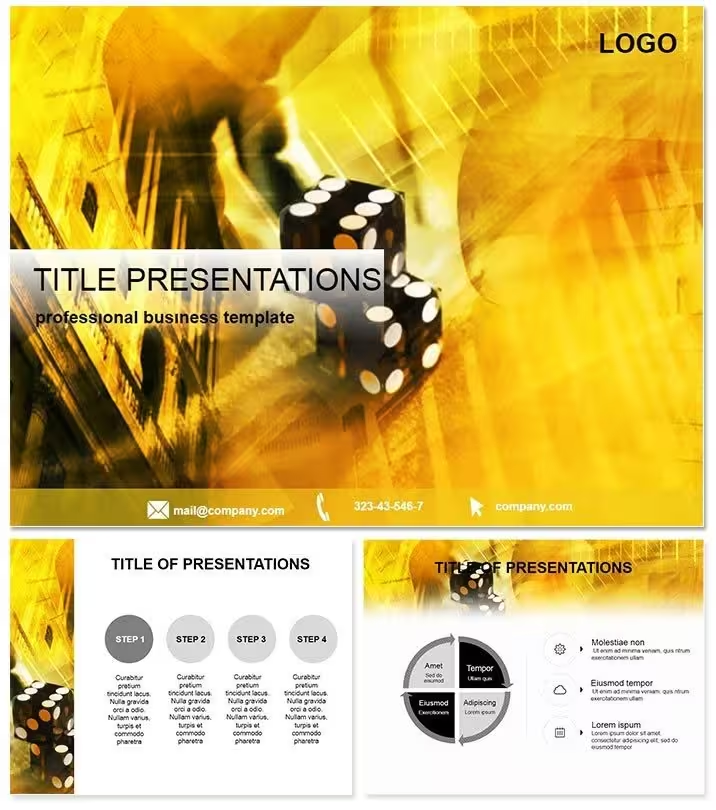
28 diagrams ship in this download, split across 7 color schemes so the same structural layouts are available in distinctly different visual registers - from deep black-and-gold to high-contrast crimson. Three master slides govern the overall page layout, and three atmospheric backgrounds set the visual tone behind each diagram. The paid version at $18 includes all 28 diagrams and all 7 color schemes; the $8 base tier delivers only the 3 masters and 3 backgrounds without the diagram pack.
The visual identity across the slides draws on casino aesthetics: dark base layers with warm metallic accent lines, sharp geometric shapes with high color contrast between diagram elements and backgrounds. Labels sit outside the main diagram shapes rather than inside them - a deliberate layout choice that keeps text readable during projection, where internal labels inside dark shapes lose legibility under overhead lighting. Compared to flat single-color diagram sets, the depth here comes from layered tones rather than gradients, which keeps elements editable without needing a designer to rebuild the color logic.
File formats included: .key, .kth, .jpg. The .key file opens in Keynote for full editing; .kth is the theme file for reuse across multiple decks; .jpg exports provide static versions for use in documents or emails.
Key Specifications At a Glance
FeatureDetailsDiagrams included (paid tier)28 diagrams across 7 color scheme variationsMasters and backgrounds3 master slide layouts, 3 atmospheric backgroundsEditable diagram elementsShapes, connectors, and labels resize and recolor independently in KeynoteText placeholdersUpdate placeholder labels without ungrouping diagram componentsColor scheme adjustmentSwap between 7 built-in schemes via master slide palette; apply brand colors through Format > Master SlidesFile formats.key for editing, .kth for theme application, .jpg for static exportKeynote compatibilityKeynote 2016 and later on macOS; iPad-compatible via Keynote for iOSFree vs paid differenceFree tier: 3 masters + 3 backgrounds only. Paid tier ($22): adds all 28 diagrams and 7 color schemesHow Consultants Use This in Client Work
A strategy consultant preparing a quarterly briefing for a retail client needed a visual hierarchy for a three-stage market entry model. Building the layered diagram from scratch in Keynote would have taken close to two hours - defining shapes, matching stroke weights, aligning label positions across seven slides. Using an existing diagram set cut that preparation to under 40 minutes, with the remaining time spent on content rather than layout mechanics.
Risk management trainers in the financial services sector use the high-contrast color scheme to distinguish risk tiers in probability-impact matrices. The dark background with bright segment fills makes the zones immediately distinguishable on a projector screen - something a default white-background Keynote slide rarely achieves without custom work. One trainer reported reusing the same file structure across five consecutive workshop cohorts by swapping only the data labels and the color scheme between sessions.
Marketing directors presenting campaign ROI use the funnel-style diagrams to show audience narrowing from reach to conversion. The geometric precision of the shapes - consistent stroke weights, uniform padding between layers - avoids the visual noise that often appears when funnel diagrams are built manually in Keynote using basic shape tools.
Download and start editing immediately - the .key file is available as soon as the order is complete.
Customization in 5 Steps
Adapting this Keynote diagram template to a specific brand or topic takes under 20 minutes for most users. The workflow below applies to Keynote 12 or later on macOS.
- Step 1 - Open the .key file in Keynote (1 minute). Double-click the downloaded .key file. Keynote loads all 28 diagram slides with masters applied automatically.
- Step 2 - Choose a color scheme (2 minutes). Navigate to the slide panel, select a color scheme variant that matches your brand tone, and delete the other six scheme groups if you only need one.
- Step 3 - Apply brand colors via master slides (3 minutes). Go to View > Edit Master Slides. Change the accent color on the master to match your brand palette - all slides using that master update simultaneously.
- Step 4 - Replace text labels on diagrams (5-8 minutes). Click any text placeholder and type your content. Labels are not grouped with shapes by default, so repositioning is straightforward.
- Step 5 - Export as .key or PDF (1 minute). Use File > Export To > PDF for a shareable static version, or keep the .key file for live presentation.
Editing difficulty: Beginner. No Keynote-specific design skills are required. Shape manipulation and color changes use standard Keynote tools available in all versions from 2016 onward.
A note on the diagram connector lines: they are drawn as separate shape elements, not as Keynote smart connectors. This means they do not auto-reroute when shapes move - but it also means they carry independent stroke formatting that can be adjusted precisely without affecting the shapes they connect.
Why This Template, Not a Blank Slide
Building 28 diagrams with consistent visual logic from a blank Keynote file requires more than just drawing shapes. Color contrast ratios between background and shape fill need deliberate planning - especially when targeting projection readability rather than screen-only use. Stroke weights need to match across all diagrams so the deck reads as a unified set. Label positioning outside shapes, which this layout uses throughout, requires manual alignment on every slide.
The time cost for that work across 28 slides runs between 6 and 10 hours depending on design experience. That estimate does not include iteration time when color choices look wrong on a projector versus a laptop screen - a difference that is difficult to anticipate without prior experience designing for large-format display.
The dark-background design with metallic accent geometry is a deliberate structural choice, not decoration. Dark backgrounds reduce glare in low-light meeting rooms and help diagram shapes carry more visual weight than they would on white. Gold or amber accent lines create contrast without competing with data labels. These decisions are embedded in the template's master structure - applying them manually to a blank file requires understanding why they work, not just what they look like.
Download the Casino Win Keynote diagram template and start with a tested visual foundation instead of building one from scratch.
Frequently Asked Questions
Which versions of Keynote open this file correctly?The .key file is compatible with Keynote 2016 and all later versions on macOS, including Keynote 12 and 13. It also opens on iPads running Keynote for iOS. Earlier versions of Keynote (pre-2016) may not render all master slide elements correctly, and font substitution can occur if system fonts differ. For best results, open on macOS with Keynote 12 or later. If Keynote flags any missing fonts on first open, substitute with a similar sans-serif from your system font library - the layout will not shift.
What is the difference between the $8 and $18 versions?The $8 tier includes only the 3 master slide layouts and 3 backgrounds - no diagram slides are included. The $18 paid tier adds all 28 diagrams and all 7 color scheme variations. If you only need the slide structure for building your own layouts, the base tier is sufficient. If you need pre-built diagram types ready to populate with your data, the full paid version is required. The diagram pack cannot be purchased separately after buying the base tier - the $18 version is a complete single purchase.
How do I change the color scheme to match my brand?Open the .key file in Keynote, then go to View > Edit Master Slides. Each master contains a color palette tied to the accent fills on the diagram shapes. Select the master you are using, click on any colored shape, and change the fill color via the Format panel on the right. Because shapes share a master-level style, updating one fill updates all identical elements on slides using that master. For a more comprehensive rebrand, use the Format > Advanced > Define Master Slide Colors option in Keynote 12 and later to replace theme colors globally in one step.
Is this template licensed for use in paid client presentations?The standard license covers internal business use and client presentations where the template is used as a vehicle for your own content. You may use slides built from this template in client deliverables. Reselling the template itself, sublicensing it, or distributing the .key or .kth files to third parties is not permitted under the standard license. If you need extended rights for use in commercially distributed products or template resale, contact ImagineLayout directly about an extended license agreement.
Does the template include animations or transitions?The template structure supports Keynote's native animation tools, but no animations are pre-applied to diagram elements. This is a deliberate choice - pre-set animations lock down build order and timing in ways that often conflict with a presenter's specific content sequence. To add animations, select any shape or text element, open the Animate panel in Keynote, and apply a build-in or build-out effect. Slide transitions can be added via the slide panel. Removing pre-built animations from templates is time-consuming; starting without them gives full control over the presentation flow from the beginning.
What is the refund policy if the file does not work?ImagineLayout offers refunds for technical issues that prevent the file from opening or functioning in the specified software version. If the .key file does not open in Keynote 2016 or later on a supported macOS version, contact support with a description of the issue and your order number. Refunds are not issued for change-of-mind purchases after the download has been accessed. Review the file format and compatibility specifications on this page before purchasing to confirm the template matches your software environment.
Good for
- Project roadmaps and sprint plans
- Product launch timelines
- Quarterly or annual review decks
- Company history and milestone summaries
Licence
reviews
My strategy consultant used the funnel-style diagrams to show market entry stages and the client signed the contract.
The high-contrast color scheme for risk tiers was great for a financial services training.
Used the dark background with bright segment fills for a probability-impact matrix and it was very clear.
The deep black-and-gold color scheme is elegant but the high-contrast crimson one is better for urgent risk communication.
Pretty solid template but the geometric precision of the shapes was a bit too rigid for my creative agency's brand.
FAQ
Will it work in Google Slides?
Are fonts embedded?
Can I use this for client work?
What's the refund policy?
Do you update the template after purchase?
Similar templates
See all Keynote templates →



All 1 slides