 Click to zoom
Grand Casino Keynote Template - Instant Download
| Format | .pptx |
| Slides | 3 unique layouts |
| Aspect ratio | 16:9 |
| Compatibility | PowerPoint |
| Animated | No |
| Language | English |
| License | Commercial |
| File size | — |
| Version | v1.0 |
| Last updated | September 2026 |
What's inside
What is a Keynote template for casino and gaming presentations? A Keynote template for casino and gaming presentations is an Apple Keynote file (.key/.kth) built around a casino visual identity - roulette, poker, and gaming imagery - containing editable diagram slides, master layouts, and multiple color schemes for business, entertainment, or educational presentations on gambling industry topics.
Package Contents
28 diagram slides and 7 color schemes are included in the full $24 package. Three slide masters and three backgrounds are shared across both pricing tiers. The $12 base tier delivers the masters and backgrounds - the branded casino-themed structural foundation. The $24 full package adds all 28 diagrams and the seven color scheme variants, making it the complete toolkit for anyone building a deck around casino, gaming, or high-stakes event subject matter.
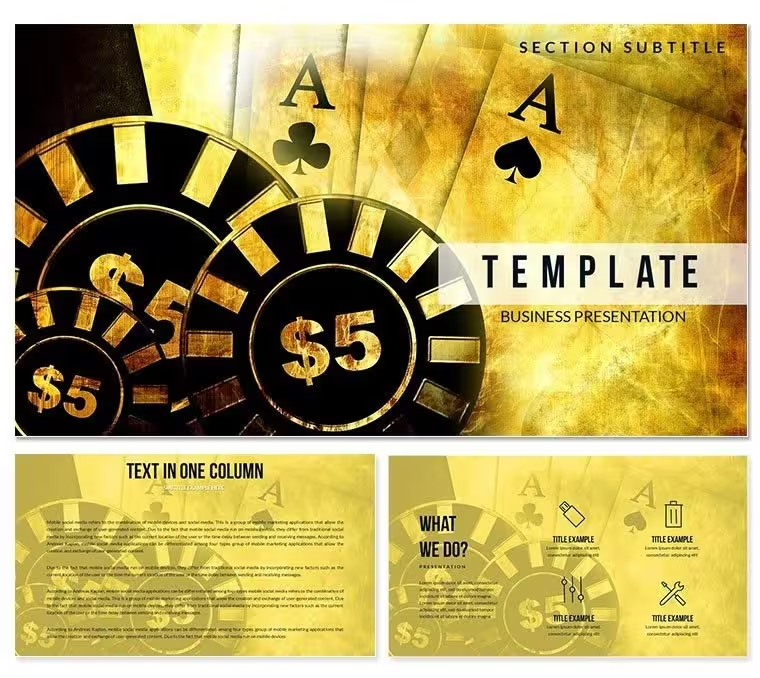
The visual identity draws on classic grand casino aesthetics: deep green felt tones, red and black card-suit color associations, gold accent elements, and the kind of refined geometry that appears in upscale gaming venues. The background design uses these references to establish immediate visual context - an audience that works in gaming regulation, hospitality management, or entertainment strategy recognizes the domain before reading a single text element. Diagram types in this set include data comparison layouts, structured timeline slides, multi-column feature lists, and strategic framework visuals.
What separates this set from narrowly focused roulette-only or card-game-specific alternatives in the category is its range across both visual and structural dimensions. The seven color schemes include a high-contrast dark variant ideal for projected presentations in event venues, a lighter neutral palette for printed materials or screen-shared video calls, and five intermediate schemes that allow adaptation to hospitality brand standards without custom design work. The 28 diagram types cover the full range of content that appears in a casino industry business presentation - from financial performance summaries to operational workflow charts.
From Strategy Decks to Boardroom Pitches
A business development director at a casino resort group prepares an investor presentation for a new property concept. The deck needs a market positioning matrix, a phased development timeline, and a revenue model comparison across three scenarios. Building those three diagrams from a blank Keynote slide in a casino-appropriate visual style - sourcing background imagery, setting up contrast ratios, drawing diagram shapes with consistent styling - takes the better part of a working day. With this file, the same three slides are content-ready in under an hour, visual identity established by the template structure itself.
A gaming regulation analyst at a regional authority uses the set differently. Quarterly compliance briefings to senior government stakeholders require visually accessible data presentation - not complex diagrams, but clearly structured comparison tables and timeline layouts that non-specialist audiences can read at a glance. The neutral color scheme variants in this template are appropriate for government and regulatory meeting contexts, where the dark high-contrast variant would feel out of place. One file, two audiences, different color schemes selected per use case.
Download and start editing immediately.
How to Make It Yours in Under 20 Minutes
Editing difficulty: Beginner. No prior Keynote design experience required.
- Step 1 - Open the .key file in Keynote 12 or later (1 minute): Double-click the file to launch it in Keynote. All 28 diagrams and 7 color scheme sets load in the slide navigator immediately.
- Step 2 - Select your color scheme and delete unused variants (2-3 minutes): Identify the scheme that fits your audience context - dark for event projection, neutral for printed or video-call use. Delete the unused scheme slides from the navigator.
- Step 3 - Apply brand or event colors via the master slide editor (3 minutes): View - Edit Master Slides. Update the primary and accent color values with your brand hex codes. Every diagram slide updates automatically.
- Step 4 - Replace placeholder text with your content (5-8 minutes): Click any text box to edit. Headings, data labels, and body copy fields are all independent - edit each without affecting surrounding diagram structure.
- Step 5 - Export as .key for live editing or PDF for distribution (1 minute): File - Export To - PDF creates a share-ready version; keep the .key source file for future edits or alternate versions.
How do I switch the casino template to a lighter color scheme for a printed handout? In the slide navigator, locate the light or neutral scheme variant slides. Select them and apply that master via the Slide Layout panel. Alternatively, open the master slide editor and replace the dark background fills with lighter values - the diagram shapes will remain correctly positioned and only the color values change.
What You'd Need to Replicate This Yourself
Replicating the visual identity of this set from a blank Keynote file requires: sourcing or commissioning casino-appropriate background imagery, setting up a multi-layer background structure that keeps imagery visible but non-distracting behind content, establishing a typography hierarchy that reads at projection scale, and drawing each of the 28 diagram structures with precise shape alignment. A skilled Keynote designer prices this kind of work at roughly four to six hours per diagram for complex layouts. For the full 28-diagram set with seven color scheme variants, the equivalent custom design scope runs between 30 and 50 hours.
One specific design observation worth noting: the color palette in this template uses deep jewel tones - forest green, burgundy, near-black - at the primary background level, with gold and cream as accent tones for text and diagram elements. This is a deliberate inversion of typical presentation design practice, which places light backgrounds behind dark text. The casino design convention works in the opposite direction: dark environments, bright focal points. On a projected display at full room depth, this contrast structure often outperforms light-background designs in readability, particularly in venue settings with ambient lighting.
The diagram shapes in this set use clean geometric forms - rectangles, horizontal bars, and radial layouts - without decorative casino iconography embedded inside the diagrams themselves. That restraint is intentional. Placing card-suit icons or roulette wheel graphics inside data containers would interfere with content readability. The thematic elements belong in the background and border areas; the diagram interior stays clean for data. That separation is harder to achieve consistently in a hand-built file than it appears.
Download and start editing immediately.
Frequently Asked Questions
Which version of Keynote is required to use this template?Keynote 12 or later on macOS is required to open and edit the .key file correctly. Keynote 12 is a free download from the Mac App Store and runs on macOS Monterey (12.0) or later. Older Keynote versions may display rendering issues or font substitution warnings when opening the file. The .kth theme file follows the same version requirement and is used to apply the visual style to an existing Keynote presentation rather than opening as a standalone file. Check your macOS version before downloading to confirm compatibility.
What is included in the $12 base package versus the $24 full package?The $12 base package includes three slide masters and three background designs in the Grand Casino visual style. These provide the branded layout structure - the themed backgrounds, master font hierarchy, and color framework - but no pre-built diagram slides are included at this tier. The $24 full package adds all 28 diagram slides and the seven color scheme variants. For buyers preparing a full structured casino or gaming industry presentation, the full package is the practical choice. The base tier suits buyers who primarily want the branded visual identity and plan to build their own slide layouts in Keynote.
Can I use this for a corporate event or client presentation?The standard license covers internal business presentations and decks delivered to clients as presentation output - investor briefings, event concept pitches, marketing presentations, or training sessions built with this file all fall within standard license use. The license does not permit redistribution of the source .key or .kth files, resale as part of a template collection, or sublicensing to third parties. For corporate events where the finished deck is distributed digitally to a large audience, review ImagineLayout's Terms of Use at imaginelayout.com/terms/ to confirm your specific use case falls within the standard scope.
How do I change the color scheme for a printed handout or lighter-background use?Open View - Edit Master Slides in Keynote. Select the master slide that corresponds to the dark background variant and update the background fill from the deep jewel tone to a lighter neutral value - off-white, light gray, or your document background color. Simultaneously update the primary text color from the light accent tone to a dark readable value. All diagram slides referencing that master update automatically. Alternatively, use one of the seven included color scheme variants - at least one is designed for lighter, print-appropriate contexts - and apply it via the Slide Layout panel without modifying the master manually.
Does this template work on Windows?Apple Keynote is a macOS-only application. The .key and .kth files are not natively supported on Windows. There is no official Windows version of Keynote. If you work on Windows or need to share the finished presentation with Windows-based colleagues, export the completed Keynote file as a .pptx via File - Export To - PowerPoint. The exported file opens in Microsoft PowerPoint, though some visual elements - particularly custom fonts and certain background effects - may not transfer perfectly during conversion. For a fully Windows-native equivalent, browse ImagineLayout's PowerPoint template section for comparable casino-themed designs.
What is the refund policy for digital template downloads?Refunds on digital downloads are handled case-by-case under ImagineLayout's refund policy. Refunds are available when a verified technical error prevents the file from opening in Keynote 12 or later on macOS. Style or content preference after download does not qualify for a refund - the preview images and base tier purchase option exist specifically to let buyers evaluate the design before committing to the full package. If you encounter a technical file error after purchase, contact ImagineLayout support at imaginelayout.com/contact-us/ and provide your order number along with a description of the problem. Full refund terms are at imaginelayout.com/refund-policy/.
Good for
- Project roadmaps and sprint plans
- Product launch timelines
- Quarterly or annual review decks
- Company history and milestone summaries
Licence
reviews
Used it for a last-minute report and it was convenient.
Charts were already prepared so I just filled data.
Design is okay but a bit plain.
Easy to use even under time pressure.
FAQ
Will it work in Google Slides?
Are fonts embedded?
Can I use this for client work?
What's the refund policy?
Do you update the template after purchase?
Similar templates
See all Keynote templates →


All 1 slides