 Click to zoom
Vocal Microphones Keynote Template - Instant Download
| Format | .pptx |
| Slides | 3 unique layouts |
| Aspect ratio | 16:9 |
| Compatibility | PowerPoint |
| Animated | No |
| Language | English |
| License | Commercial |
| File size | — |
| Version | v1.0 |
| Last updated | September 2026 |
What's inside
What is a Keynote template for music and audio presentations? A Keynote template for music and audio presentations is a pre-built Apple Keynote file (.key/.kth) built around a specific visual theme - in this case vocal microphone imagery - and containing editable diagram slides, master layouts, and background designs ready to brand and present.
Files and Formats Included
28 diagram slides and 7 color schemes ship in the paid package at $27. Three slide masters and three background designs are shared across both tiers. The $12 base tier delivers the masters and backgrounds - the structural foundation of the deck. The $27 full package adds all 28 diagrams and the seven color scheme variants, which is where the visual breadth of this set becomes practical for audio industry and entertainment presentations.
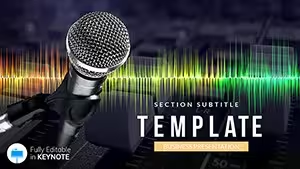
The visual identity centers on vocal microphone imagery - specifically the kind of stage and studio microphone that appears in recording sessions, live performances, and broadcast environments. The background design uses this subject to establish a dark, high-contrast aesthetic that reads clearly in both projected and screen-shared contexts. Diagrams in this set combine text-heavy informational layouts with clean data containers - suitable for product comparison slides, audio gear specification sheets, feature breakdowns, and session workflow diagrams.
Compared to single-theme audio templates that use only abstract sound-wave graphics, this set grounds the visual language in a recognizable industry object. That specificity helps presentations about microphone products, recording services, or audio brand strategy feel visually coherent rather than generically themed. The seven color schemes give additional flexibility: a corporate sales team presenting a product line can switch from a dark scheme to a lighter professional variant without rebuilding any diagrams.
Three Situations Where This Pays Off
A product manager at an audio equipment distributor needs to present a new microphone line to a regional retail buyer. The presentation requires a spec comparison table, a feature-benefit matrix, and a positioning overview. Building those three slides from a blank Keynote canvas with consistent brand styling takes approximately two hours. With this file, the same three slides are ready to fill with data in under 35 minutes - format consistency already handled by the template structure.
A recording studio owner preparing a client pitch for podcast production services needs a deck that signals industry credibility without requiring a graphic designer. The microphone-themed visual identity does that work immediately. The studio owner replaced placeholder text across eight slides, adjusted the color scheme to match the studio's brand colors, and had a client-ready deck in one afternoon - reused across three separate pitches by swapping client-specific data each time.
Music educators presenting audio technology curriculum at a college audio engineering program also reach for this set. The art and entertainment Keynote theme collection covers the broader category, but the microphone-specific visual context is better suited to technical audio course lectures than a generic entertainment theme. A lecturer used the same master file across five semester modules by swapping diagram content and color schemes between course topics.
Download and start editing immediately.
From Download to Final Deck
Editing difficulty: Beginner. The workflow below applies to Keynote 12 or later on macOS.
- Step 1 - Open the .key file in Keynote 12+ (1 minute): Double-click to open. Keynote launches the file directly with all masters and diagrams loaded.
- Step 2 - Choose your color scheme variant (2 minutes): Review the seven available color schemes using the slide navigator. Delete the six scheme variants you are not using to keep the file clean.
- Step 3 - Apply brand colors via the master slide editor (2-3 minutes): View - Edit Master Slides. Update primary and accent color swatches with your brand hex values. All diagram elements referencing that color update automatically.
- Step 4 - Replace text labels and placeholder content (5-8 minutes): Click each text container to overwrite. Feature lists, spec tables, and comparison cells all update independently without needing to ungroup diagram elements.
- Step 5 - Export as .key or PDF (1 minute): File - Export To - PDF for a shareable version, or keep as .key for a live editable presentation file.
How do I switch between the seven color schemes? Each color scheme is represented as a set of slides in the master navigator. Select the color scheme slides you want, apply them to your presentation slides via the Slide Layout panel, then delete the unused scheme slides. The switch takes under two minutes once you identify the target scheme variant.
Why This Template, Not a Blank Slide
Building a microphone product presentation from a blank Keynote slide requires sourcing or creating thematic imagery, setting up background layers, establishing a consistent typography hierarchy, and drawing each diagram shape individually. A competent Keynote user with access to stock imagery can produce one well-designed diagram slide in about 45 minutes. At eight slides, that is six hours of layout work before any content has been written.
One specific design choice in this set worth examining: the background uses a focused, low-saturation photographic element rather than a flat color. Flat color backgrounds in audio and music presentations can read as generic. A recognizable industry object - even slightly blurred or darkened to serve as a backdrop - anchors the presentation visually in a specific context. Audiences in music, broadcast, and audio production recognize the reference immediately, which signals domain familiarity before the first word of content.
The diagram containers in this set use dark fields with light text rather than the reverse, which maintains legibility on the high-contrast background. This is a deliberate layout decision: placing light text on dark containers against a dark background requires carefully managed contrast ratios. The template handles this balance in each of the seven color schemes so editors do not accidentally create illegible slides when swapping colors.
For adjacent subject matter, pair this with a audio recording software Keynote template or a studio microphone Keynote set for a consistent visual system across multiple related presentations.
Download and start editing immediately.
Frequently Asked Questions
Which Keynote version is required to open this template?Keynote 12 or later on macOS is required to open the .key file without compatibility warnings. This version ships free with macOS and is available via the Mac App Store. Older Keynote versions may fail to render certain master slide configurations or substitute fonts. The .kth file provides an alternative entry point - it functions as an importable Keynote theme rather than a standalone presentation file. If you are running a pre-Keynote 12 install, update macOS to Monterey or later to access the compatible version before purchasing.
What is the difference between the .key and .kth files?The .key file is the complete presentation file - it opens directly in Keynote and contains all slides, masters, backgrounds, and diagrams. This is the file you edit to produce your final presentation. The .kth file is a Keynote theme file - it stores only the master slide structure and visual design without the content slides. Use the .kth file when you want to apply the visual style of this template to a presentation deck you are already building. In Keynote, go to Document - Change Theme and select the imported .kth file to apply the design to your existing content.
What does the $12 base package include versus the $27 full package?The $12 base package includes three slide masters and three background designs. These provide the structural and visual foundation for the presentation - the branded look, font hierarchy, and background imagery - but no pre-built diagram slides are included. The $27 full package adds all 28 diagram slides and the seven color scheme variants. For buyers who need to present detailed audio product or service information, the diagram package is the more useful purchase. The base tier works if your primary need is a branded master layout for slides you will build from scratch in Keynote.
Can I use this template for commercial client presentations?The standard license permits use in internal business presentations and in decks prepared for clients where the template file itself is not redistributed as part of the deliverable. A sales presentation, client pitch, or product briefing built with this file falls within permitted use. Redistribution of the raw .key or .kth source files - including as part of a template pack sold or given to others - is not permitted under the standard license. Review the full Terms of Use at imaginelayout.com/terms/ for specifics before commercial use in edge cases.
Does this template work on a Windows computer?Apple Keynote is a macOS-only application. The .key and .kth files require Keynote 12 or later running on a Mac. There is no official Windows version of Keynote. If you need a similar presentation template that works in Microsoft PowerPoint on Windows, browse ImagineLayout's PowerPoint template section for equivalent designs. If you work on a Mac but need to share with Windows colleagues, export the finished Keynote file as a .pptx via File - Export To - PowerPoint - this converts the layout for use in PowerPoint, though some formatting elements may shift during conversion.
What is the refund policy for this download?Because this is a digital file download, refunds are handled on a case-by-case basis under ImagineLayout's refund policy. Refunds are typically available when a technical issue prevents the file from opening in the supported software version. A refund is generally not issued because the style or content of the template does not match the buyer's expectations after download - the preview images and free tier give a clear picture of the design before purchase. If you encounter a file error, contact ImagineLayout support at imaginelayout.com/contact-us/ with your order number and a description of the problem.
Good for
- Project roadmaps and sprint plans
- Product launch timelines
- Quarterly or annual review decks
- Company history and milestone summaries
Licence
reviews
I don’t usually leave reviews but the chart layouts were actually handy.
Some slides felt too busy with icons everywhere.
Used it for a business review meeting and it looked organized enough.
The timeline pages made my report easier to explain.
It’s okay if you need something quick.
FAQ
Will it work in Google Slides?
Are fonts embedded?
Can I use this for client work?
What's the refund policy?
Do you update the template after purchase?
Similar templates
See all Keynote templates →


All 1 slides